Pick work item values from any REST API — with instant search, on-demand loading, and the option to copy more data from the chosen item into other fields.
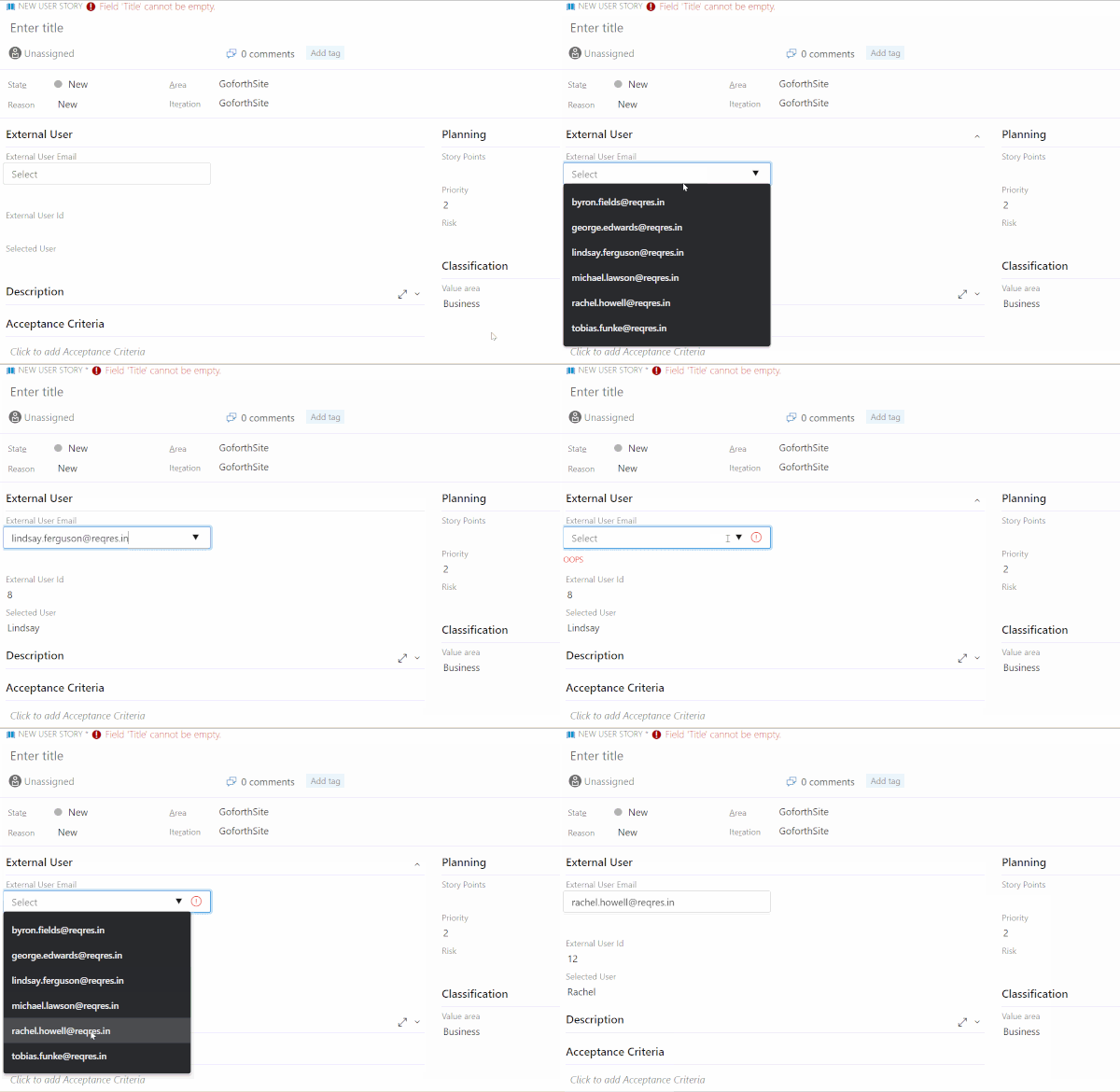
Works with the ServiceNow Table API, Azure DevOps REST APIs, or any HTTPS endpoint that returns JSON.
What's new in 2.0
- Loads only when needed. By default nothing is requested until someone opens the list, so forms open faster. Check Load the list when the work item opens to preload it instead.
- Clear field states. A red outline and “(required)” when a required field is empty, a blue outline and dot for a change that isn't saved yet, and the normal outline once it's saved. Fields made required by work item rules are detected automatically.
- Search that finds things. Type any part of a value — matching ignores case and accents, ranks the best matches first and highlights them. Lists with thousands of items stay smooth.
- Cascading lists. Use
$(Field.ReferenceName) in the URL or parameters; the list reloads when that field changes.
- Setup assistant. Organization settings › REST Picklist lets you test your endpoint, pick the list and value with a click, preview the picklist, and copy the settings into your process.
- Light, dark and high contrast themes, keyboard and screen reader support, and touch-friendly sizing on phones.
Set it up
- Open Organization settings › REST Picklist to build and test the settings (optional, but the fastest way).
- In Organization settings › Boards › Process, open your inherited process and work item type.
- Choose Add custom control, pick Rest Data Mapping Picklist, choose the field on the Options tab and fill in the settings.
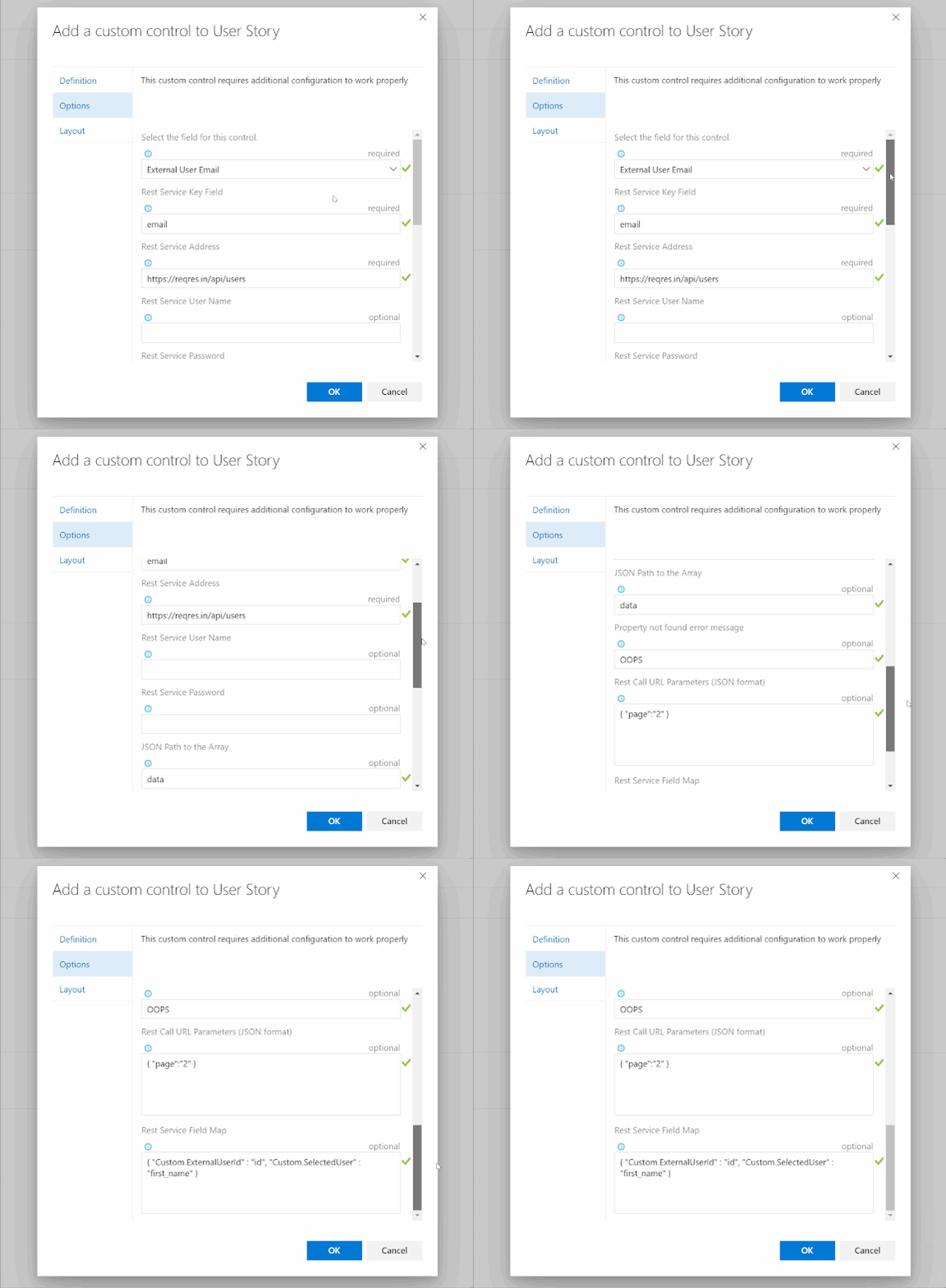
Settings
| Setting |
Example |
Notes |
| REST endpoint URL |
https://api.contoso.com/customers |
HTTPS only. Work item values can go in the path: …/regions/$(Custom.Region)/customers |
| URL parameters (JSON) |
{ "status": "active", "region": "$(Custom.Region)" } |
Added to the query string |
| Authentication |
Bearer |
Leave empty for public endpoints; Bearer sends the token as a bearer token, anything else uses HTTP Basic |
| Password or token |
|
See the security note below |
| JSON path to the array |
data.result |
Leave empty when the response is the list itself |
| Value property |
name or owner.email |
Listed and saved in the field |
| Copy to other fields (JSON) |
{ "Custom.CustomerId": "id", "Custom.CustomerEmail": "contact.email" } |
Field reference name → property of the picked item |
| Load the list when the work item opens |
|
Off by default for faster forms |
| Show as required when empty |
|
Visual only; make the field required on the work item type to block saving |
| Message when the value isn't in the list |
This customer is no longer active. |
Shown under the field |
For example, for this response:
{
  "data": [
    { "id": 7, "email": "michael.lawson@example.com", "first_name": "Michael" },
    { "id": 8, "email": "lindsay.ferguson@example.com", "first_name": "Lindsay" }
  ]
}
use JSON path to the array data, Value property email, and Copy to other fields { "Custom.ExternalUserId": "id", "Custom.FirstName": "first_name" }.
Security
- The endpoint is called from the browser of the person using the form, so anyone who can open the work item can see the password or token. Use a read-only token limited to this API — never a personal access token with broad rights.
- Only HTTPS endpoints are called, cookies are never sent, and work item values can't change the endpoint's host.
- Responses are shown as plain text and are never interpreted as HTML.
CORS
The service must allow requests from the extension's origin (https://oscararguedasbarboza.gallerycdn.vsassets.io). The setup page shows the exact origin if a test request is blocked. This isn't needed for Azure DevOps REST APIs.

