Work Item ApprovalsAdds a work item panel that allows for users to show their individual approval for an item. |

Work Item ApprovalsAdds a compact Approvals panel to work item forms, letting team members record a formal decision against any work item.
What is added on installation
FunctionalityDecisions — Four options are available:
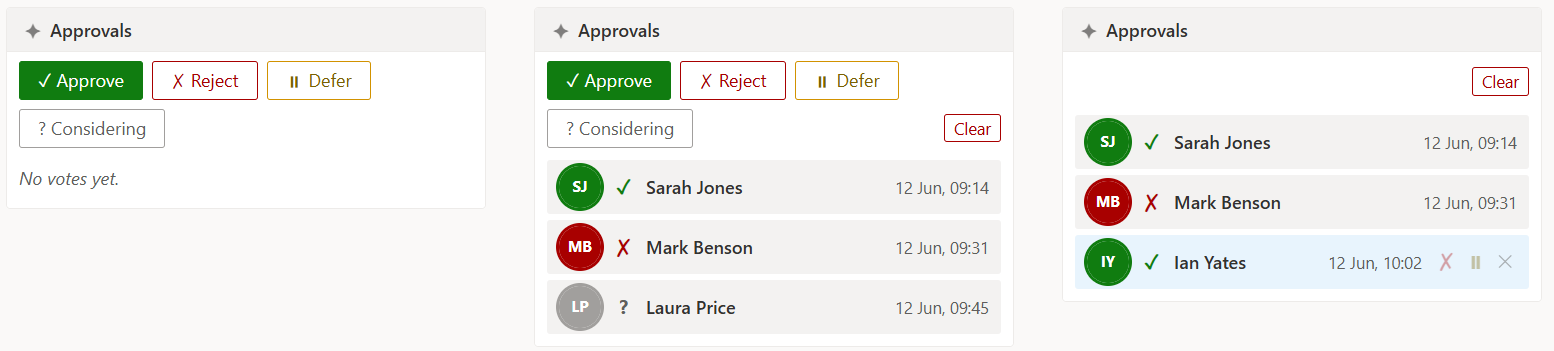
Voting — Click a decision button to record your vote. Your avatar, name, and timestamp appear in the list and the decision buttons are replaced with smaller switch icons. Switching your vote — Once you have voted, click one of the switch icons to move to a different decision without removing your vote first. From Considering you can switch to any decisive state; from a decisive state you cannot switch back to Considering. Removing your vote — Click the remove icon on your own row to retract your vote completely. The decision buttons reappear. Clear all — A Clear button in the toolbar wipes all votes after a confirmation prompt. Who can see this button is controlled by the Clear button setting. History field — When a custom text field is configured, each decisive vote change updates that field and writes a revision to the work item History tab. Considering votes are not included. Auto-refresh — The panel checks for new votes every 15 seconds so all viewers stay in sync without manually refreshing the page. Azure DevOps pre-requisitesIf you intend to use the History field feature, a plain-text custom field must already exist in your Azure DevOps process. The field is not created by this extension. ConfigurationGo to Project Settings → Approvals to adjust: Work item types — Toggle which work item types show the Approvals panel. All enabled (the default) means the panel appears on every type. If a type is toggled off, the panel shows a short message explaining how to remove it from the form layout via Project Settings → Process → [Type] → Layout. History field — Enter the reference name of a plain-text custom field (for example Clear button — Controls who can see and use the Clear all button:
The settings page also shows a read-only list of the 25 most recently active work items that have at least one vote. Each row shows the work item type, ID, title, state, a decision summary, and when the last vote was cast. Expand a row to see the individual votes. Privacy and data storageVote data and settings are stored in the Azure DevOps Extension Data Service, scoped to the project. All project members with access to the work item can see the stored votes. Permissions
Questions, ideas, or bugs?Open an issue on GitHub — we would love to hear from you. |