Skip to content
| Marketplace
Sign in
Azure DevOps>Azure Boards>PR Details
PR Details

PR Details

Neo Fintech Lab

|
1 install
| (0) | Free
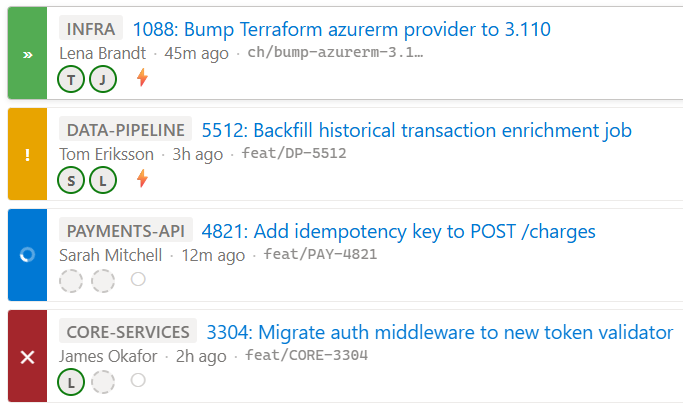
Adds a work item section showing enriched cards for each linked pull request: status, repo name, title, creator, approvals, and auto-complete state.
Get it free

PR Details — Azure DevOps Extension

Adds a Pull Requests section to every work item form, showing a rich card for each linked pull request.

What it shows

Each card displays:

Element Detail
Status strip Coloured left bar with icon — see statuses below
Repo name Badge showing the repository the PR targets
PR title Linked to the PR page; truncates with ellipsis
Creator Avatar + display name
Last updated Relative time (e.g. "2h ago", "3d ago")
Approvals Required reviewer approval count (e.g. ✓ 1/2)
Auto-complete ⚡ if enabled, ○ if not

The approvals and auto-complete footer is hidden for draft, abandoned, and completed PRs.

Status indicators

Strip colour Icon Meaning
Grey ✕ Abandoned
Grey ? Draft
Blue ◌ (spinner) Build in progress
Red ✕ Build failed
Amber ? Awaiting author (required reviewer voted −5)
Amber ! Unresolved comments
Green ✓ All checks passed (OK)
Greener ✓ Completed / merged

Status is computed from the PR's state, its most recent build statuses (deduplicated per context), reviewer votes, and active comment threads.

Card ordering

  1. Active PRs first, sorted by most recently updated
  2. Completed PRs next, sorted by close date
  3. Abandoned PRs last

Technical details

  • Contribution point: ms.vss-work-web.work-item-form-group
  • Scopes: vso.work (read work items), vso.code (read pull requests)
  • SDK: azure-devops-extension-sdk v4 + azure-devops-extension-api v4
  • Build: TypeScript 5 → webpack 5 → dist/
  • Package: npm run package → releases/neofintechlab.pr-details-x.x.x.x.vsix
  • Publisher: neofintechlab (private, not listed on Marketplace)

Building and installing

npm install
npm run package          # builds webpack bundle and creates .vsix

Install via the Manage Extensions page of your Azure DevOps organisation, or use tfx extension publish.

Project structure

src/
  pr-details.ts    – all extension logic (fetch, parse, render)
  pr-details.css   – card styles
  pr-details.html  – webpack entry point (HTML shell)
dist/              – webpack output (gitignored)
images/            – extension icon
releases/          – packaged .vsix files
preview.html       – standalone browser preview of all 8 card states
vss-extension.json – extension manifest
  • Contact us
  • Jobs
  • Privacy
  • Manage cookies
  • Terms of use
  • Trademarks
© 2026 Microsoft