MoleKey
Keyboard-first navigation and comfort pack for Visual Studio 2022 / 2026.
Open files, inspect symbols, browse references and move through your code
without leaving the keyboard. MoleKey keeps these navigation tools together,
backs up settings before changing them and provides one-click recovery.
Start with one navigation round trip
Open a C++ solution and start in a source file you want to return to.
- Press
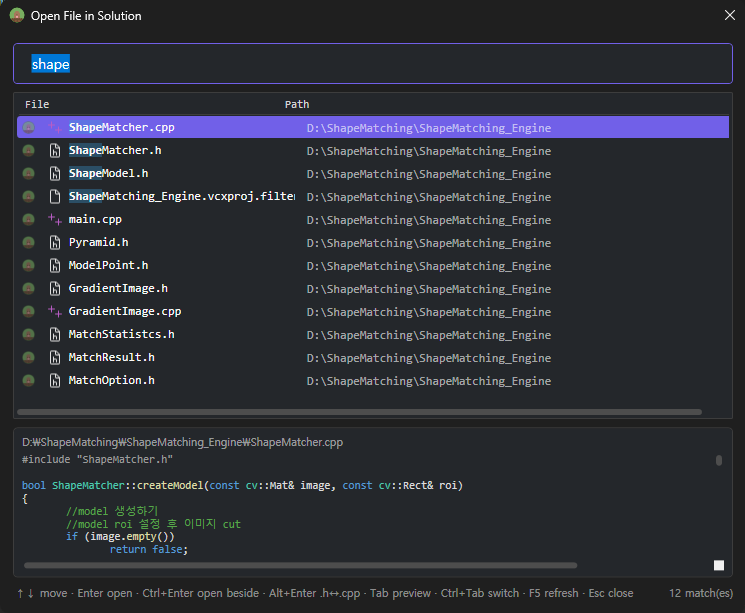
Alt+Shift+O, type part of another file's name, pick a result with
the arrow keys and press Enter. Use its directory to distinguish duplicate names.
- Press
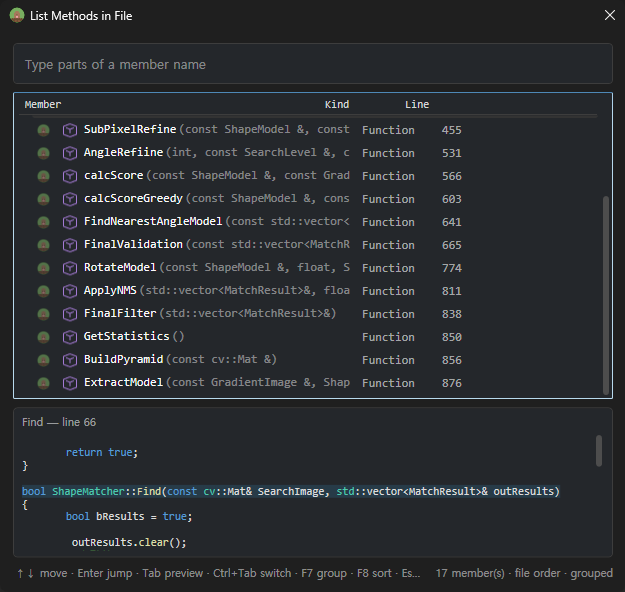
Alt+M, filter for a member and press Enter to jump to its code.
- Put the caret on a function or variable and press
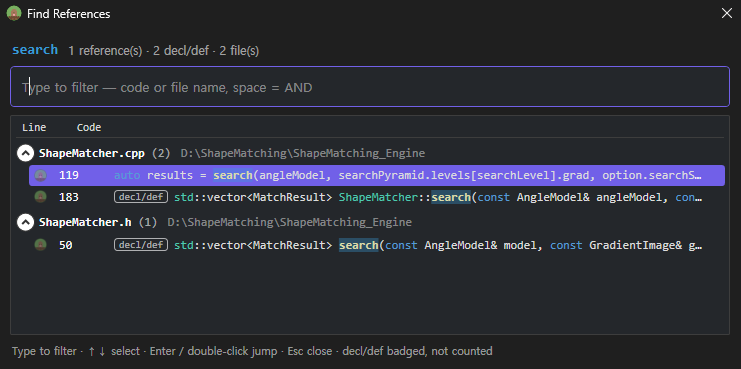
Alt+Shift+F. Confirm
the name in the search dialog, then pick a result and press Enter.
C/C++ results match names across scopes; check the file and surrounding code
when different symbols share a name. The status line reports search coverage.
- Press
Shift+Alt+J, select your starting file/line and press Enter to return.
The default selection is the previous location, which may be an intermediate
stop. Arrow keys preview locations; Esc returns focus without navigating.
If a shortcut does not open the expected window, open MoleKey from
View → Other Windows and check the shortcut profile and Health & Restore.
Applying the profile asks for consent and backs up affected bindings.
For C# and other languages, reference searches use Visual Studio's own window.
Screenshots
Open File in Solution (Alt+Shift+O) — type parts of the name or path,
arrows pick without leaving the search box, preview below.
List Methods in File (Alt+M) — the active document's members, grouped by
class, with the body of the selected one previewed underneath.
Find All References (Alt+Shift+F) — C/C++ function and variable references grouped by file with
syntax-colored lines, function declarations badged and left out of the count, and a
separate popup to enter a function or variable name (Enter or Find), plus a compact filter in the docked results pane. Alt+Shift+F also opens the popup from whitespace in a C/C++ editor. The caret word is optional and only supplies the initial query. Results stay in a dockable window beside Output as you navigate. Each search has its own tab and filter; repeating a name refreshes its tab. Use Alt+Shift+F to reopen the popup for another name, right-click → Refresh results (or F5 in the focused pane) to refresh from current code while retaining selection and scroll position, and the tab close buttons to remove results. Submitting a search focuses the result list for immediate arrow-key navigation. Searches show a loading status while running. Tabs last until closed or the solution closes. Variable declarations and uses are included once per line. Searches match exact names across scopes, so same-named variables in different classes appear together.
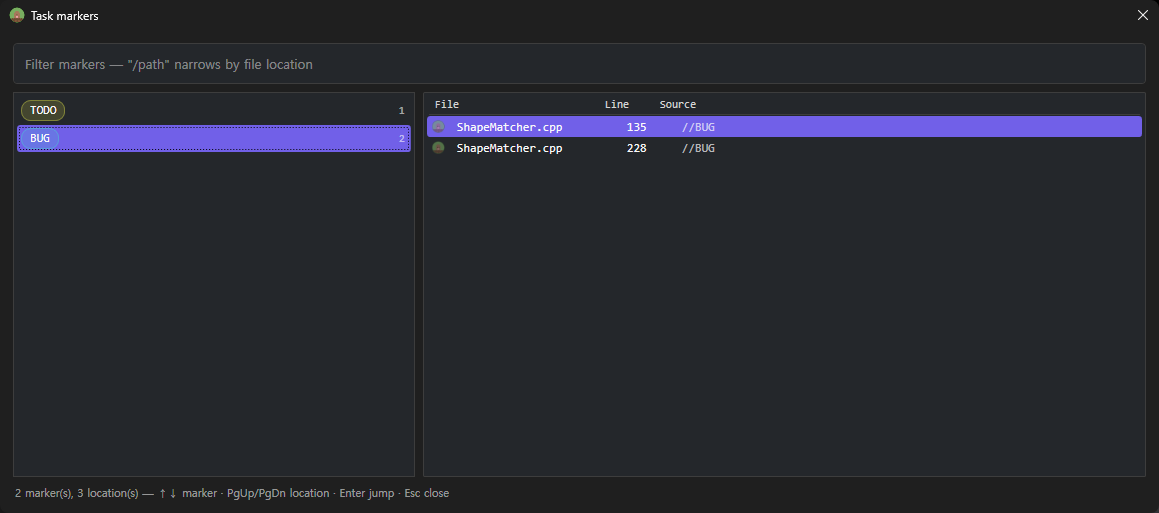
Task markers (Shift+Alt+K) — every TODO / FIXME / BUG in the
solution's comments: markers with counts on the left, their locations on the
right.
Navigation
| Key |
Window |
Alt+Shift+O |
Open File in Solution — every solution file, filtered as you type (space = AND terms) |
Alt+M |
List Methods in File — the active document's functions/fields/types grouped by class, Enter jumps |
Alt+Shift+S |
Find Symbol in Solution — every type & member defined in your code |
Alt+Shift+F |
Find All References — C/C++ gets function and variable references grouped by file; other languages keep the Visual Studio window |
Ctrl+Shift+G |
Open File Under Caret — resolves the #include or path at the caret across the whole solution |
Shift+Alt+J |
Jump History — current location marked, previous location selected; arrows preview, Enter jumps, Esc returns |
Shift+Alt+K |
Task Markers — every TODO / FIXME / HACK in the solution's comments |
Shift+Alt+H |
Hashtags — browse every #tag written in comments across the solution |
Shift+Alt+G |
Goto Hashtag — locations of the #tag under the caret, Enter = next |
Ctrl+F12 |
Toggle Declaration/Definition — C/C++ functions jump between the .h prototype and the .cpp body |
All finders share one flow: type to filter → arrows to pick (without leaving
the search box) → Enter to jump → Esc to close. Filter tokens work everywhere:
/src narrows results to paths containing src, and .cpp (file finder)
filters by extension. Matching is fuzzy — mkap finds MasterKeyApplier —
with exact prefix and substring hits always ranked first.
In the file finder, Ctrl+Enter opens the file beside what you were reading
(reusing the side group when there already is one), and Alt+Enter opens the
file's C/C++ partner (.h ↔ .cpp) instead of the row you picked — so
picking foo.h when you meant foo.cpp costs no second search.
With the editor split, Alt+Shift+W moves the caret to the group on the other
side and Alt+Shift+U puts the split away — both from the editor, where you
are when you want them.
Opened the wrong one? Ctrl+Tab cycles file → member → symbol (and
Ctrl+1/2/3 goes straight to one) carrying your query with it, so a
misfire costs one keystroke instead of Esc-plus-retype.
Write #likeThis (starts with a letter, Unicode/Korean OK) in any comment:
// #renderLoop frame starts here
/* #refactor split this class */
- Tags render underlined in link-blue right in the editor
- Typing
# in a comment autocompletes existing tags
- Preprocessor directives (
#include, #region) are never mistaken for tags
- Solution-wide index with per-file caching; unsaved edits included
Task markers — Shift+Alt+K
The same comment parser also collects TODO, FIXME, HACK, BUG, XXX
and UNDONE, browsable the same way: markers on the left with counts, their
locations on the right, Enter jumps. Only uppercase markers in comments
count, so ordinary prose ("note that this is a bug") never shows up, and
neither does anything in code or a string literal. Unlike the built-in task
list this covers the whole solution, not just the files you have open. Edit the
list with task_markers in %APPDATA%\VsMasterKey\settings.txt.
Jump History — Shift+Alt+J
The trail of places you've been this session, as a filterable list with code
previews. Navigate-backward (Ctrl+-) walks the same trail one blind step at a
time and overshooting loses the spot; here you can see it and go straight
there. The current file and line are marked, and the most recent different
location is selected. Arrows update the preview without moving the editor;
Enter jumps and Esc returns to the original editor. Open-file previews include
unsaved edits. Choosing the current location preserves the caret column and
selection. Nothing is written to disk.
C/C++ references
Alt+Shift+F on a C/C++ symbol lists its code references grouped by file, with
syntax-colored previews — including on Visual Studio 2026's new C++ editor- An inline "N references" count next to each function definition (the
CodeLens C++ never got); click it to open its call-site list
Alt+O toggles header/source even when the counterpart lives in another
folder or project — the whole solution is searchedCtrl+F12 toggles between a function's declaration and its definition
(and cycles through overload lines) — no browse database required
Shortcut profile & custom keys
- MoleKey profile: a curated navigation key set (
Alt+G go to definition,
Alt+O toggle header/code, Alt+←/→ navigate back/forward, …) applied only
with your consent, merged next to the Visual Studio defaults — never replacing them.
Original bindings are backed up on first touch; Restore brings them back exactly.
- My Keys: bind any of Visual Studio's ~10,000 commands to your own shortcut —
search the command, capture the key in a dialog (even combinations Visual Studio already
uses), pick Global or Text Editor scope, Apply. Conflict scanning included.
Enhanced syntax coloring
Presets that give fields, parameters, statics and macros distinct colors
(dark & light variants), or build your own per-item scheme with a color picker.
Works on Visual Studio 2022 and 2026 (including the 2026 C++ editor rework).
Moving from Visual Studio 2022? It doesn't bring your Fonts and Colors along, and
importing the .vssettings through Visual Studio drops every C++ item — 2026 renamed
them. Import from Visual Studio 2022… on the Colors page maps the old names to the new
ones so the C++ colors survive too. The same page also puts the editor
settings the upgrade resets — scroll bar map mode, its preview tooltip,
scroll bar marks, line numbers — back within reach.
Trust
- Every destructive operation (key bindings, colors) snapshots the original first — restore anytime
- All data stays local in
%APPDATA%\VsMasterKey — nothing is transmitted
- Every editor decoration can be turned off
- The Health & Restore page shows profile, backup and command-hook status,
runs Self-Diagnose, and keeps shortcut/color recovery in one place
- Restoring shortcuts turns automatic profile application off, so the restored
state remains in place after restarting Visual Studio
Feedback
Bug reports and feature requests:
Issues. Release history:
CHANGELOG.

