Azure Deployment Stacks report more than a deployment what-if can: alongside
Create and Modify they name the resources a deploy will Detach or Delete
because they dropped out of the template, and they report each resource's
management and deny status. That output is the most valuable thing a pre-deploy
review has, and it currently arrives as one HTML blob per stack, per stage.
This extension puts every stack in a run on one screen.
What it adds
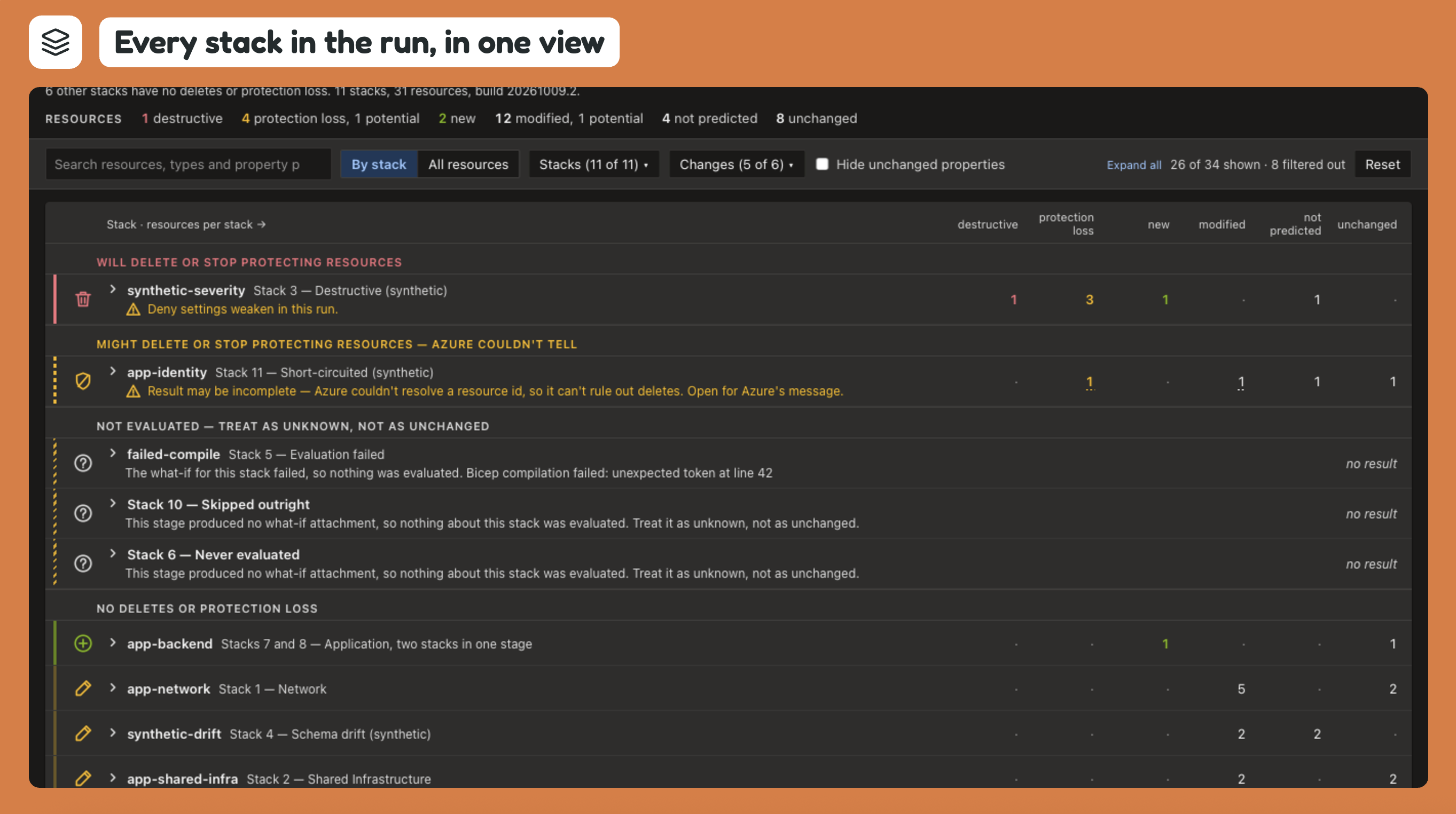
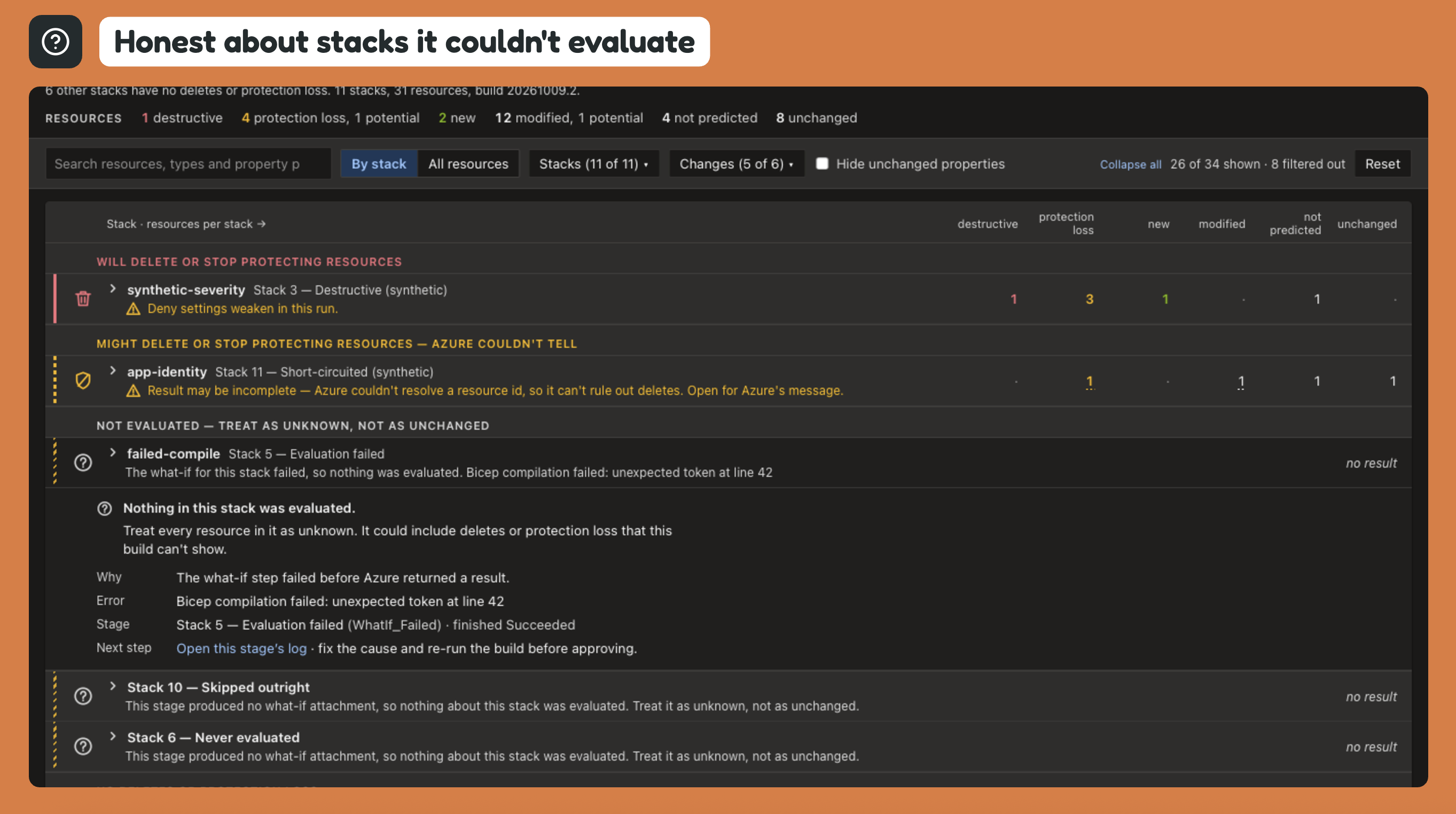
A build results tab. It opens on one sentence: how many stacks will delete
or stop protecting resources, how many more might, how many were not evaluated,
and whether Azure warned that a result may be incomplete. Below it is one line
per stack, worst first, with its resource counts by severity. Open a stack for
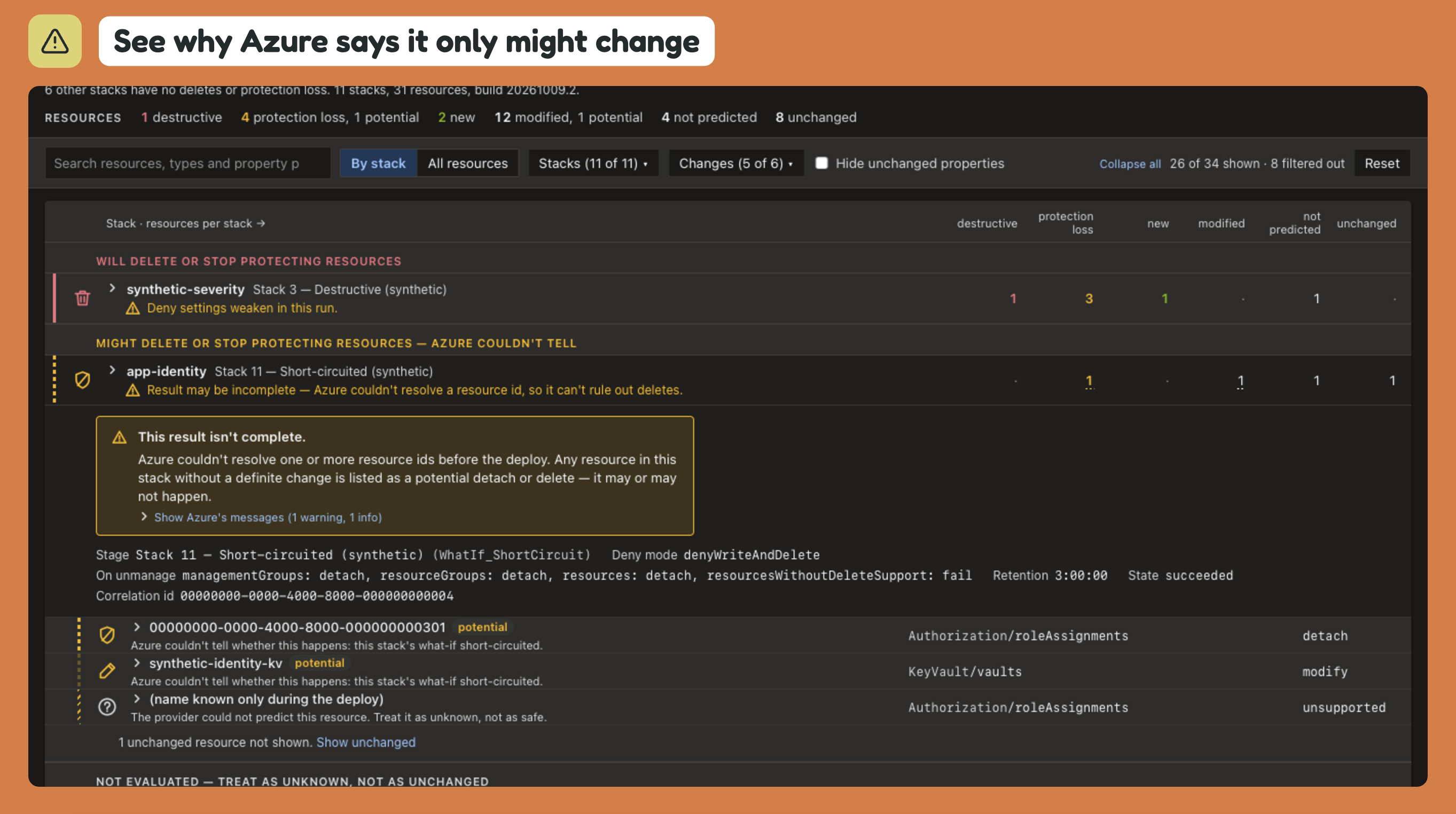
its resources, and a resource for its property changes, before and after side by
side. A stack nobody evaluated opens on why: Azure's error, the stage's result,
and a link to the stage's log. "All resources" lists every changed resource
across the run, ranked by how much it can hurt you. Choose which changes and
which stacks to show from the toolbar, or search; what you open and filter lives
in the URL, so a link picks out the resource you were looking at.
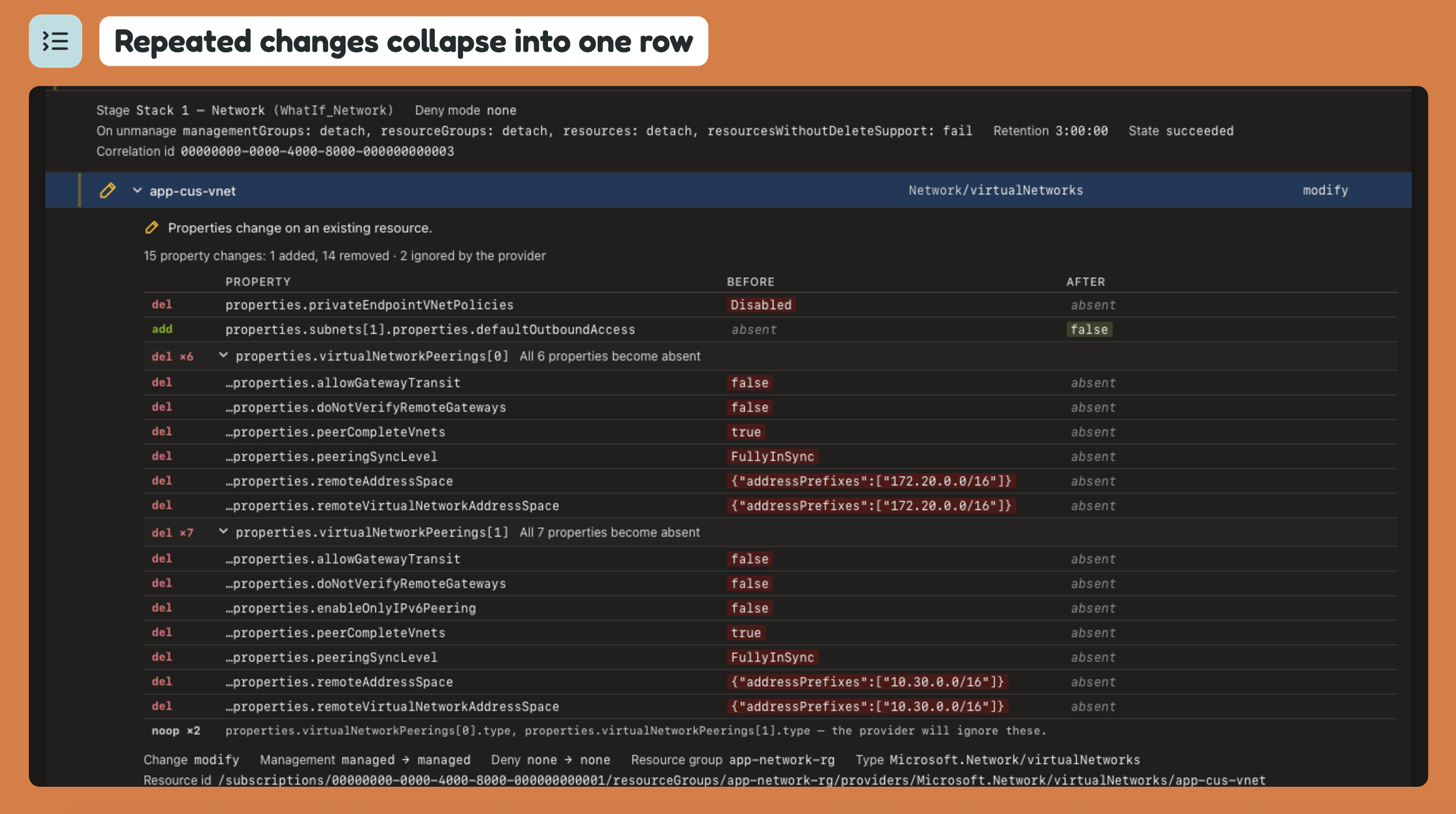
Azure's own warnings stay with the stack they are about. When a resource's name
cannot be worked out before the deploy, Azure short-circuits it, says the result
is non-deterministic, and marks the changes it is unsure of as potential. A
stack whose only deletes are potential is listed as one that might delete,
apart from the stacks that will.
A pipeline task. One task, with BicepDeploy@0's operations and input
names. whatIf previews a stack against what it currently manages and attaches
the result; create applies it, validate checks it, and delete removes it.
What-if, create and validate read the same inputs and take the same code path,
so a preview cannot disagree with the deploy it previews about the unmanage
actions or deny settings — a difference there makes the preview a lie, most
obviously about whether a dropped resource is reported as Detach or as Delete.
When Microsoft's Bicep Deploy task is enough
Azure Pipelines has a built-in task,
Bicep Deploy (BicepDeploy@0),
that deploys Bicep templates, deployment stacks included. It needs no extension
and Microsoft maintains it. If it covers what you need, use it.
Compared with BicepDeploy@0 as Microsoft documented it on 23 September 2026,
and with its source on 6 October 2026. That task changes, so check its current
page before relying on this section.
Use BicepDeploy@0 if you:
- deploy ordinary deployments rather than stacks. It can preview those with
what-if too.
- deploy stacks and do not need to preview the change first.
- deploy at tenant scope. Deployment stacks do not exist there, so this
extension's task covers resource group, subscription and management group
scope only.
- run classic release pipelines. This extension's tab is a build results tab, so
a release has nowhere to show it.
What this extension adds:
- A page to read the result on. One tab for every stack in a run: filterable and
ranked by severity, with any stage that produced nothing shown as not
evaluated rather than as unchanged.
BicepDeploy@0 reports to the build
log only, and a built-in task cannot add a page to the build results.
- What-if for deployment stacks.
BicepDeploy@0 can create, validate and
delete a stack, but not preview one. A stack what-if is what reports the
resources a deploy would Detach or Delete because they dropped out of the
template. Microsoft has this in progress: an open pull request to the library
BicepDeploy@0 is built on,
Azure/bicep-deploy#327,
adds stack what-if as text in the build log. Expect this difference to close.
- Preview and deploy from one set of inputs. This is an alternative to
deploying with
BicepDeploy@0, not something to add on top of it: previewing
here and deploying there means keeping two tasks' inputs in step by hand.
The thing it refuses to do
Absence of data never renders as absence of change.
What-if stages usually run with continueOnError, so a stage that fails attaches
nothing at all. A tab that rendered only the attachments it received would show
eight clean stacks as a safe deploy while the ninth was never evaluated. So the
tab reconciles against the build timeline rather than the attachment list: every
what-if stage in the run gets a row, and a stage that produced nothing is ranked
unevaluated — above noChange, so no filter can hide it. The
headline says how many stacks were not evaluated, and they get their own group,
above every stack that only modifies. Neither dismisses.
The task holds up its end: it writes its sidecar manifest on failure as well as
on success, because "evaluated, found nothing" and "never evaluated" have to be
different on the wire.
Severity is the maximum across four axes
A resource can lose protection with no property change and no interesting change
type. A noChange resource whose management status moves from managed to
notManaged is the stack quietly stopping to govern a key vault, and sorting on
change type puts it at the bottom of the table next to two hundred benign no-ops.
The tab draws each rung as an icon; the build log and its summary print the
glyph.
| Tab |
Log |
Rung |
Reached by |
 |
- |
destructive |
delete |
 |
/ |
protectionLoss |
detach, management lost, deny settings weakened |
 |
+ |
create |
create |
 |
~ |
modify |
modify |
 |
? |
unevaluated |
unsupported, an unrecognised change type, or a stage that attached nothing |
 |
* |
noChange |
noChange |
Permissions
vso.build — build read — and nothing else. No build_execute, no code, no
serviceendpoint. The tab is a static page: everything it shows comes from build
attachments produced by the task, and it makes no request to any host outside
Azure DevOps. No CDN, no font host, no telemetry.
The task talks to Azure Resource Manager using the service connection you give
it, and downloads a version-pinned Bicep compiler from github.com/Azure/bicep
at run time. Pinning is deliberate: compiler output changes across versions, and
every consumer's what-if should compile identically. The pinned version may move
in a minor release, always with a release note; set bicepVersion to stay on
one.
Tested on Azure public cloud. The task takes its sign-in authority and Resource
Manager URL from the service connection, so other clouds should work the same
way, but none has been tried.
Getting started
- task: StackWhatIf@1
  displayName: What-If — network
  continueOnError: true
  inputs:
    operation: whatIf
    azureResourceManagerConnection: 'My ARM Connection'
    stackId: network
    stackName: app-network
    templateFile: stacks/01-network-stack.bicep
    parametersFile: params/network.bicepparam
    location: CentralUS
    actionOnUnmanageResources: detach
    actionOnUnmanageResourceGroups: detach
    denySettingsMode: none
Repeat the step per stack, in one stage or several. Name a stage
WhatIf_<Something> and the tab shows it even when it never ran, as not
evaluated; a stage named otherwise appears once a what-if attaches to it. Full
documentation, including why the fan-out belongs in your YAML rather
than inside the task, is in the
repository.
What-if is a prediction, not a promise
It carries documented accuracy limits and stack what-if inherits every one of
them. The Detach and Delete rows are simultaneously the most valuable output here
and the ones to check hardest. This tool exists to make them easier to read —
it is not a reason to trust them without looking.
One limit found while testing: a stack what-if compares the parameter values it
is given, not the template's defaults. A change that comes only from a parameter
default, such as a utcNow() stamp, was reported as no change. Pass values that
the preview must see.

