Breakpoint Assistant - Visual Studio Extension
🎯Accelerate debugging with bulk breakpoint automation
A powerful Visual Studio extension that supercharges your debugging workflow by intelligently setting breakpoints on specific code patterns.
Language Support:
Breakpoint Bulk Actions
Interactive dialog to select multiple code patterns and set breakpoints in bulk:
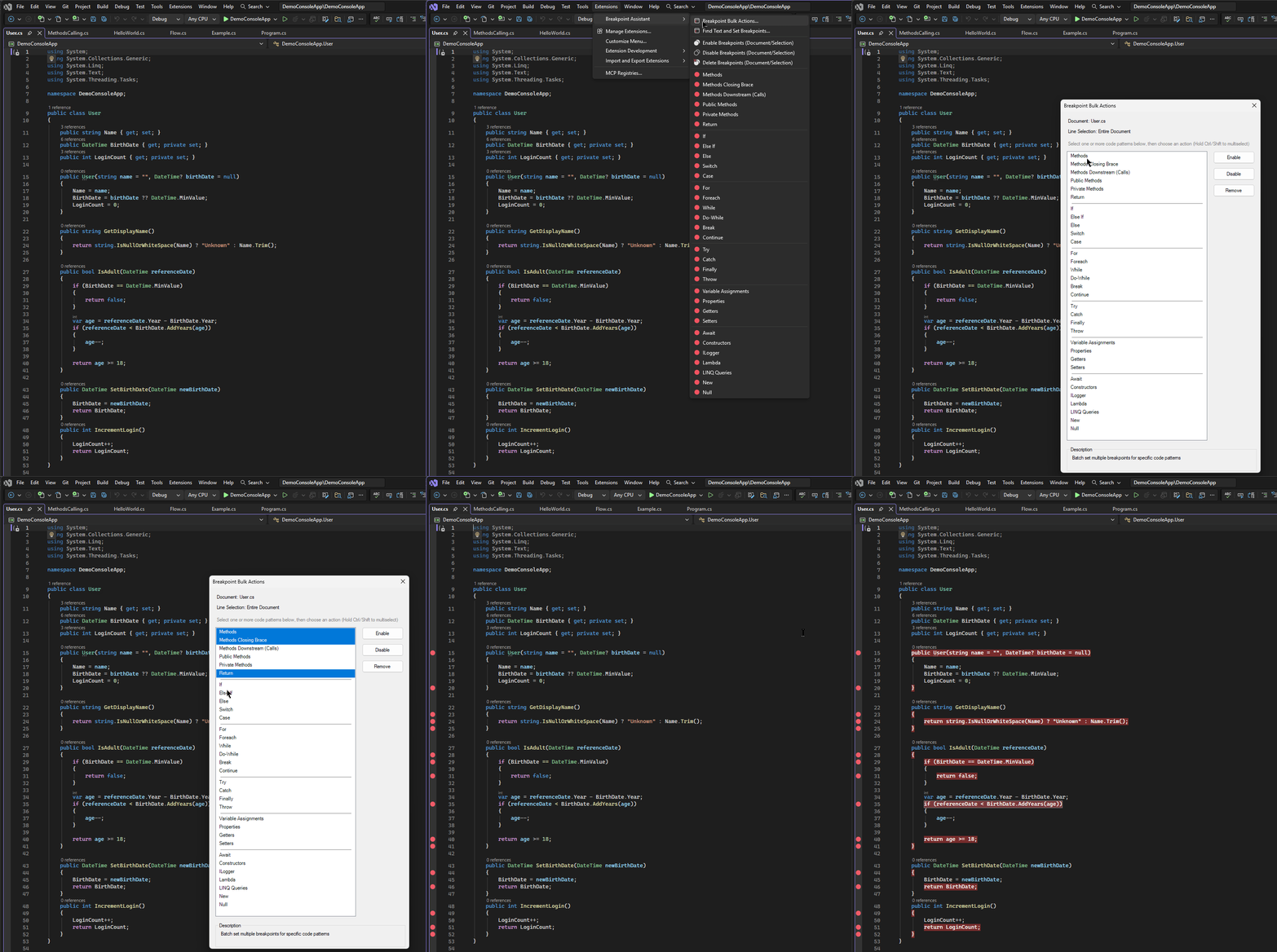
Breakpoint Bulk Actions - Screenshot:
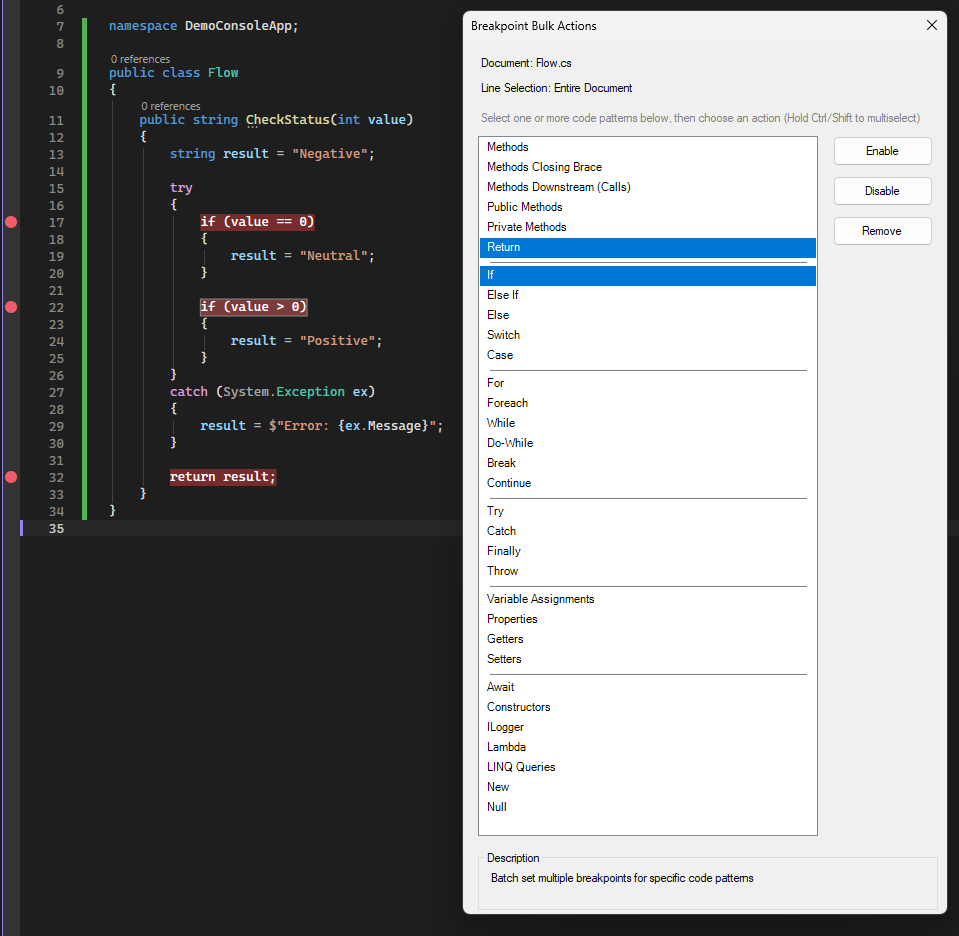
Find Text And Set Breakpoint
Search for specific text and automatically place breakpoints on matching lines
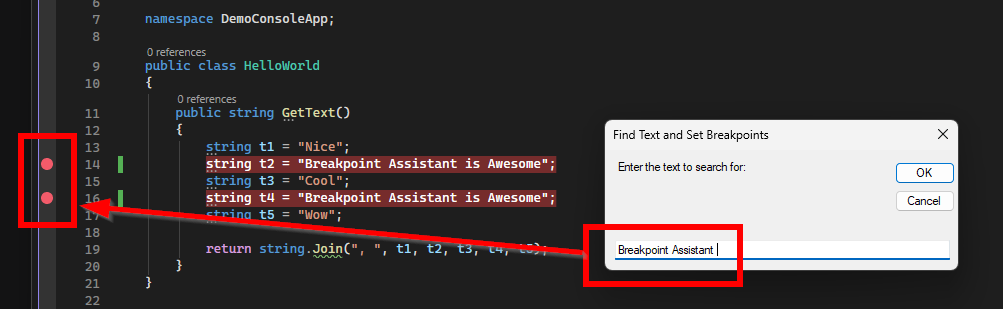
Works on Selected Text or Entire Document
Breakpoint Assistant can operate on either the entire document or just a selected portion of code, giving you flexibility in how you apply breakpoints.
Example of Selected Text:
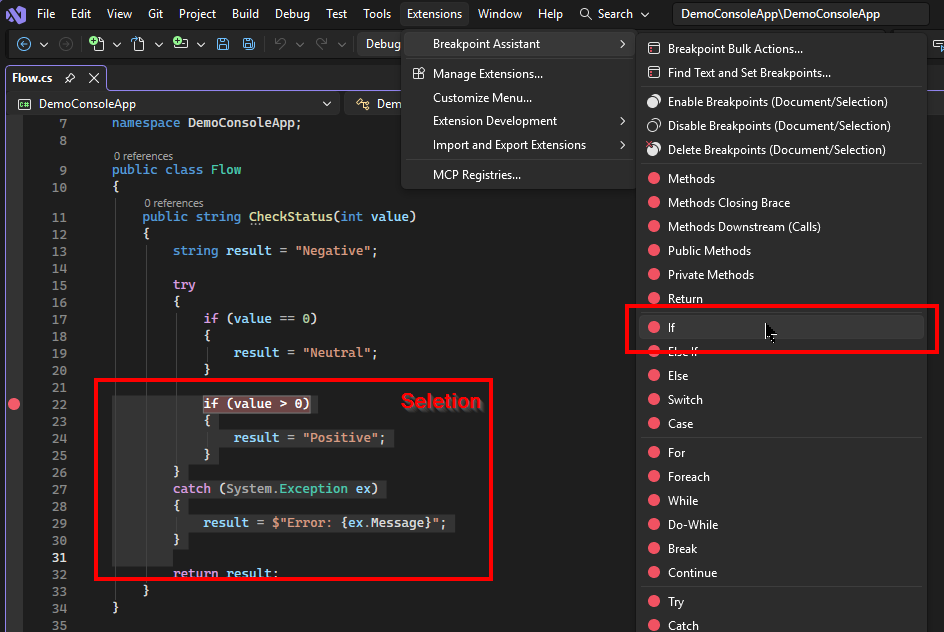
All Features
Breakpoint Assistant eliminates the tedious process of manually setting breakpoints by automatically finding and marking specific code patterns in your C# files. Simply select a code pattern type, and the extension does the rest.
Screenshot:
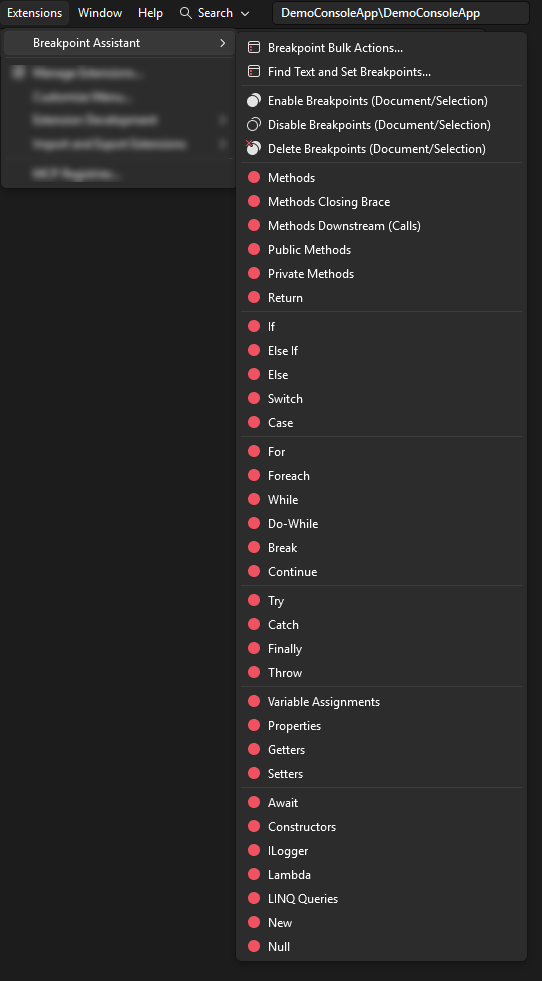
- Breakpoint Bulk Actions - Interactive dialog to select multiple code patterns and set breakpoints in bulk
- Find Text and Set Breakpoints - Search for specific text and automatically place breakpoints on matching lines
🔄 Breakpoint Management
- Enable Breakpoints - Enable all breakpoints in the current document or selected text
- Disable Breakpoints - Disable all breakpoints in the current document or selected text
- Delete Breakpoints - Remove all breakpoints in the current document or selected text
📍 Methods & Functions
- Methods - Set breakpoints at the first line of all method declarations
- Methods Closing Brace - Set breakpoints at the closing brace of all methods (useful for tracking method exits)
- Methods Downstream (Calls) - Set breakpoints on method invocations
- Public Methods - Target only public method declarations
- Private Methods - Target only private method declarations
- Return - Set breakpoints on all return statements
🔀 Conditional Logic
- If - Set breakpoints on all if statement conditions
- Else If - Set breakpoints on all else if conditions
- Else - Set breakpoints on else blocks
- Switch - Set breakpoints on switch statements
- Case - Set breakpoints on case labels
🔁 Loops
- For - Set breakpoints on for loop declarations
- Foreach - Set breakpoints on foreach loop declarations
- While - Set breakpoints on while loop conditions
- Do-While - Set breakpoints on do-while loops
- Break - Set breakpoints on break statements
- Continue - Set breakpoints on continue statements
⚠️ Exception Handling
- Try - Set breakpoints on try block entries
- Catch - Set breakpoints on catch block entries
- Finally - Set breakpoints on finally block entries
- Throw - Set breakpoints on throw statements
🏷️ Properties & Variables
- Variable Assignments - Set breakpoints on all variable assignment statements
- Properties - Set breakpoints on property declarations
- Getters - Set breakpoints on property get accessors
- Setters - Set breakpoints on property set accessors
🚀 Advanced Features
- Await - Set breakpoints on all await expressions (async code debugging)
- Constructors - Set breakpoints on constructor declarations
- ILogger - Set breakpoints on logging statements
- Lambda - Set breakpoints on lambda expressions
- LINQ Queries - Set breakpoints on LINQ query expressions
- New - Set breakpoints on object instantiation (new keyword)
- Null - Set breakpoints on null checks and null assignments
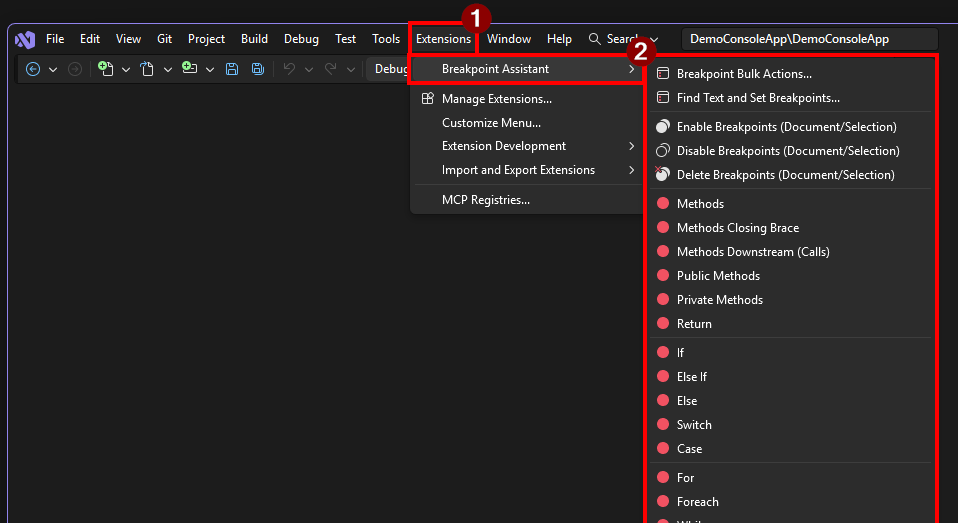
How to Use
- Open any C# code file
- Optionally select a range of code
- Go to Extensions > Breakpoint Assistant
- Select the desired feature from the submenu
- View results in the Breakpoint Assistant Output window
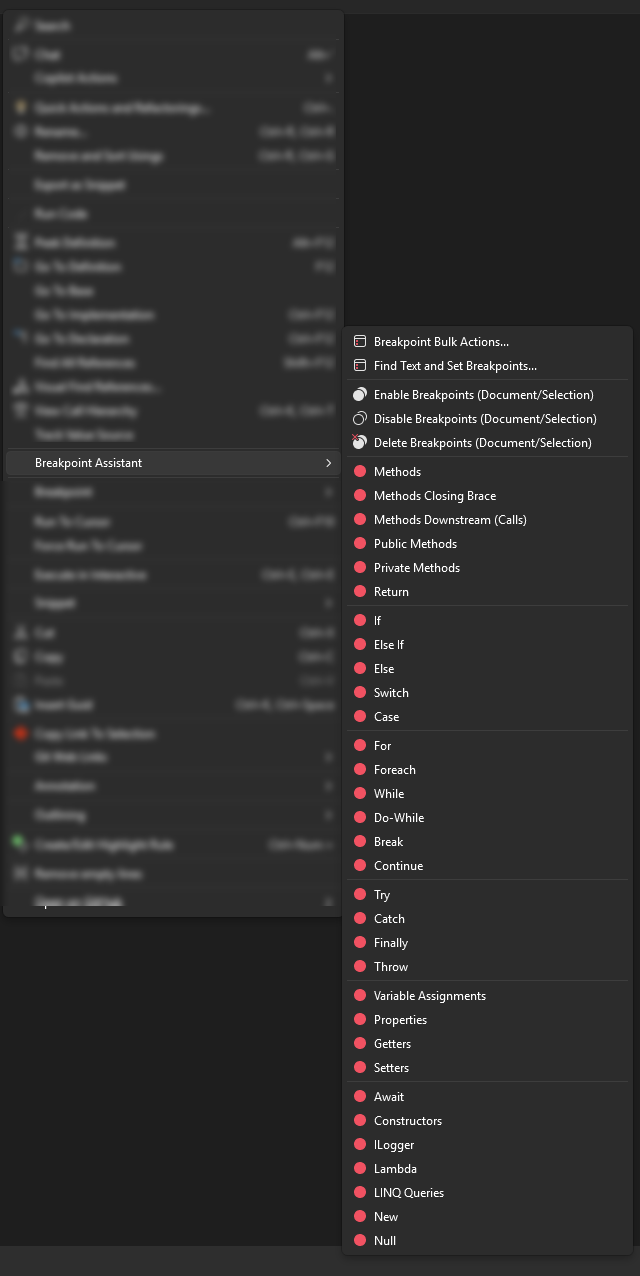
- Open any C# code file
- Optionally select a range of code
- Right-click in the editor
- Choose Breakpoint Assistant from the context menu
- Select the desired feature
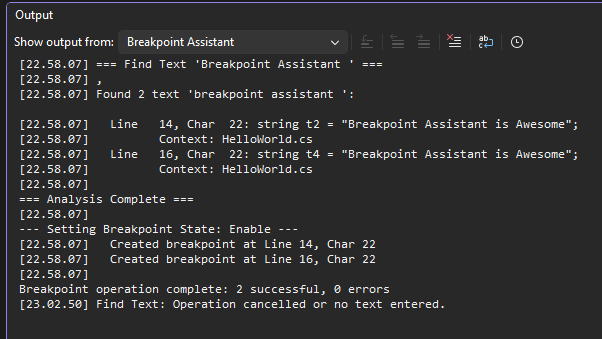
Output Window
All results and logs are written to the Breakpoint Assistant pane in the Visual Studio Output window.
To view:
- Go to View > Output (Ctrl+Alt+O)
- Select "Breakpoint Assistant" from the dropdown
System Requirements
- Visual Studio 2022 (version 17.0 or higher)
- .NET Framework 4.7.2 or higher
License
MIT

