Macros for Visual Studio



Record once. Repeat forever — manually or on cue.
A modern Visual Studio extension that brings back the power of recorded automation. Record sequences of text edits and IDE commands, replay them with a single keystroke, or trigger them automatically on build, save, or any IDE event. Every macro is an editable C# script — no black boxes, full IntelliSense.
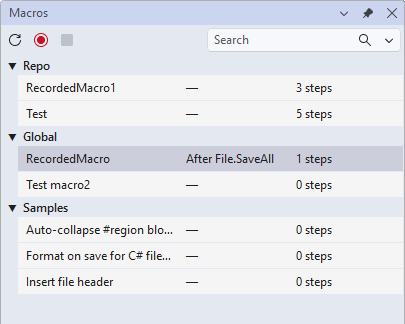
Why
- Stop doing the same 6-step ritual every time you open a file or start a build.
- Run a code-format pass automatically after every successful build.
- Capture your testing workflow once; replay it on demand.
- Intercept and modify commands before they execute (e.g., block Save during a build).
- Version-control team automation — save macros in your repo, shared by the team.
30-second wow
- Record: Press
Ctrl+Shift+R, do your thing (type code, run commands), press Ctrl+Shift+R again to stop.
- Replay: Move your caret and press
Ctrl+Shift+P — your actions replay instantly.
- Trigger (optional): Add
// @trigger Build.SolutionBuildDone at the top of the macro to fire it automatically.
// @trigger Build.SolutionBuildDone when success=false
await VS.StatusBar.ShowMessageAsync("💥 Build failed!");
await ExecuteCommandAsync("View.ErrorList");
Documentation
- Getting Started — 60-second setup, hotkeys, save your first macro.
- Recording — What gets captured, step aggregation, the current slot.
- Replaying — Play Last, tool window, error handling.
- C# Scripting Reference — Helpers API, MacroGlobals, code examples.
- Triggers — @trigger directive, all event/command types, filters, examples.
- Macro Samples — 15 ready-to-use macros you can copy and customize.
- Scopes — Global vs Repo macros, storage, team sharing.
- Security — Trust gate, auto-disable, why macros are code.
- Troubleshooting — Common issues and fixes.
- Architecture — For contributors: how it works under the hood.
How does this compare?
Macros for VS vs. the alternatives
| Feature |
Macros for VS |
Old VS Macros (≤2010) |
Visual Commander |
VS Code (any macro extension) |
| Record edits + replay |
✅ |
✅ |
✅ |
◐ |
| Macros are transparent, editable C# scripts |
✅ |
VBA only |
✅ |
◐ |
| Full IntelliSense in the macro editor |
✅ |
✅ |
◐ |
❌ |
| Event triggers (build, save, debugger, …) |
✅ |
✅ |
✅ |
❌ |
BeforeCommand interception (cancel a VS command) |
✅ |
✅ |
✅ |
❌ |
Trigger filters (when filename=*.cs) |
✅ |
❌ |
❌ |
❌ |
| Per-repo, version-controllable, team-shared scope |
✅ |
❌ |
❌ |
❌ |
| Trust gate / consent prompt for shared macros |
✅ |
❌ |
❌ |
❌ |
| Re-entrance guard + auto-disable + kill switch |
✅ |
❌ |
❌ |
❌ |
| Built-in sample gallery |
✅ (15 ready) |
❌ |
examples |
❌ |
| Actively maintained |
✅ |
❌ |
✅ |
◐ |
The combination "recorded + scriptable + triggered + team-shared + trust-gated + sample-seeded" is unique to Macros for VS. Visual Commander has the first three; nobody else has the last three.
Contributing
Issues, ideas, and PRs welcome on GitHub.
| |

