Overview Q & A Rating & Review
CodeAnalysis Cognitive Complexity VSIX
A Visual Studio extension that calculates and displays Cognitive Complexity metrics for C# methods using CodeLens technology.
Features
🎯 Cognitive Complexity Analysis
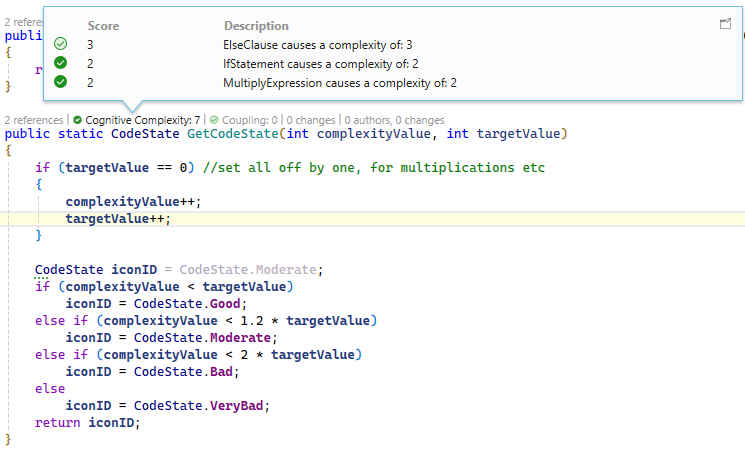
Real-time calculation of cognitive complexity for C# methodsCodeLens integration shows complexity scores directly in the editorVisual indicators for complexity levels (good/warning/error states)Detailed breakdowns of complexity contributors
⚙️ Configurable Options
Customizable threshold (default: 12) - Set your own complexity warning levelLogging control - Enable/disable detailed logging for debuggingPerformance tuning - Adjustable polling interval for change detection
Batch processing for efficient change detectionSmart polling with configurable intervalsMemory efficient with proper resource cleanupLow CPU usage with optimized algorithms
🔧 Visual Studio Support
Visual Studio 2022 (17.x)Visual Studio 2025 (18.x)Visual Studio 2026 (19.x) - Future-proofed
Installation
Download the .vsix file
Double-click to install, or use Visual Studio's "Extensions > Manage Extensions > Install from VSIX"
Restart Visual Studio
Configuration
Access settings via Tools → Options → C# Code Analysis → Cognitive Complexity :
Complexity Threshold : Methods above this score show warnings (default: 12)Enable Logging : Turn on detailed logging for troubleshooting (default: off)Polling Interval : How often to check for code changes in seconds (default: 5)
Usage
Open a C# file in Visual Studio
Ensure CodeLens is enabled (Tools → Options → Text Editor → All Languages → CodeLens )
Hover over method names to see cognitive complexity scores
Click the CodeLens indicator for detailed complexity breakdown
Understanding Cognitive Complexity
Cognitive Complexity is a measure of how difficult code is to understand, as defined by Sonar's Cognitive Complexity whitepaper . It considers:
Control flow structures (loops, conditionals)Nesting depth Boolean operations Method complexity
Lower scores indicate more readable, maintainable code.
Troubleshooting
Extension Not Loading
Ensure CodeLens is enabled in Visual Studio options
Check that the extension is properly installed via Extensions Manager
Restart Visual Studio after installation
Increase the polling interval in options
Disable logging if not needed
Consider excluding very large files from analysis
Missing Complexity Scores
Ensure the method has a proper signature
Check that the file is recognized as C# code
Verify CodeLens is enabled for the current document
Version History
v0.31 — First public release
Real-time cognitive complexity calculation for C# methods via CodeLens
Visual state indicators (good / warning / degraded)
Configurable complexity threshold, logging, and polling interval
Support for Visual Studio 2022, 2025 (Community, Professional, Enterprise)
Support for Visual Studio 2026 (future-proofed)
License
MIT — see license_mit.txt