Publish multiple apps to container (dependencies detection)
Publish PerTenant app to online
Run Tests in container
Remove Container
Compile App
Set build no. in App.Json and of the build pipeline
Planned tasks
Create nuget package
Get app from nuget
How to use
On your Azure DevOps account go to the Marketplace, find the extension and install it.
After that, you can use the new tasks in your pipelines through visual designer or yaml, as you wish. Just define the parameters and run the pipeline.
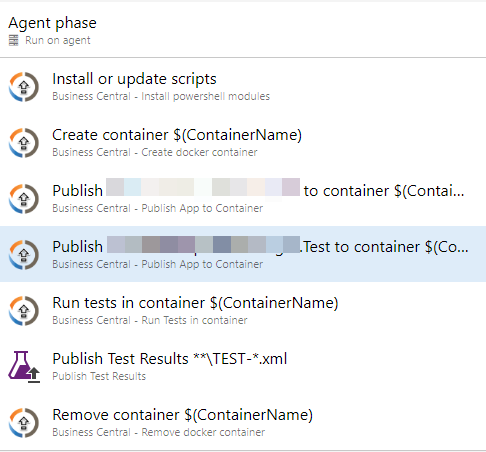
Example of Release Pipeline to create container, publish the app, test it
Install or update scripts
Create container
Publish Main App to container
Publish Test App to container
Run tests in container
Publish test results
Remove container
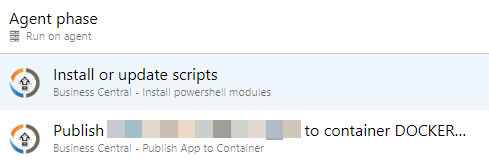
Example of Release Pipeline to release the app into QA container
Install or update scripts
Publish Main App to container
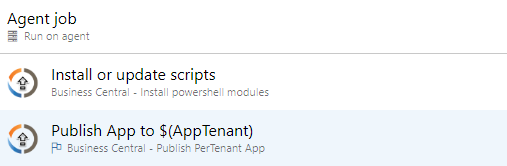
Example of Release Pipeline to release the app online
Install or update scripts
Publish App to tenant
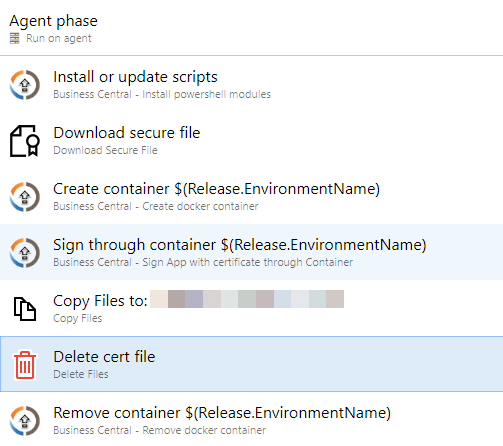
Example of Release Pipeline to sign the app
Install or update scripts
Download secure file
Create container
Sign through container
Delete file
Publish signed app artifact
Background Container Creation
To speed up pipelines, you can create the container in the background while other tasks (e.g. compilation) run in parallel.
Tasks
createbccontainer@6 - Set runInBackground: true to start container creation as a detached process.
waitforbccontainer@1 - Waits for the background container creation to finish. Streams stdout/stderr to the pipeline log. Fails if the background process failed or timed out.
cancelbccontainercreation@1 - Cancels a running background container creation and optionally removes the partially created container. Useful in cleanup/error conditions.
Example YAML usage
# Start container creation in background
- task: createbccontainer@6
  displayName: Start container creation (background)
  inputs:
    containername: 'BCApps'
    artifactUrl: '$(AppArtifactFromBranch)'
    runInBackground: true
    # ... other inputs as usual

# Run compilation in parallel while container is being created
- task: CompileBCApps@5
  displayName: Compile Apps
  inputs:
    ArtifactUrl: '$(AppArtifactFromBranch)'
    UseALCNuget: true
    Prerelease: true  # Use prerelease compiler for vNext
    # ...

# Wait for container to be ready before publishing/testing
- task: waitforbccontainer@1
  displayName: Wait for container creation
  inputs:
    containername: 'BCApps'
    timeoutMinutes: 30

# If something fails, cancel the background creation
- task: cancelbccontainercreation@1
  displayName: Cancel container creation
  condition: failed()
  inputs:
    containername: 'BCApps'
    removeContainer: true