Win32/MFC String Resource Visualizer - Visual Studio Extension
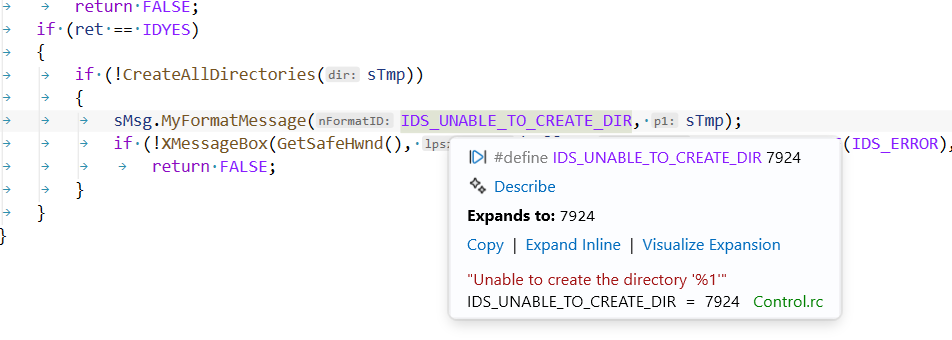
The string, its numeric ID, and the source .rc file appear merged into the
standard C++ Quick Info tooltip.
The problem
In MFC/Win32 code, string resources are referenced by symbolic ID:
AfxMessageBox(IDS_DISABLE_MEM_DRIVE_NO_DRIVE_SIGNAL_STORED);
Those IDs are #defines in resource.h (#define IDS_… 12345) with the actual
text living in a STRINGTABLE block in a .rc file. When you hover the ID in
Visual Studio, the built-in C++ Quick Info shows only the numeric value from
the #define. You have to open the .rc/string table and
look it up manually, which is a constant small friction in large MFC codebases.
Goal: hover an IDS_… identifier → see a tooltip with its string.
How it works
This extension resolves any symbol defined in a STRINGTABLE, keyed by its
name. While the IDS_ prefix is the standard recommended by Microsoft, any string-table naming
scheme will work. As a fast pre-filter it only looks up identifiers beginning with
ID by default (matching the near-universal IDS_ convention); if your string
tables use a different prefix, change ID prefixes under Tools → Options →
Win32 String Resource Visualizer (or clear it to consider every identifier).
Only STRINGTABLE entries are matched. Dialog, menu, and control IDs (IDD_,
IDR_, IDC_, …) are ignored.
Supported Visual Studio versions
| Visual Studio |
Version range |
| Visual Studio 2022 |
17.x |
| Visual Studio 2026 |
18.x |

