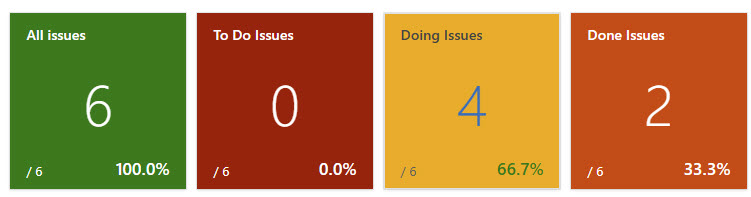
A compact 1×1 dashboard widget for Azure DevOps that shows a work-item count and a live percentage derived from two saved queries — with full conditional formatting and colour-coded backgrounds that update automatically.
What it shows
Element
Description
Large number
Count returned by the Numerator query
/ N (bottom-left)
Count returned by the Denominator query (optional)
Percentage (bottom-right)
(Numerator ÷ Denominator) × 100
Background colour
Changes automatically based on conditional formatting rules
Clicking the tile opens the numerator query directly in Azure DevOps Boards.
Use cases
Bug burn-down — Closed bugs / Total bugs
Sprint completion — Done stories / All stories in sprint
Test pass rate — Passed tests / All tests
SLA compliance — Resolved within SLA / Total incidents
Release readiness — Completed features / Planned features
Any two saved queries can be used — the widget works with flat lists, tree queries, and link queries.
Configuration
Open the widget's configure panel to set:
Setting
Description
Title
Label shown at the top of the tile
Numerator query
The count displayed as the main number
Denominator query
Used as the denominator for the percentage calculation
Default background colour
Colour shown when no conditional formatting rule matches
Show denominator
Toggle the / N denominator count on or off
Display mode
Count (default), Fraction (42 / 58), or Percentage only
Decimal places
0, 1, or 2 decimal places on the percentage
Goal percentage
Optional target — shows ✓ or gap-to-goal in the footer
Click action
Open numerator query, denominator query, a custom URL, or nothing
Conditional formatting
One or more colour rules applied in order — first match wins
Conditional formatting rules
Rules follow the pattern "If percentage <op>value%", where <op> is one of <, <=, >=, >, or =.
Example setup:
Rule
Colour
If percentage <= 25%
🔴 Red
If percentage <= 50%
🟠 Orange
If percentage <= 75%
🟡 Amber
If percentage > 75%
🟢 Green
Rules are evaluated top to bottom — the first matching rule determines the tile's background colour. The colour picker offers a 40-colour palette matching the standard ADO design system.
Edge cases
Situation
Widget behaviour
Denominator query returns 0 results
Percentage shows N/A
Queries not yet configured
Tile shows Not configured
Query fails to load
Tile shows Error (details in browser console)
No matching formatting rule
Default background colour is used
Permissions required
vso.work — read-only access to work items and queries. No write access is requested.
Supported sizes
Size
Description
1 × 1
Compact tile — count + percentage
1 × 2
Wide tile — count on the left, details panel on the right