VersionUp
VersionUp is a Visual Studio extension that allows developers to quickly and easily increment the version of C#/.NET projects directly from the Solution Explorer context menu.
Designed for Visual Studio 2022 and 2026, it supports modern SDK-style projects and integrates seamlessly into your development workflow.
Features & Functionality
- Quick Increment: Easily increment project versions directly from the Solution Explorer context menu by right-clicking any supported project and choosing the desired increment level.
- Supported Project Types: Fully supports modern SDK-style projects including C# (
.csproj), F# (.fsproj), and VB.NET (.vbproj).
- Supported Versioned Files:
- MSBuild / Project Files:
.csproj, .fsproj, .vbproj (updates <Version> or <PackageVersion> elements).
- Shared Build Properties:
directory.build.props, directory.build.targets.
- Assembly Attributes:
AssemblyInfo.cs, AssemblyInfo.fs, AssemblyInfo.vb (updates AssemblyVersion, AssemblyFileVersion, and AssemblyInformationalVersion).
- NuGet Package Specs:
.nuspec (updates <version> inside <metadata>).
- AppX Package Manifests:
package.appxmanifest (updates <Identity Version="..." />, always normalized to 4 segments as required by the AppX schema).
- JSON Configurations:
package.json (updates the top-level "version" property).
- Native C++ Resources:
.rc files (updates FILEVERSION/PRODUCTVERSION keywords as well as "FileVersion"/"ProductVersion" string values).
- VSIX Extension Manifests:
source.extension.vsixmanifest (updates <Identity Version="..." />).
- WiX Installers:
.wxs files (updates <Product Version="..." />, <Package>, or <Module>).
- Segment Selection: Choose to increment the Major, Minor, Build, or Revision segment of the version number.
- Intelligent Formatting:
- Automatically resets lower-order version segments to zero when a higher-order segment is incremented (e.g., incrementing the Minor version resets Build and Revision to 0).
- Handles missing or unparseable version numbers by defaulting to
1.0.0.
- Dynamically formats the version output, maintaining a three-part version (
Major.Minor.Build) if there is no Revision, and only appending the Revision part if it is explicitly incremented or already exists.
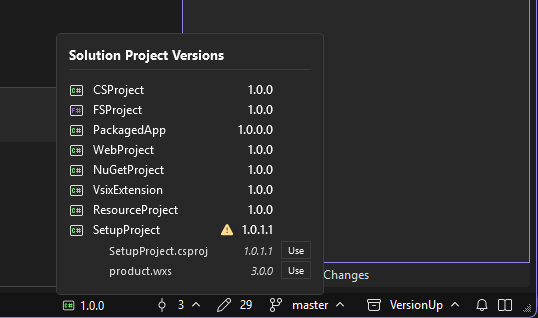
- Status Bar Info: Provides a convenient status bar button that displays the active project's version. Clicking it reveals a fly-out list of all project versions in the solution.
- Version Mismatch Detection & Resolution: Automatically scans projects to check if they have different version numbers across multiple files (such as
.csproj, AssemblyInfo.cs, and package.appxmanifest).
- Displays a warning indicator in the status bar tooltip if the active project is out of sync.
- Lists all version-sensitive files and their current versions under each project in the status bar fly-out control.
- Renders a "Use" button next to each version. Clicking it immediately aligns all other files in that project to the chosen version, fully integrated with Visual Studio's linked undo stack so the entire alignment can be reversed with a single Undo (Ctrl+Z) command.
- Undo Feature: Built-in undo support allows you to easily revert accidental version increments using Visual Studio's native undo stack.
- Integrated Logging: Records operations and version changes seamlessly via an integrated logger.
- Visual Studio 2022 & 2026 Compatible: Built on the modern Visual Studio SDK model to integrate seamlessly into your development workflow.
Samples
A comprehensive sample solution containing all supported project types and versioned files is available in the Samples folder. Open Samples.sln in Visual Studio to see and test the extension's behavior across all supported file formats!
Installation
You can install VersionUp in two ways:
- Visual Studio Marketplace: Search for "VersionUp" in the Extensions manager in Visual Studio and click install.
- Manual Installation: Download the latest
.vsix file from the Releases page and double-click it.
Developer Setup
Prerequisites
- Visual Studio 2022 or 2026 with Visual Studio extension development workload installed.
- .NET SDK 8.0 or later.
- .NET Framework 4.8 targeting pack.
Building the Project
Open the solution and build:
dotnet build
Running Tests
To run the unit test suite:
dotnet test
Contributing
Contributions are welcome! Please open an issue or submit a pull request on GitHub.
License
This project is licensed under the PolyForm Noncommercial License 1.0.0 - see the LICENSE file for details.
Copyright (c) 2026 Hefaistos68
Created and maintained by Hefaistos68 (dev@hefaistos68.dev).
For more projects, visit https://github.com/Hefaistos68.

