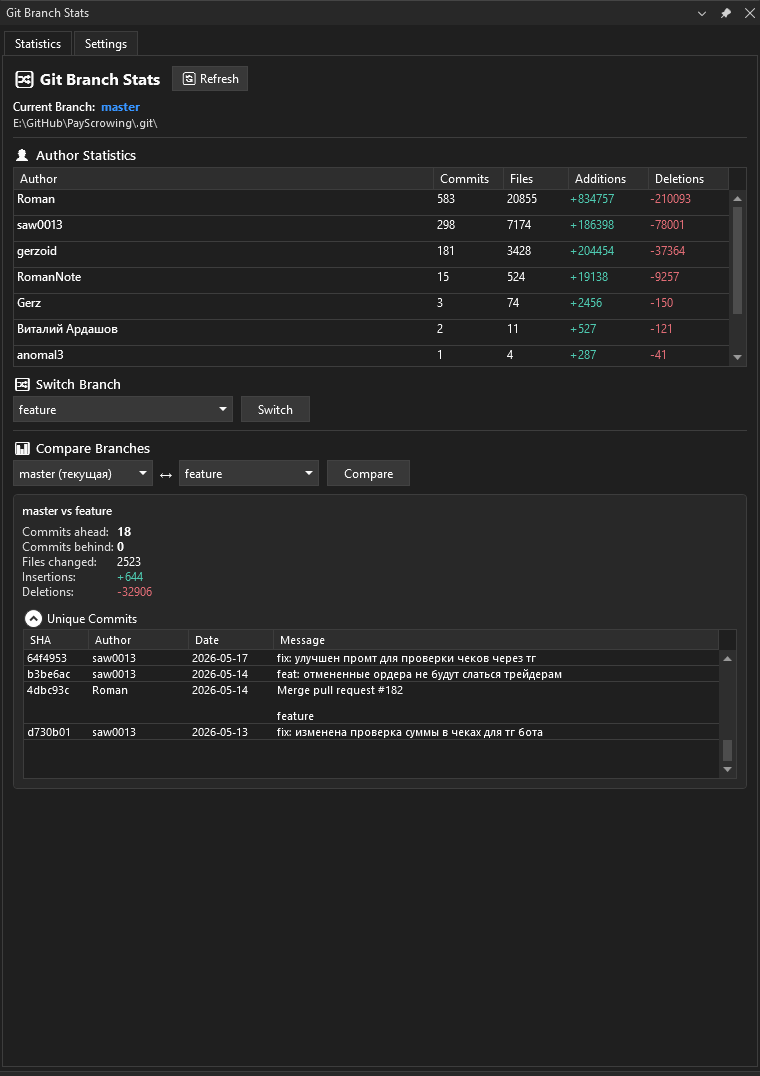
Git Branch StatsVisual Studio 2022 extension that shows Git branch statistics: per-author commits, files changed, lines added/deleted, branch switching and branch comparison. |

Git Branch StatsGit Branch Stats is a Visual Studio tool window that gives you an at-a-glance view of the Git repository behind your current solution — who contributed what, how your branches differ, and quick branch switching — all without leaving the IDE. Why you might like itWhen you work on a shared repository it’s easy to lose track of who has been doing what and how far your branches have diverged. Git Branch Stats brings that information right into Visual Studio: open the tool window and you immediately see author activity, branch differences, and the commits that set two branches apart. Features👤 Author statisticsSee per-author activity for the current branch in a sortable table:
🔀 Branch switchingCheck out any local branch directly from the tool window — pick it from the list and click Switch. If files are locked by a running build or the running app, you get a clear message instead of a crash. 📊 Branch comparisonCompare any two branches and instantly see:
🌐 Localization & custom translations
🎨 Theme-aware UIThe window follows your active Visual Studio theme — Light, Dark, and Blue — and repaints automatically when you switch themes. Getting started
Requirements
Built on LibGit2Sharp — no separate Git installation is required. FeedbackFound a bug or have an idea? Please open an issue on the project repository.
|