
InlayIndex
Visual Studio: 2022/2026 | License: MIT | Version: 1.0.0
View on GitHub: https://github.com/Ghost-Girls/InlayIndex
InlayIndex is a Visual Studio 2022/2026 extension that enhances C/C++ code readability by providing inline hints for array indices, enum values, and struct field names directly within the editor.
Powered by ClangSharp (libclang) for precise AST-level code parsing, it brings a code-reading experience comparable to CLion's inlay hints to Visual Studio.
Features
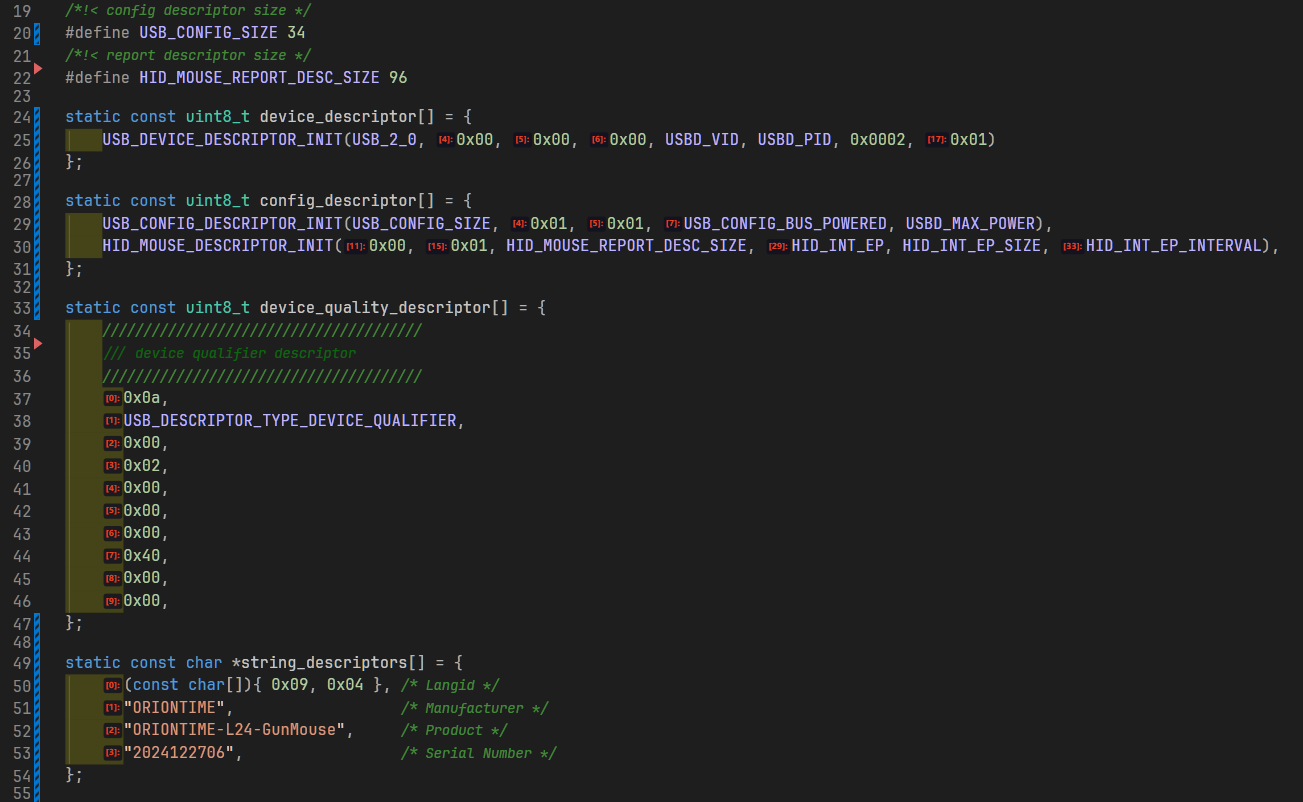
Array Index Hints
Display [0]:, [1]:, [N]: labels for each element in array initializers, supporting up to 10 dimensions.
// Before: hard to tell which element is which
int matrix[2][3] = { 1, 2, 3, 4, 5, 6 };

// After: indices are displayed inline
int matrix[2][3] = { [0][0]:1, [0][1]:2, [0][2]:3, [1][0]:4, [1][1]:5, [1][2]:6 };
| Dimension |
Display |
| 1D |
[0]: [1]: [2]: |
| 2D |
[0][0]: [0][1]: [1][0]: |
| 3D |
[0][0][0]: [0][0][1]: [0][1][0]: |
| 4D |
[0][0][0][0]: [0][0][0][1]: |
| 5D+ |
and so on, up to 10 dimensions |
Struct Array Hints
struct Point { int x; int y; };
struct Point pts[3] = {
    [0]:{ .x:1, .y:2 },
    [1]:{ .x:3, .y:4 },
    [2]:{ .x:5, .y:6 }
};
Enum Value Hints
Display NAME=value labels at enum definitions, showing both explicitly assigned and automatically computed values.
// Before: need to manually count
enum Color { RED, GREEN, BLUE };

// After: values are displayed inline
enum Color { RED=0, GREEN=1, BLUE=2 };
Struct Field Hints
Display .fieldName: labels within struct/unions initializers, recursively for nested structures.
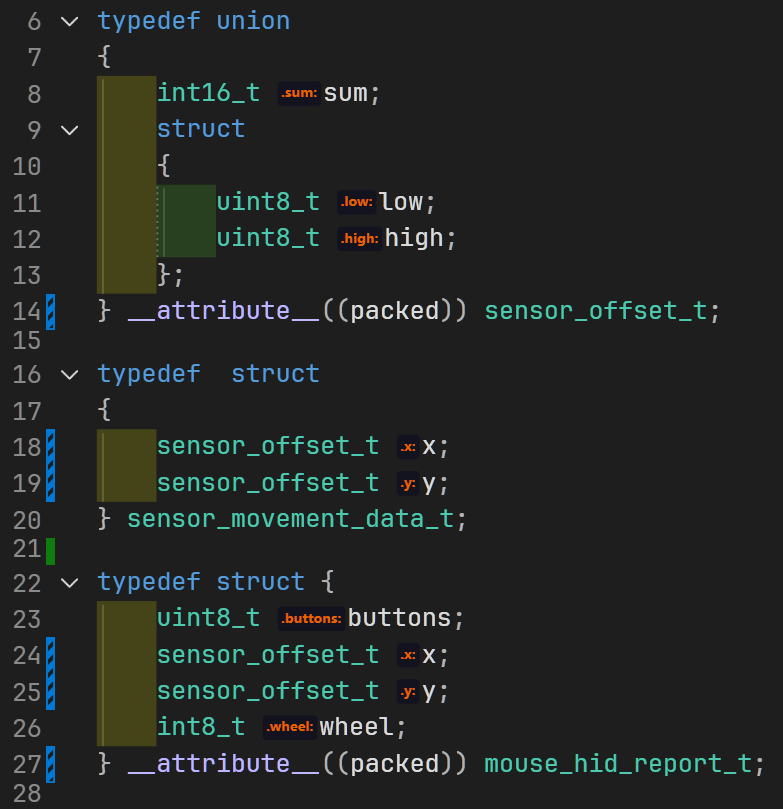
struct Point { int x; int y; };
struct Point points[2] = {
    [0]:{ .x:1, .y:2 },
    [1]:{ .x:3, .y:4 }
};
Depth-based Color Coding
Array indices are color-coded by nesting depth using a rainbow scheme, making multi-dimensional structures visually distinguishable.
| Depth |
Color |
| 0 |
Red |
| 1 |
Orange |
| 2 |
Yellow |
| 3 |
Green |
| 4+ |
Cyan, Blue, Purple (cycling) |
Installation
Via VSIX (Manual)
- Download the latest
.vsix from the Releases page on GitHub
- Double-click the
.vsix file
- Follow the installation wizard
- Restart Visual Studio
Build from Source
git clone https://github.com/Ghost-Girls/InlayIndex.git
cd InlayIndex
Open InlayIndex.slnx in Visual Studio, then build and deploy:
- Release: Build the
InlayIndex project → produces .vsix in bin/Release/
- Debug: Set
InlayIndex as startup project → F5 launches Experimental Instance
Configuration
Navigate to Tools → Options → InlayIndex to customize:
Feature Toggles
| Option |
Default |
Description |
| Array Index Hints |
On |
Show [N]: labels for array elements |
| Enum Value Hints |
On |
Show NAME=value at enum definitions |
| Struct Field Hints |
On |
Show .fieldName: in struct initializers |
Style
| Option |
Default |
Description |
| Theme |
Orange |
Orange / Blue / Green / High Contrast |
| Font Size |
11pt |
Range: 5-12pt |
| Font Weight |
Bold |
Normal / Medium / SemiBold / Bold |
| Background Opacity |
80% |
Range: 0-100% |
| Depth Colors |
On |
Rainbow color by nesting depth |
| Auto Background Color |
Off |
Auto-generate dark background from foreground (HSL brightness to 12%) |
| Custom Background Color |
#101020 |
Manual label background (used when Auto Background is off) |
Display Limits
| Option |
Default |
Description |
| Max Dimensions |
10 |
Maximum array dimensions to annotate (1-10) |
| Max Elements |
10000 |
Maximum elements per array |
Project Awareness
| Option |
Default |
Description |
| VisualGDB Detection |
On |
Auto-detect include paths from VisualGDB projects |
| vcxproj Detection |
On |
Auto-detect include paths from standard vcxproj |
| CMake Detection |
Off |
Auto-detect includes from CMake projects |
| Option |
Default |
Description |
| Debounce Delay |
200ms |
Delay after editing before re-parsing (100-2000ms) |
Architecture
         Source Code
              │
              ▼
  ┌──────────────────────┐
  │    ClangParser       │  ◄── ClangSharp (libclang) AST
  │  (CXTranslationUnit) │
  └──────────┬───────────┘
             │
             ▼
  ┌──────────────────────┐
  │  InlayHintGenerator  │  ◄── Extract: ArrayInfo, EnumInfo, StructInfo
  └──────────┬───────────┘
             │
             ▼
  ┌──────────────────────┐
  │   InlayHintManager   │  ◄── Cache & manage List<InlayHintTag>
  └──────────┬───────────┘
             │ TagsUpdated event
             ▼
  ┌──────────────────────┐
  │  InlayHintTagger     │  ◄── ITagger<IntraTextAdornmentTag>
  │  (GetTags)           │       Create WPF adornments
  └──────────┬───────────┘
             │
             ▼
  ┌──────────────────────┐
  │  Visual Studio       │
  │  Editor Pipeline     │  ◄── Render inline in text view
  └──────────────────────┘
Key Components
| Component |
File |
Responsibility |
| ClangParser |
Parser/ClangParser.cs |
Parse C/C++ code via ClangSharp AST; dual-mode parsing (unsaved file + temp file fallback) |
| InlayHintGenerator |
Parser/InlayHintGenerator.cs |
Convert AST results into InlayHintTag list with style properties |
| InlayHintManager |
Adornment/InlayHintManager.cs |
Thread-safe tag cache with TagsUpdated event |
| InlayHintTagger |
Adornment/InlayHintTagger.cs |
ITagger<IntraTextAdornmentTag> implementation; creates WPF UI elements |
| InlayIndexViewCreationListener |
Adornment/InlayIndexViewCreationListener.cs |
View lifecycle; text change debouncing (500ms); retriggers parsing |
| VisualGDBConfigDetector |
Parser/VisualGDBConfigDetector.cs |
Auto-detect include paths from VisualGDB/vcxproj/CMake |
| InlayIndexOptionsPage |
Options/InlayIndexOptionsPage.cs |
VS Options dialog integration |
Documentation & Support
For full documentation, source code, and to report issues, visit the GitHub repository:
https://github.com/Ghost-Girls/InlayIndex
License
MIT License
Publisher: Ghost-Girls
Made for C/C++ developers who value code readability.

