Fairmas AI-based Pull Request Code Review Extension for Azure DevOps
The Fairmas AI-based Pull Request Code Review Extension is a comprehensive Azure DevOps pipeline task that leverages Ollama-hosted language models to automatically review Pull Requests and provide detailed, actionable code feedback. This extension offers advanced features for improved code quality, performance optimization, and developer productivity, including inline comments that appear directly at specific code lines where issues occur.
🚀 Key Features
Intelligent Code Analysis
- AI-Powered Reviews: Uses Ollama-hosted language models (DeepSeek Coder V2) for comprehensive code analysis
- Inline Comments: Comments appear directly at specific code lines where issues occur
- Severity-Based Organization: Comments organized by criticality (critical, high, medium, low, info)
- Language-Specific Insights: Specialized templates for JavaScript/React, Python, Java, C#, and more
- Context-Aware Feedback: Considers PR title, description, and file context for relevant suggestions
Advanced Review Capabilities
- Review Profiles: Preset profiles for security-focused, performance-focused, style-focused, and comprehensive reviews
- Custom Instructions: Fully customizable AI prompts for specific team requirements
- File Filtering: Glob patterns, size limits, and file count controls for targeted reviews
- Summary Reports: PR-level statistics, quality scores, and actionable recommendations
- Parallel Processing: Review multiple files simultaneously with configurable concurrency
- Response Caching: Cache AI responses to avoid re-reviewing unchanged files
- Rate Limiting: Configurable delays to prevent API throttling
- Error Handling: Comprehensive retry logic and graceful error recovery
⚙️ Setup Requirements
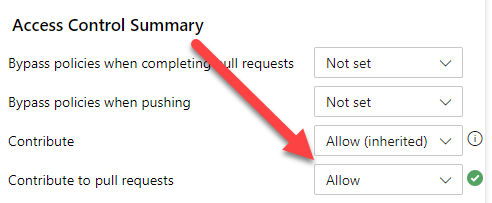
1. Build Service Permissions
Ensure the build service has permissions to contribute to pull requests in your repository:
2. OAuth Token Access
YAML Pipelines
Add a checkout section with persistCredentials set to true:
steps:
- checkout: self
  persistCredentials: true
Classic Pipelines
Enable "Allow scripts to access the OAuth token" in Agent job properties:

3. Ollama Configuration
Ollama Endpoint Setup
- Endpoint:
http://your-ollama-server:11434/api/generate
- Model: DeepSeek Coder V2 (default) or other Ollama-compatible models
- API Key: Your Ollama API key (if required)
Self-Hosted Benefits
- Privacy: Code never leaves your infrastructure
- Cost Control: No per-token charges
- Customization: Use specialized models for your domain
- Performance: Local processing for faster responses
🎯 Configuration Options
Basic Settings
| Setting |
Description |
Default |
| Ollama Endpoint |
Your Ollama server endpoint URL |
Required |
| AI Model |
AI model to use |
deepseek-coder-v2 |
| Review Mode |
Review strictness (critical/balanced/strict) |
balanced |
| Min Severity |
Minimum issue severity to report |
info |
| Setting |
Description |
Default |
| Comment Mode |
Single comment or separate by severity |
single |
| Generate Summary |
Create PR-level summary report |
true |
File Filtering
| Setting |
Description |
Default |
| File Patterns |
Glob patterns to include/exclude files |
None |
| Max Files |
Maximum files to review (0 = unlimited) |
0 |
| Skip Large Files |
Skip files larger than threshold |
true |
| Max File Size |
Maximum file size in bytes |
1048576 (1MB) |
| Setting |
Description |
Default |
| Enable Parallel Reviews |
Review multiple files simultaneously |
true |
| Max Concurrency |
Maximum concurrent reviews |
3 |
| Rate Limit Delay |
Delay between API requests (ms) |
1000 |
| Enable Cache |
Cache AI responses |
true |
| Cache TTL |
Cache time-to-live in hours |
24 |
Review Profiles & Templates
| Setting |
Description |
Default |
| Review Profile |
Preset review focus |
Custom |
| Review Template |
Language-specific template |
None |
- Groups all issues by severity in one comment thread
- Best for: Quick overview of all issues in a file
- Format: Organized sections for each severity level
- Creates separate comment threads for each severity level
- Best for: Focused attention on specific severity levels
- Format: Individual threads for critical, high, medium, low, and info issues
📋 Review Profiles
Security Focused
- Prioritizes security vulnerabilities and best practices
- Identifies authentication, authorization, and data protection issues
- Provides specific remediation steps for security risks
- Emphasizes performance bottlenecks and optimization opportunities
- Analyzes algorithms, database queries, and resource management
- Suggests caching strategies and optimization techniques
Style Focused
- Concentrates on code style, readability, and maintainability
- Reviews naming conventions, formatting, and documentation
- Promotes DRY principles and SOLID design patterns
Comprehensive
- Full review covering all aspects of code quality
- Balanced approach across bug detection, security, performance, and style
- Provides both immediate concerns and long-term maintainability suggestions
🔧 Language-Specific Templates
JavaScript/React
- ES6+ features and async/await patterns
- React hooks, lifecycle methods, and performance optimizations
- Common issues like missing dependency arrays and memory leaks
Python
- PEP 8 compliance and type hints
- Exception handling and context managers
- Security issues and performance considerations
Java
- Access modifiers and exception handling
- Generics, lambdas, and Optional usage
- Resource management and thread safety
C#
- LINQ patterns and async/await
- Exception handling and resource management
- Nullable reference types and pattern matching
🚀 Usage Examples
Basic Configuration
- task: FairmasAIPullRequestReview@2
  displayName: 'AI Code Review'
  inputs:
    aoi_endpoint: 'http://your-ollama-server:11434/api/generate'
    model: 'deepseek-coder-v2'
    review_mode: 'balanced'
    comment_mode: 'single'
    generate_summary: true
Advanced Configuration
- task: FairmasAIPullRequestReview@2
  displayName: 'Security-Focused AI Review'
  inputs:
    aoi_endpoint: 'http://your-ollama-server:11434/api/generate'
    model: 'deepseek-coder-v2'
    review_profile: 'security-focused'
    review_template: 'javascript-react'
    file_patterns: |
      +src/**/*.js
      +src/**/*.ts
      -*.test.js
      -*.spec.ts
    max_files: '10'
    skip_large_files: true
    max_file_size: '2097152'
    parallel_reviews: true
    max_concurrency: '5'
    rate_limit_delay: '500'
    enable_cache: true
    cache_ttl_hours: '48'
🔍 Sample Output

Summary Report
# 📊 AI Code Review Summary

**Review completed on:** 2024-01-15 14:30:25

## 📈 Overview
- **Files Reviewed:** 5
- **Total Issues Found:** 12
- **Overall Quality Score:** 78/100

## 🎯 Issues by Severity
- 🔴 **CRITICAL:** 1 issue(s)
- 🟠 **HIGH:** 3 issue(s)
- 🟡 **MEDIUM:** 5 issue(s)
- 🔵 **LOW:** 3 issue(s)

## 💡 Recommendations
- 🔴 **Critical Priority**: Address 1 critical issue(s) immediately before merging
- 🔒 **Security**: 2 security concern(s) identified - review carefully
- ⚡ **Performance**: 1 performance issue(s) found - consider optimization
🛠️ Troubleshooting
Common Issues
Build Service Permission Errors
Error: Failed to add comment to PR: 403 Forbidden
Solution: Ensure build service has "Contribute to pull requests" permission.
API Rate Limiting
Error: AI API request failed: 429 Too Many Requests
Solution: Increase rate_limit_delay or decrease max_concurrency.
Cache Issues
Error: Failed to load cache
Solution: Check pipeline artifacts directory permissions or disable caching.
Large File Processing
Error: Failed to get diff for large-file.js
Solution: Enable skip_large_files or increase max_file_size.
For Large PRs
- Enable parallel reviews with
max_concurrency: 5
- Use file filtering to exclude unnecessary files
- Enable caching with longer TTL
For Rate-Limited APIs
- Increase
rate_limit_delay to 2000ms
- Decrease
max_concurrency to 1-2
- Use sequential review mode
For Memory Issues
- Enable file size filtering
- Limit
max_files to reasonable numbers
- Use targeted file patterns
📊 File Pattern Examples
Include Specific Files
+*.js
+*.ts
+src/**/*.py
Exclude Test Files
-*.test.js
-*.spec.ts
-**/test/**
Mixed Patterns
+src/**/*.js
+src/**/*.ts
-*.test.js
-*.spec.ts
-node_modules/**
The extension is compatible with all supported build agent operating systems including Linux, macOS, and Windows.
🤝 Contributing
Contributions are welcome! Please:
- Fork the repository
- Create a feature branch
- Make your changes
- Add tests if applicable
- Submit a pull request
Report issues on GitHub Issues.
📄 License
MIT License
🙏 Acknowledgments
Based on mlarhrouch/azure-pipeline-gpt-pr-review with significant enhancements and new features for Ollama integration.

