Skip to content
| Marketplace
Sign in
Visual Studio>Tools>Dreamine Project Wizard
Dreamine Project Wizard

Dreamine Project Wizard

Dreamine

|
2 installs
| (1) | Free
Create verified Dreamine projects and complete MVVM items for WPF, WinForms, Blazor, MAUI, Hybrid, and CrossUI. Select an architecture mode, compatible FullKit packages, and platform-aware items witho
Download

Dreamine Project Wizard

Build structured Dreamine applications directly from Visual Studio.

Dreamine Project Wizard helps developers create verified Dreamine projects and complete MVVM items without manually assembling projects, folders, references, and NuGet packages.

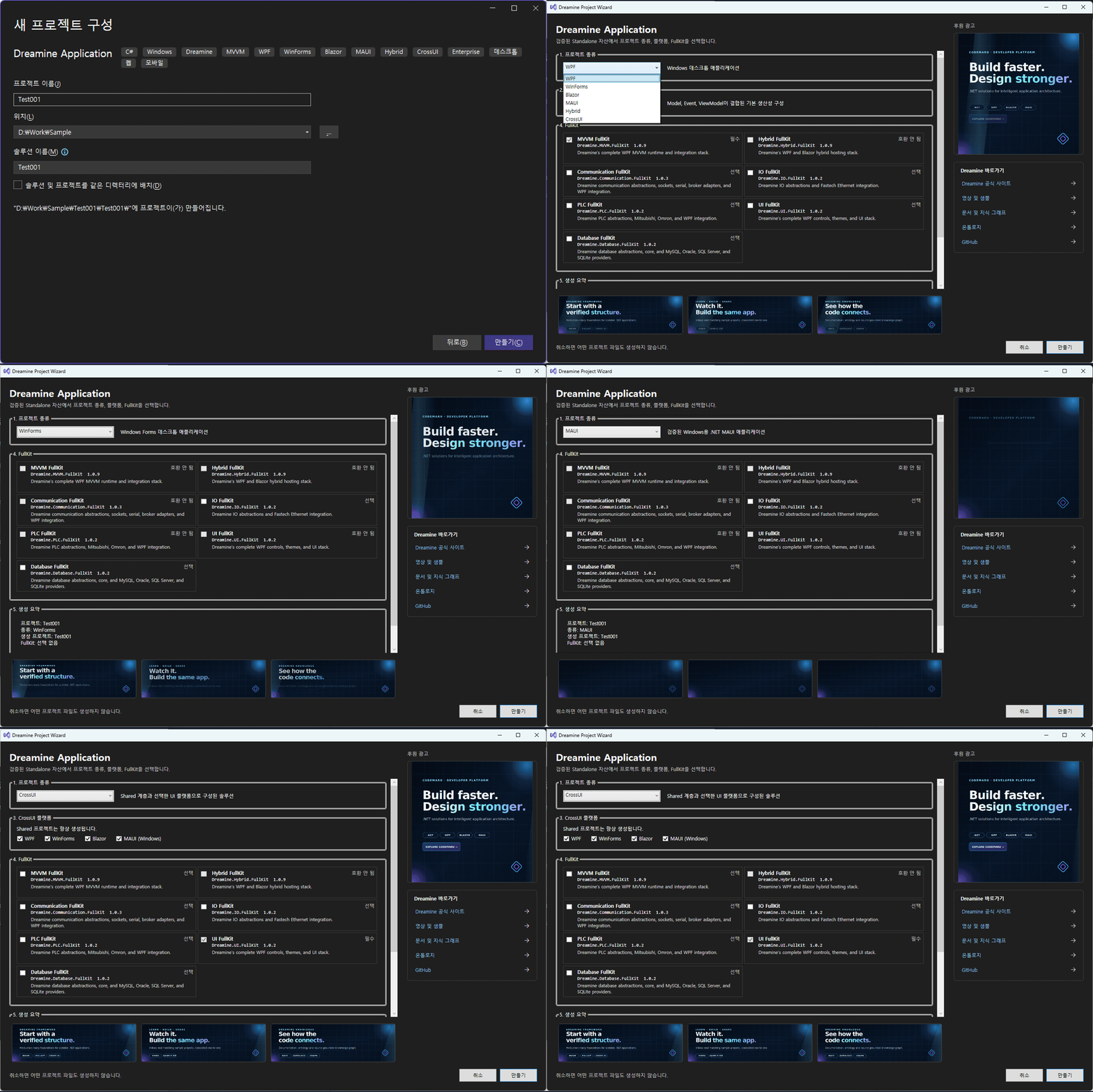
Create a Dreamine application

01-project-creation.gif

Choose the target UI platform, WPF architecture mode, compatible FullKit packages, and optional CrossUI platforms from one project wizard.

Supported project types

  • WPF Core
  • WPF Smart
  • WPF Enterprise
  • WinForms
  • Blazor
  • .NET MAUI
  • WPF + Blazor Hybrid
  • CrossUI

FullKit selection

  • Dreamine.MVVM.FullKit
  • Dreamine.Hybrid.FullKit
  • Dreamine.Communication.FullKit
  • Dreamine.IO.FullKit
  • Dreamine.PLC.FullKit
  • Dreamine.UI.FullKit
  • Dreamine.Database.FullKit

Required FullKit packages are selected and locked automatically. Incompatible packages are disabled with a reason, while compatible optional packages remain selectable.

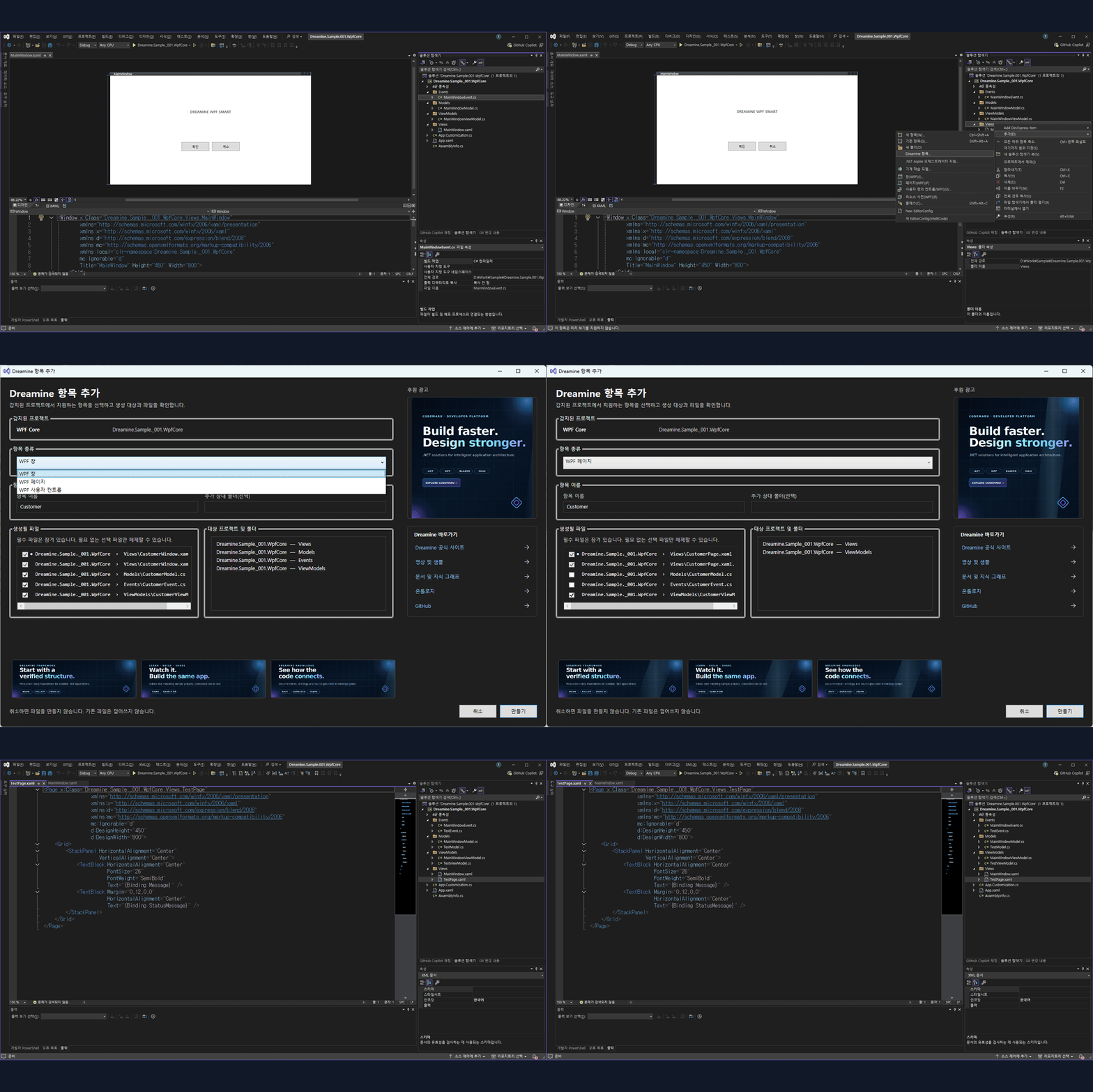
Add complete Dreamine items

02-item-creation.gif

Add platform-aware Dreamine items directly from a project or physical folder. Preview every generated file and deselect optional Model, Event, ViewModel, or scoped CSS files before creation. Required view files remain selected as one safe bundle.

Supported item types

  • WPF Window
  • WPF Page
  • WPF UserControl
  • WinForms Form
  • WinForms UserControl
  • Razor Component
  • Razor Page
  • MAUI ContentPage
  • MAUI ContentView
  • Shared ViewModel
  • Shared Model
  • Shared Event
  • Shared Service

Safe generation

  • Existing files are never overwritten.
  • All target paths are validated before creation.
  • Files are rendered and validated before commit.
  • Failed transactions remove only files created by that transaction.
  • Generated solutions are parsed through SolutionPersistence.
  • Project references remain relative.
  • CrossUI keeps the platform-to-Shared dependency direction.
  • No telemetry, remote advertisement download, or remote code execution is used.

Official links

  • Website: https://dreamine.kr/
  • Documentation: https://dreamine.kr/knowledge
  • Samples: https://dreamine.kr/resources
  • Ontology: https://dreamine.kr/ontology
  • GitHub: https://github.com/CodeMaru-Dreamine
  • Support: admin@codemaru.co.kr
  • Contact us
  • Jobs
  • Privacy
  • Manage cookies
  • Terms of use
  • Trademarks
© 2026 Microsoft