Skip to content
| Marketplace
Sign in
Visual Studio>Controls>dotConnect for SQLite
dotConnect for SQLite

dotConnect for SQLite

Devart Software

|
53,657 installs
| (0) | Free Trial
High-performance ORM enabled ADO.NET data provider for SQLite that builds on ADO.NET technology
Download

.NET Connector for SQLite with ORM Support

dotConnect

Get Started | Explore Features | Documentation

30 days free trial • ORM support • Visual Studio integration

dotConnect for SQLite is a versatile enterprise-grade connector that enables access to SQLite data in .NET applications of all levels. It delivers advanced ORM support, compatibility with multiple SQLite versions and .NET platforms, and easy integration with a variety of IDEs, including Microsoft Visual Studio.

Moreover, this connector regularly undergoes security and performance tests to make sure it stays ahead of the competition at all times. Extra benefits include premium support, frequent updates, and detailed documentation to help you with a quick and easy start.

  • Advanced ORM support: EF Core, Dapper, NHibernate, LinqConnect, and more
  • Full compliance with ADO.NET standards
  • Advanced encryption methods: CEROD, SEE, SQLiteCrypt, and SQLCipher
  • Support for all SQLite data types, user-defined functions, and more
  • Support for non-blocking, on-demand data loading with paginal access and query-based master-detail relationships
  • Top performance with intelligent fetch sizing, deferred column loading, and efficient batch execution
  • Integration with Visual Studio

Installation

  1. Install the NuGet Package
Install-Package Devart.Data.SQLite

Or download the Windows installer (.exe) from the official website.

  1. Activate license
  • Free Trial License: Evaluate the full capabilities of dotConnect for SQLite in a non-commercial environment—ideal for development and testing. Start your free trial
  • Commercial License: Deploy dotConnect for SQLite in commercial applications and access full technical support with a valid license. Purchase a license

Usage

This snippet directly configures a SQLite connection using a connection string.

using Devart.Data.SQLite;

namespace SQLiteConsoleApp
{
    class Program
    {
        static void Main(string[] args)
        {
            string databasePath = @"path\to\your\sakila.db;";

            string connectionString = $"Data Source={databasePath};License Key=**********";

            using (SQLiteConnection connection = new SQLiteConnection(connectionString))
            {
                try
                {
                    connection.Open();
                    Console.WriteLine("Connection successful!");
                }
                catch (Exception ex)
                {
                    Console.WriteLine($"Connection failed: {ex.Message}");
                }
            }

            Console.WriteLine("Press any key to exit...");
            Console.ReadKey();
        }
    }

}

Read the full documentation for connection here.

Video overview

dotConnect for SQLite video overview

Compatibility

The following table show which version of this package to use with which version of frameworks.

Frameworks Version support
Entity Framework Core 10, 9, 8, 7, 6, 5, 3, 2, 1
.NET 10, 9, 8, 7, 6, 5
.NET Core 3.1, 2
.NET Framework 4.8-2.0

More information here

Enhanced ORM Support

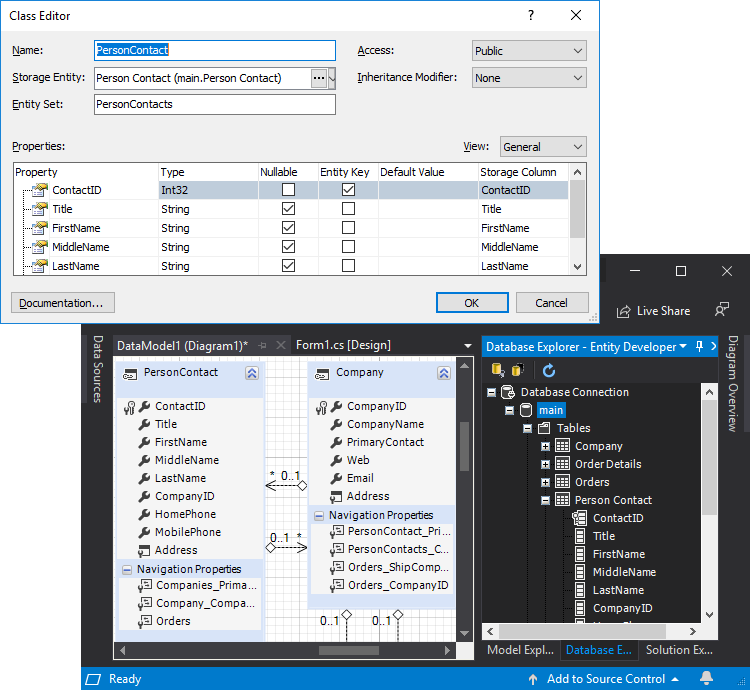
dotConnect for SQLite offers enhanced ORM support with a bundled visual designer for ORM models - Entity Developer. Our SQLite ADO.NET Provider supports the following ORMs:

  • Entity Framework v1 - v6
  • Entity Framework Core 1.x - 10
  • NHibernate 1.x-5.x
  • Dapper 1.x, 2.x

Advanced Visual Studio Integration with SQLite

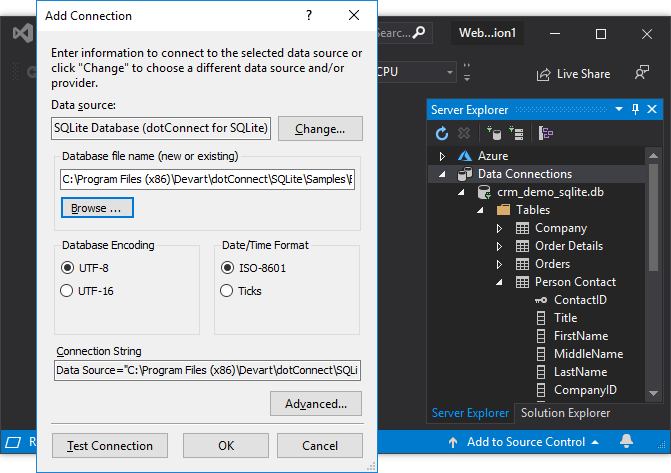
dotConnect for SQLite provides a vast number of GUI tools that increase your productivity. For example, it includes DataSet tools, such as DataSet Wizard, DataSet Editor, DataSet Manager, provide you an easy way to create and edit typed and untyped DataSets.

SQLite ADO.NET Provider supports advanced Visual Studio integration (DDEX) and provides convenient visual component editors to simplify component tweaking.

Support Area

Documentation

Request form

Feedback page

Product history

  • Contact us
  • Jobs
  • Privacy
  • Manage cookies
  • Terms of use
  • Trademarks
© 2026 Microsoft