SendPulse SSIS ComponentsImprove your ETL processes by SendPulse data integration with key databases and cloud services using our SendPulse SSIS Components, ensuring high-efficiency data import and export |

SendPulse SSIS Components allow you to integrate SendPulse customers, orders, products, and other objects with other cloud applications and databases via SQL Server Integration Services (SSIS). They include optimized SendPulse Source, SendPulse Destination, and SendPulse Lookup components and provide their own SendPulse Connection Manager. Features:
Included ComponentsSQL Support for SendPulse
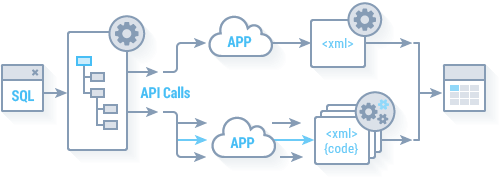
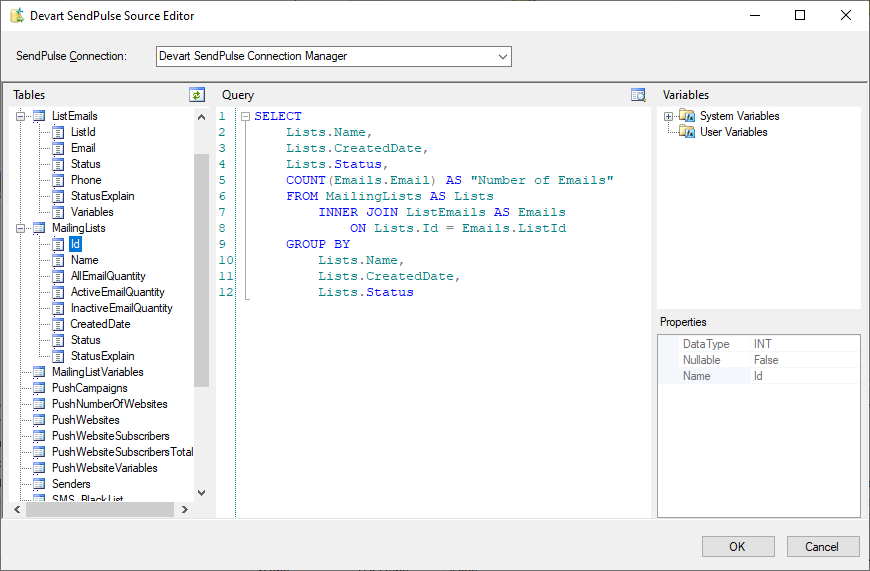
SSIS SendPulse Source supports SQL to get data from SendPulse. Simple statements are translated directly to SendPulse API calls and executed on the SendPulse side, and for more complex statements, the necessary data are queried from SendPulse and processed locally. You can specify complex SELECT statement with grouping, filtering, ordering, etc. in the SSIS SendPulse Source editor. Convenient SSIS SendPulse Source Editor
SSIS SendPulse Source component offers a convenient editor, which displays all the SendPulse objects and their fields and allows you to quickly build a query to SendPulse via drag-n-drop. It also displays the list of available system and user variables of the package, allowing you to quickly add them to your select statements. If necessary, you can also quickly preview data, returned by the source, and check whether you query returns what you need. Advanced Lookup Optimizations
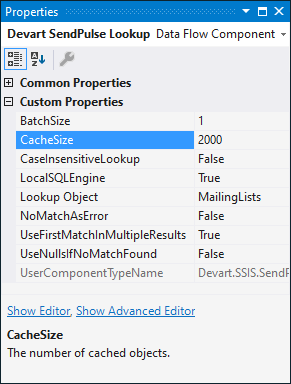
SSIS SendPulse Lookup component offers very high performance because of the advanced optimization techniques used. It checks several rows at once, and caches the returned results to reduce the number of round-trips to the server. High-performance SSIS SendPulse Destination
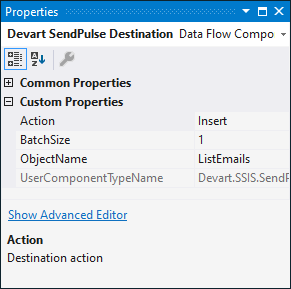
SSIS SendPulse Destination component allows you to quickly load data to SendPulse. It supports all kinds of DML operations - Insert, Update, or Delete. How to orderAfter the installation, Devart SSIS Data Flow Components can be evaluated for free during the trial period. After the trial period is over you need to purchase a license for add-ins you want to continue using and register them. Devart SSIS Data Flow Components can be ordered on the corresponding Ordering page of our website. One license allows you to install Devart SSIS Data Flow Components on one development computer and one deployment server per license, provided that Devart SSIS Data Flow Components are used by the licensed developer only. To get the full overview, please visit the SSIS SendPulse's page. Download a copy of SendPulse SSIS Components today! All SSIS Data Flow Components in One Ultimate PackageOur SSIS Integration Universal Bundle allows you to integrate data of more than 40 cloud applications and databases via SQL Server Integration Services. Get our SSIS Data Flow Components for all the supported sources together with a discount of over 75% in comparison to buying them separately! All Devart's SSIS Data Flow ComponentsMore ResourcesExplore additional resources about SSIS:
Social |