Git Line Blame
Displays the commit message at the end of the current line or the selected lines.
Features
- Inline Commit Info: Shows commit summary, author, and date next to your code
- Multi-line Selection Support: Select multiple lines to see commit info for all of them
- Same Commit Grouping: Groups consecutive lines from the same commit with a visual bracket
- Commit Message and History: Hover to see the commit message and history in the tooltip
- Quick Commit Navigation:
Ctrl+Click to open File History or the commit in the browser
- Code Folding Support: Shows the most recent commit for collapsed regions
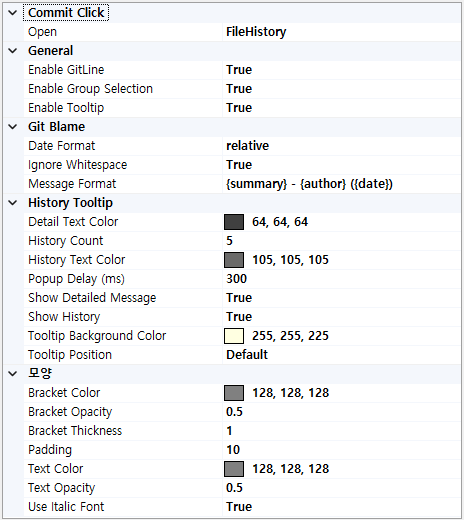
- Customizable Settings: Configure appearance and behavior through Tools > Options > Git Line Blame
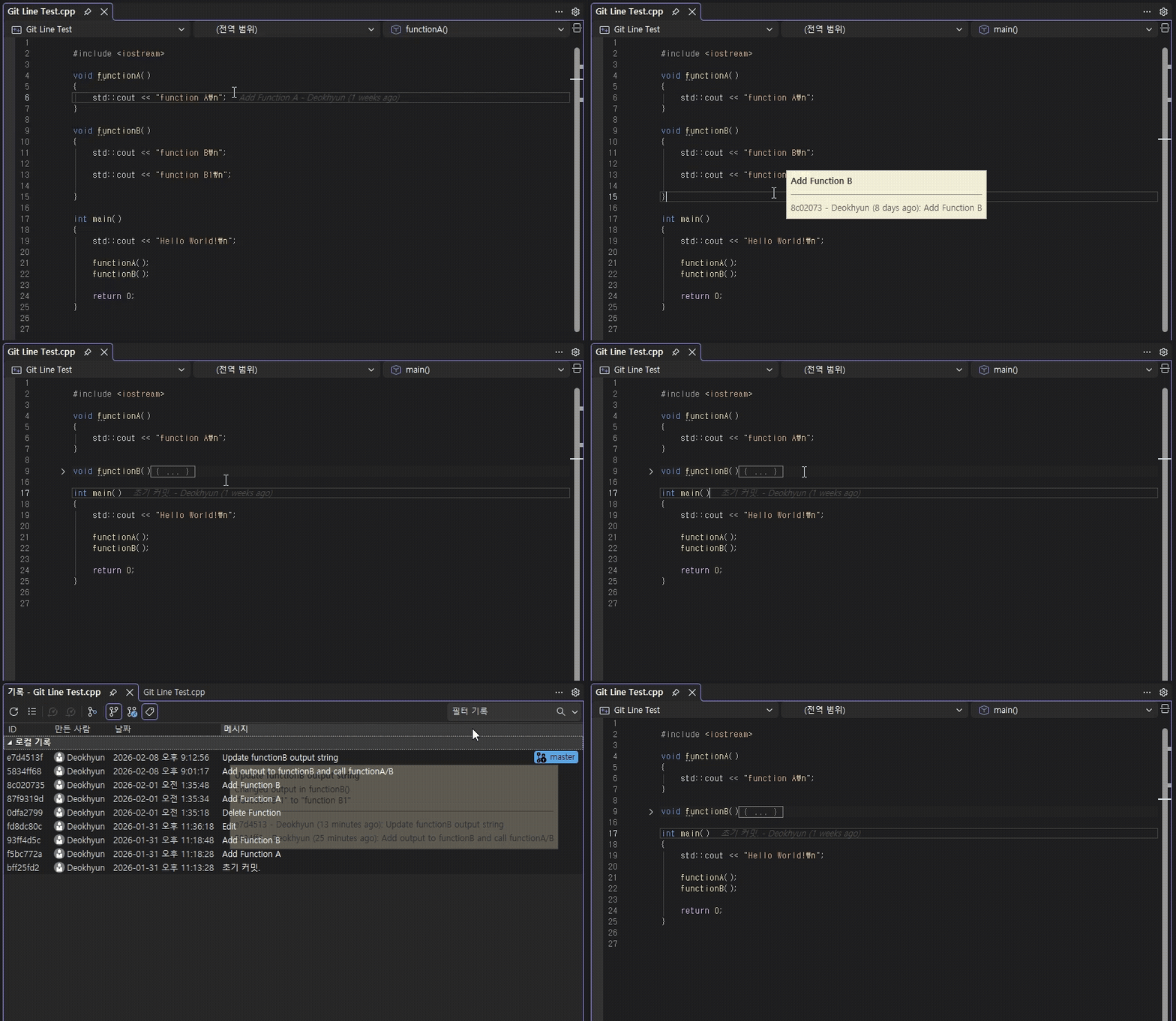
Screenshots
Options
Usage
- 1. Move the cursor to automatically display blame information for that line
- 2. Select multiple lines to see information for all selected lines
- 3. Hover over the displayed information to view commit history
- 4.
Ctrl+Click on the commit message to open the Git History or the commit in the browser.
- (The commit hash is copied to the clipboard for filtering in Git History.)
Settings
Access settings via Tools > Options > Git Line Blame
Git Blame
| Setting |
Default |
Description |
| Ignore Whitespace |
true |
Ignore whitespace changes (git blame -w) |
| Message Format |
{summary} - {author} ({date}) |
Blame message format |
| Date Format |
yyyy-MM-dd |
Date format (use relative for "2 hours ago") |
| History Count |
5 |
Commits to show in tooltip |
{summary} - Commit message{author} - Author name{date} - Commit date
| Value |
Output |
| relative |
2 hours ago |
| yyyy-MM-dd |
2024-01-15 |
| MM/dd/yyyy |
01/15/2024 |
| yy-MM-dd HH:mm |
24-01-15 14:30 |
Requirements
Prerequisites
- Git Required: Git must be installed and accessible in the system PATH. The extension will not work without Git.
Changelog
v1.14
- Fixed tooltip disappearing when moving mouse cursor over it
v1.13
- Added on/off settings for the entire blame feature, group selection, and tooltip
- Added configurable tooltip popup delay (default 300ms)
- Fixed blame not appearing after fast scroll
v1.12
- Performance improvements when editing large files
v1.11
- Added option to open commit in BranchHistory
v1.10
- Added commit message support in tooltip
- Added tooltip options
- Added options to toggle message and history visibility
v1.9
- Fixed settings not being applied on Visual Studio restart
v1.8
- Improved code folding support
- Shows the most recent commit message for folded regions
v1.7
- Open commit in Git History or Browser with Ctrl+Click
- Improved commit history display
v1.6
- Added Settings UI (Tools > Options > Git Line Blame)
| |

