Skip to content
| Marketplace
Sign in
Visual Studio>Tools>CppGuardian for Visual Studio 2019
CppGuardian for Visual Studio 2019

CppGuardian for Visual Studio 2019

CppGuardian

|
1 install
| (0) | Free
AI-powered C++ code reviews with multi-pass contextual analysis.
Download

Catch C++ Defects Before Your Pull Request

AI-powered C++ code reviews with deep contextual analysis, directly inside Visual Studio.

CppGuardian is an AI code review assistant built specifically for professional C++ development.

Unlike AI reviewers that analyze only an isolated diff, CppGuardian performs a multi-pass investigation of your codebase. It progressively explores your Git changes, source files, headers, methods, class members, callers, dependencies, ownership chains, and tests before producing a structured review focused on real defects.

Use CppGuardian to detect correctness bugs, lifetime and ownership issues, memory leaks, resource management mistakes, security-sensitive patterns, performance regressions, API contract violations, and missing tests before your code reaches production.


Free Edition

CppGuardian is free to install and includes:

  • 5 AI reviews per day
  • Git Branch Review
  • Current File Review
  • Multi-pass contextual analysis
  • Structured findings with supporting evidence
  • Investigation log
  • No registration required

Only successful reviews consume the daily quota.

You can also configure your own OpenAI API key and choose a supported model. Reviews performed with your personal key do not use the free quota, although they remain subject to your OpenAI account limits and pricing.


Why CppGuardian?

Large language models produce better reviews when they have the right context.

Instead of relying on a single prompt, CppGuardian performs multiple investigation passes to understand how your code behaves before generating findings.

During a review it may inspect:

  • Modified methods and classes
  • Companion headers and implementation files
  • Callers and call hierarchy
  • Member ownership and lifetime
  • Related APIs and dependencies
  • Existing tests and missing coverage
  • Include relationships

The result is a review that is:

  • Context-aware
  • Evidence-based
  • Focused on actionable defects
  • Prioritized by severity
  • Linked to relevant code locations

Features

Git Branch Review

Analyze the current Git branch against its detected base branch before opening a pull request.

CppGuardian builds a worklist from modified methods and class members, then investigates implementations, contracts, callers, usages, ownership flows, and tests to identify potential regressions.


Current File Review

Review the active C++ source or header file together with its companion .cpp or .h whenever available.

For large files, CppGuardian first builds a structured inventory of classes, methods, and members before reviewing them incrementally instead of treating the file as a single prompt.


Deep Contextual Analysis

During a review, CppGuardian may automatically retrieve additional repository context, including:

  • Companion source and header files
  • Call hierarchy
  • Member lifetime and ownership
  • Related APIs
  • Dependencies
  • Include relationships
  • Existing tests
  • Missing test coverage

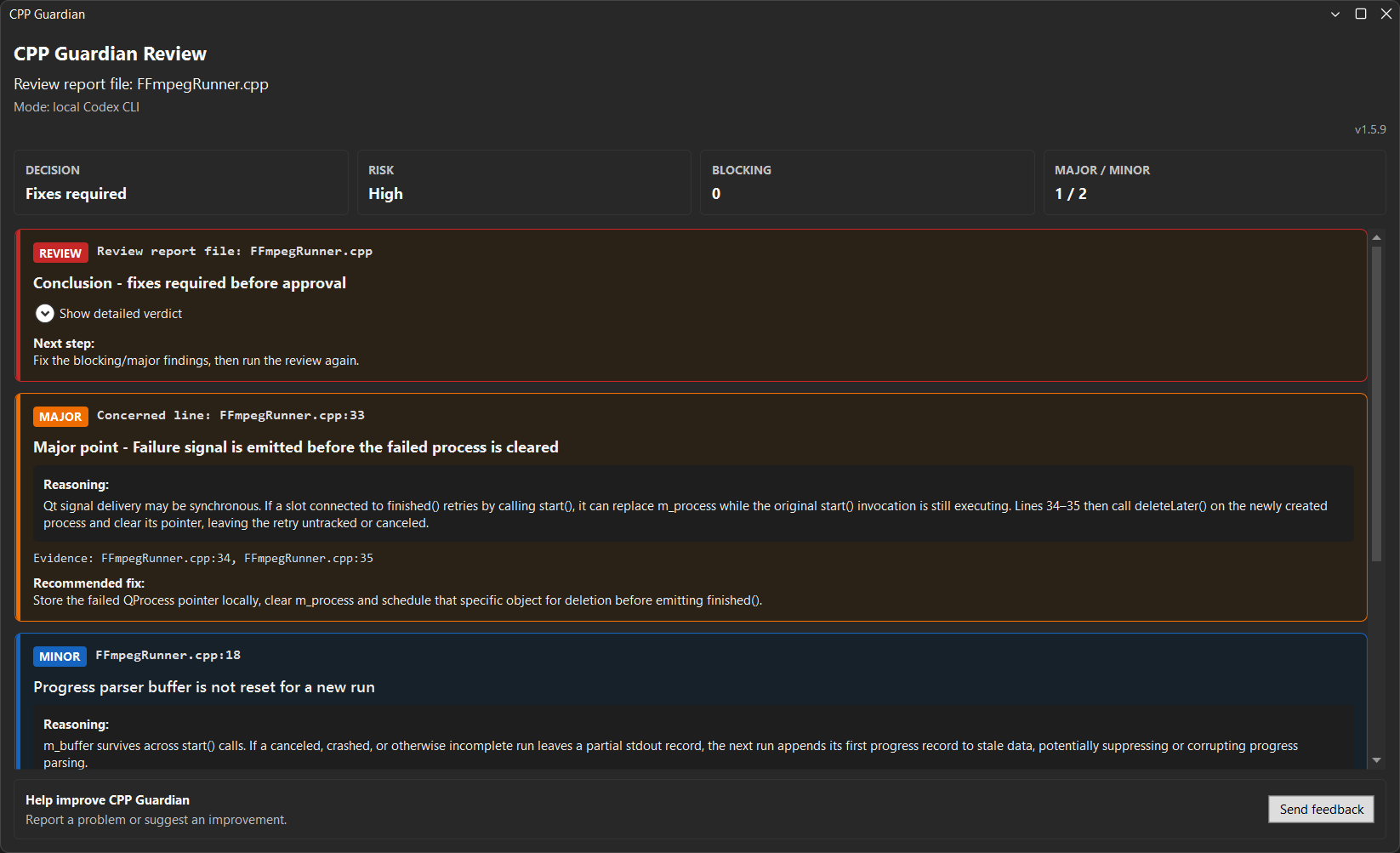
Prioritized Findings

Findings are classified by severity:

  • Blocking
  • Major
  • Minor
  • Informational

Whenever possible, each finding includes:

  • File and line location
  • Technical explanation
  • Failure conditions
  • Supporting evidence
  • Recommended fix

Investigation Log

Every review includes a detailed investigation log showing:

  • Context collected
  • Analysis steps performed
  • Hypotheses explored
  • Evidence gathered
  • Final conclusions

This makes AI reasoning transparent and easier to validate.


Localized Reports

Review reports automatically adapt to the Visual Studio interface language when supported.

Supported languages include:

  • English
  • French
  • German
  • Spanish
  • Italian
  • Portuguese

Personal OpenAI API Key

Optionally configure your own OpenAI API key and select a supported model.

Your API key is stored securely using Windows Credential Manager.

When using a personal key, it is transmitted only for the duration of the review so the CppGuardian backend can execute requests on your behalf.


What CppGuardian Reviews

CppGuardian is optimized for C++ and looks for issues involving:

  • Memory leaks
  • Resource ownership
  • RAII violations
  • Object lifetime
  • Use-after-free
  • Dangling pointers and references
  • Initialization and destruction paths
  • Exception safety
  • Cleanup logic
  • Bounds and index errors
  • Iterator invalidation
  • Concurrency issues
  • Callback and asynchronous execution
  • API contract violations
  • Header/source inconsistencies
  • Behavioral regressions
  • Security-sensitive code
  • Performance regressions
  • Missing or insufficient tests

Typical Use Cases

  • Review a feature branch before creating a pull request
  • Detect regressions after refactoring
  • Validate ownership and lifetime changes
  • Review complex C++ implementations
  • Analyze legacy code
  • Perform AI-assisted code reviews without leaving Visual Studio

Supported Visual Studio Versions

  • Visual Studio 2019

An Internet connection is required.

Reviews are performed by the CppGuardian backend using either the free guest service or your configured OpenAI API key.


Available Commands

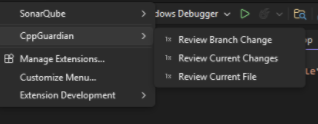
Open Extensions → CppGuardian:

  • Review Git Branch
  • Review Current File
  • Settings

Important Notice

CppGuardian is an AI-assisted code review tool.

It complements compilation, automated testing, static analysis, security analysis, and human code review—it does not replace them.

Although CppGuardian performs deep contextual analysis, AI-generated findings may occasionally be incomplete or incorrect. Developers remain responsible for validating all reported issues before making changes.

  • Contact us
  • Jobs
  • Privacy
  • Manage cookies
  • Terms of use
  • Trademarks
© 2026 Microsoft