Documentation Governance & Compliance Layer on top of ADO Wiki
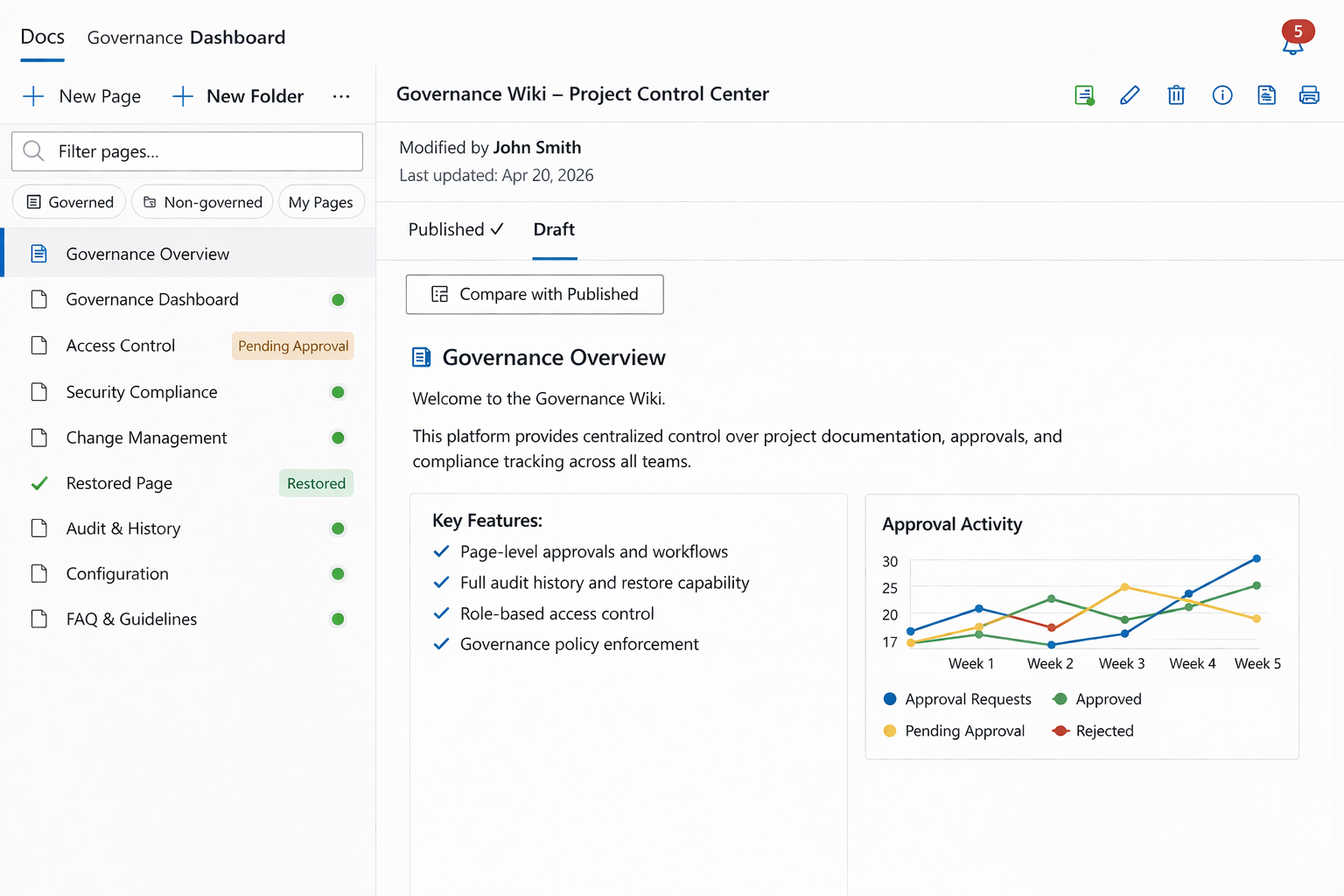
Enterprise Documentation Governance for Azure DevOps Wiki transforms the native Azure DevOps Wiki into a governed, audit-ready documentation platform — without requiring migration, duplication, or external systems.
It adds structured approval workflows, ownership enforcement, audit traceability, and compliance-aligned documentation controls directly on top of your existing Wiki.
Your current Wiki remains unchanged. Governance can be activated instantly — page by page.
The Problem
Every engineering team starts with good intentions for documentation. Then reality hits:
Wiki chaos — Hundreds of pages, no owners, no review dates, no way to know what's current and what's stale.
No governance — Anyone can edit anything. There's no approval workflow, no lifecycle tracking, and no accountability.
Compliance gaps — Auditors ask "who approved this?" and "when was it last reviewed?" and your team scrambles to reconstruct history from Git commits.
Stale, orphan docs — Pages written 18 months ago sit untouched. Nobody knows if they're still accurate. Nobody even knows they exist.
Basic editing — The built-in ADO Wiki editor lacks tables, diagrams, slash commands, and the rich formatting modern teams expect.
No offline story — Lose internet, lose your work. No way to edit documentation on a plane, in a factory, or during an outage.
Sound familiar? You're not alone. Documentation governance is one of the most requested — and most neglected — capabilities in engineering organizations.
Contextra fixes all of it.
Key Benefits
1. Lifecycle Governance
Draft → In Review → Approved → Deprecated
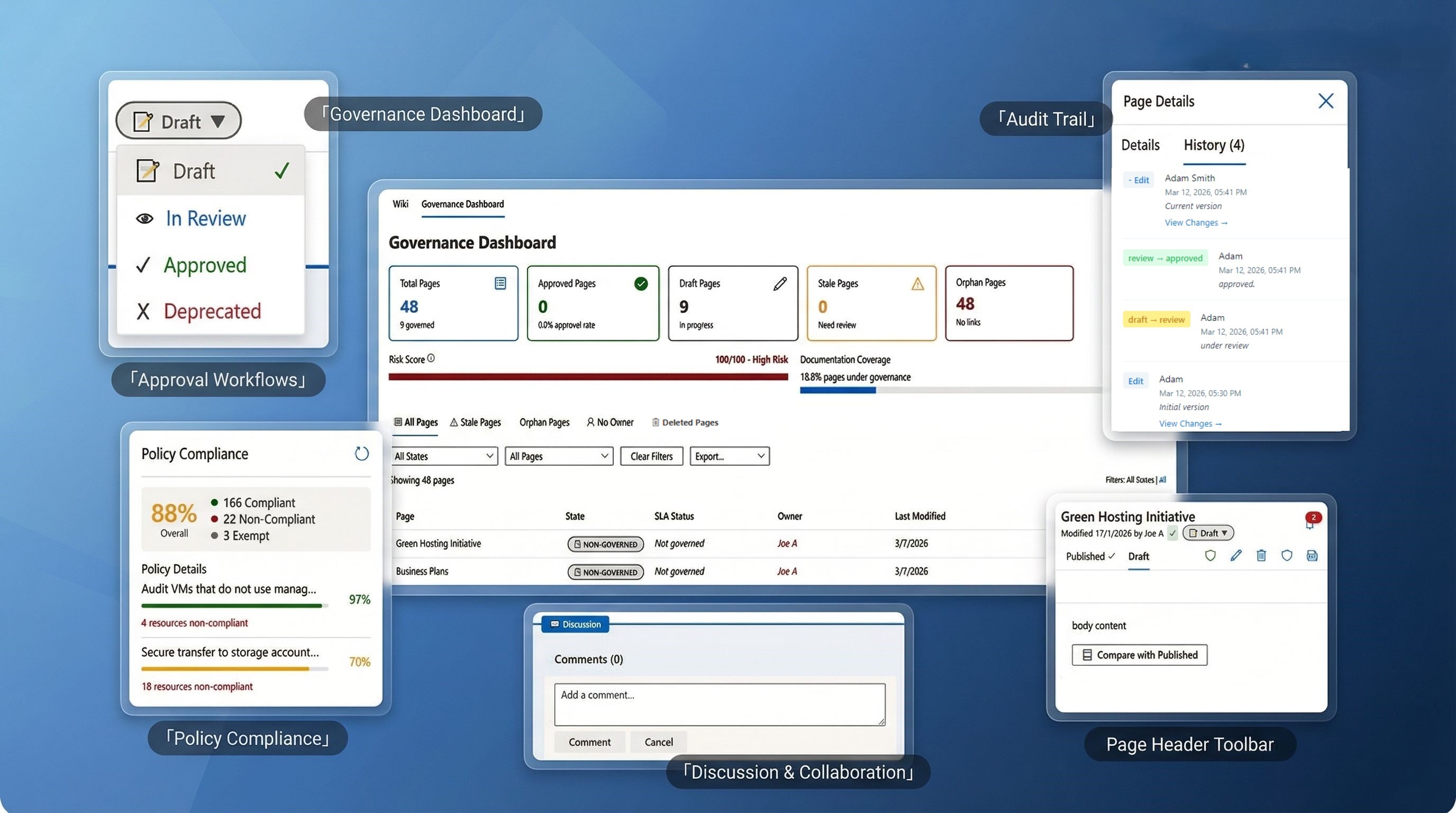
Every page follows a structured lifecycle. Assign owners, submit for review, require approvals with change summaries, and track state transitions with full audit history. Know exactly which documents are current, which are under review, and which need attention.
Write docs the way you think — not the way markdown forces you to.
A modern TipTap-powered editor with a real toolbar, slash commands, markdown shortcuts, and everything you need to create beautiful documentation without leaving Azure DevOps.
Bold, italic, underline, strikethrough, highlight, text colors
Tables with row/column management and context menus
Code blocks with syntax highlighting (50+ languages)
Slash commands — type / and pick from a menu
Markdown shortcuts — type **bold** and it just works
Drag-and-drop image upload with resizing
Bubble menu for quick formatting on selected text
3. Compliance Dashboard
See your documentation health at a glance.
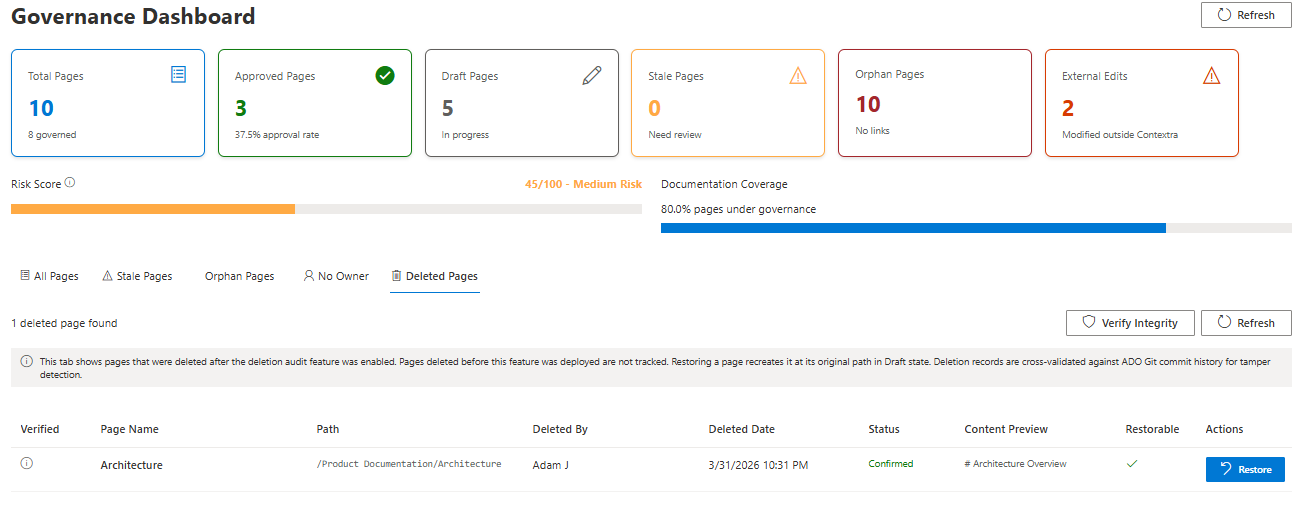
A real-time governance dashboard that calculates health scores, risk scores, compliance rates, and surfaces the pages that need attention — all without any backend infrastructure.
Health Score (0–100) — overall documentation quality
Risk Score (0–100) — stale, unowned, and non-compliant page risk
Governance Rate — percentage of pages under governance
Approval Rate — percentage of governed pages approved
Ownership Rate — percentage of pages with assigned owners
Stale page detection (90+ days without modification)
Orphan page detection (no inbound links, no linked work items)
Export compliance reports to CSV, PDF, or Word
Audit log viewer with complete event history
4. Zero Backend Required
Runs entirely on the Azure DevOps Git API. No servers. No databases. No infrastructure to manage.
Contextra stores everything — page content, metadata, governance settings, attestation records — directly in your project's wiki Git repository. There's nothing to deploy, nothing to maintain, and nothing to pay for beyond the extension itself.
100% client-side execution
Data lives in your ADO Git repository (wikiMaster branch)
Metadata stored as JSON sidecar files alongside markdown content
No external APIs, no third-party services, no data leaving your organization
Works within your existing ADO security model and permissions
5. Offline-First Editing
Edit documentation on a plane, in a factory, or during an Azure outage.
Contextra uses browser-side IndexedDB to store edits when you're offline. When your connection returns, changes sync automatically to Azure DevOps Git — no manual intervention required.
Automatic offline detection
Pending changes indicator with sync queue
Automatic background sync on reconnection
Conflict resolution with eTag-based comparison
Works in any browser that supports IndexedDB
6. Full Audit Trail
Every action. Every approval. Every acknowledgment. Fully traceable.
Contextra creates an immutable audit trail for every governance event. Approvals record the approver, timestamp, change summary, and the exact Git commit of the approved content. Attestation tracking proves who read what and when.
Append-only audit logs
Approval records with Git commit SHA snapshots
Attestation / read-receipt tracking
External edit detection (flags changes made outside Contextra)
Version history with side-by-side diff comparison
State transition history with user, reason, and timestamp
Feature Highlights
Diagrams & Visuals
Draw.io Integration — Create and edit professional diagrams directly in the page. Includes a template library with architecture, data flow, network, UML, cloud, and org chart templates.
Mermaid Diagrams — Write flowcharts, sequence diagrams, state diagrams, class diagrams, ER diagrams, Gantt charts, and pie charts using text-based Mermaid syntax.
Image Upload — Drag-and-drop images with resizing. Upload from PC or embed by URL.
Table of Contents — Auto-generated from headings, updates in real time.
Collaboration
Page Comments — Threaded discussions on every page using the native ADO Wiki comments API.
@Mentions — Tag team members in comments and annotations.
Work Item Integration — Embed ADO work items as rich chips showing ID, title, type icon, state, and direct links. Search and link with the Work Item Picker.
Notifications — In-extension notification bell for review assignments, approvals, SLA warnings, and ownership changes.
Version Control
Git-Backed — Every save is a Git commit. Full history, always.
Diff Viewer — Side-by-side comparison of any two versions.
Version Restore — One-click restore to any previous version.
Approved Snapshots — Immutable reference points for compliance audits.
Page Management
Page Templates — Blank, System Architecture, Architecture Decision Record (ADR), Component Documentation.
Page Types — Standard, System Architecture, Component, Architecture Decision, Guide.
Hierarchical Tree — Folders and nested pages with drag-and-drop organization.
Custom Fields — Attach arbitrary key-value metadata to any page.
Tags — Free-form labels with search boost and governance tracking.
Expiry Dates — Flag pages for review at a specific date.
Administration
Governance Settings Hub — Project-level admin page for configuring approver and deprecator groups.
Group-Based Authorization — Leverage existing Azure DevOps groups for approval permissions.
Azure Policy Linking — Connect documentation to Azure Policy definitions for compliance tracking.
How It Works
Step 1: Install
Install Contextra from the Azure DevOps Marketplace. It's immediately available in every project — no setup, no configuration, no backend deployment.
Step 2: Write
Open "Contextra Docs" in your project's Home hub. Create pages with the rich editor, embed diagrams, link work items, and organize your documentation in a hierarchical tree.
Step 3: Govern
Enable governance on pages that matter. Assign owners, submit for review, approve with change summaries, and track compliance on the Governance Dashboard. Export reports for auditors.
Technical Highlights
Capability
Detail
Architecture
100% client-side, runs in ADO extension iframe
Storage
Azure DevOps Git REST API (wiki repository, wikiMaster branch)
Editor
TipTap v3 with 15+ extensions
Diagrams
Bundled Draw.io + Mermaid rendering
Offline
IndexedDB with automatic sync queue
UI Framework
FluentUI React 8 (native ADO look and feel)
Search
Fuse.js fuzzy matching across titles, content, and tags
90+ documented features across governance, editing, collaboration, and compliance
Who Is Contextra For?
Engineering Teams
Write and maintain technical documentation collaboratively. Rich editing, code blocks, diagrams, and offline support — everything you need to document systems without leaving Azure DevOps.
Architects
Document architecture decisions, system designs, and component specifications with embedded Draw.io diagrams, Mermaid charts, and ADR templates. Track decision history with full versioning.
Compliance Officers
Monitor documentation health with the Governance Dashboard. Track approval rates, review cycles, attestation completion, and SLA compliance. Export audit reports to CSV, PDF, or Word.
Tech Leads & Managers
Assign page owners, set review intervals, enforce approval workflows, and identify stale or orphan documentation. Get visibility into your team's documentation maturity.
PMOs & Program Managers
Use the compliance dashboard and export capabilities to report on documentation governance across projects. Track governed vs. non-governed pages and approval rates.
What Makes Contextra Different
Traditional Wiki
Contextra
No lifecycle tracking
Draft → Review → Approved → Deprecated workflow
No approval process
Structured approvals with change summaries and audit records
No compliance metrics
Real-time health score, risk score, and SLA tracking
Basic text editor
TipTap WYSIWYG with slash commands, tables, and code highlighting