
Code Astrogator — Claude Code Chat
Claude Code chat tool window for Visual Studio 2026
Integrates the Claude Code CLI into a dockable
chat panel — streaming responses, live tool activity, and interactive approve/reject for
Claude's edits and commands, right inside the IDE.
What it is
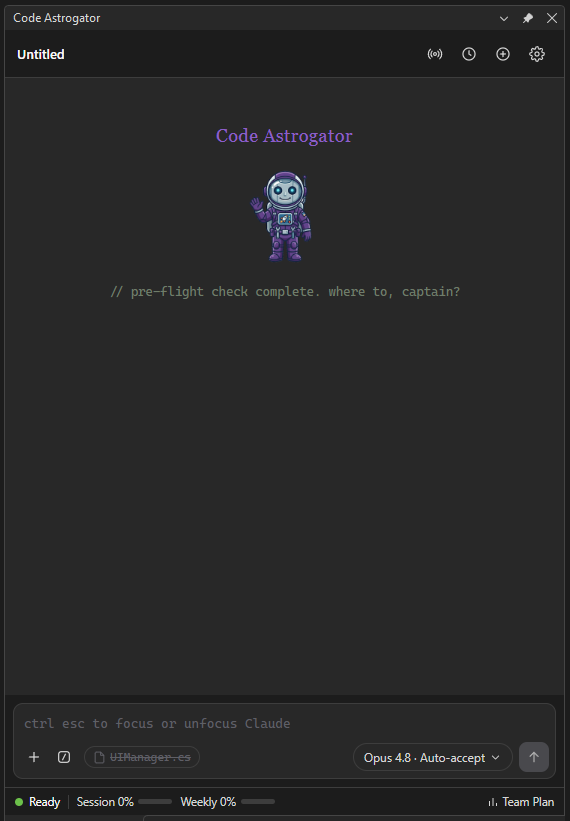
Code Astrogator brings Claude Code into Visual Studio as a dockable chat panel. It drives the
Claude Code CLI behind the scenes, so it works with whatever you already use to sign in:
both a Claude subscription (OAuth) and an API key are supported — the extension never handles
your credentials itself.
Features
- Streaming chat with Markdown (incl. tables), code blocks with copy / insert-into-editor, and
extended-thinking display. A live "working" indicator keeps you company while Claude thinks.
- Tool activity cards for Read / Grep / Bash / Edit / Write / MCP tools, with collapsible
input/output and success/error tinting.
- Permission cards — review and approve or reject Claude's file edits and commands inline in the
chat, with a syntax-highlighted diff; auto-approved edits show as a green pre-decided card.
- Inline edit review in the editor (opt-in) — instead of a chat diff, review proposed edits
directly in the code editor: to-be-deleted lines in red, to-be-added lines as green phantom lines
(the file is never touched during review), with Accept / Reject per hunk, scrollbar change
marks, and a jump-to-next/previous-change toolbar. Accept only the hunks you want.
- Auto-approve patterns — allow chosen commands/MCP tools to run without prompting, plus an
"Always" button on permission cards. An "Auto-accept commands" sub-toggle additionally runs
Bash / PowerShell / MCP calls without prompting while in Auto-accept-edits mode.
- Interactive questions — Claude's follow-up questions appear as in-turn cards with clickable
options and a free-text "Other".
- Tasks banner — when Claude works through a multi-step task list, a collapsible banner shows each
task with its live status and a done/total count.
- Model · Mode popover — pick model, effort (incl. Max), ultracode, and permission mode (Ask /
Auto-accept edits / Plan / Bypass); your choices persist across chats and restarts.
- Usage meters — session and weekly usage with reset-time tooltips and a plan badge (read locally,
no extra cost).
- Session history per workspace; conversations resume across VS restarts.
- Context attachments —
@-mention autocomplete, file drag-and-drop from Explorer, clipboard
image/file paste, web browsing, an active-file reference (with selected line ranges), and editor
right-click → "Add file / selection to Claude prompt".
- Remote control — open the current conversation in an interactive Claude Code session with
remote control enabled, continue it from the Claude app or claude.ai/code, then re-import the
advanced conversation when you end the session.
- Announcements & update notifications (opt-in) — an in-window banner for project notices and a
pointer to new releases.
- Theming — Dark / Light / Auto (follows the VS theme), a configurable accent color, and three
verbosity levels (Compact / Normal / Detailed).
Screenshots
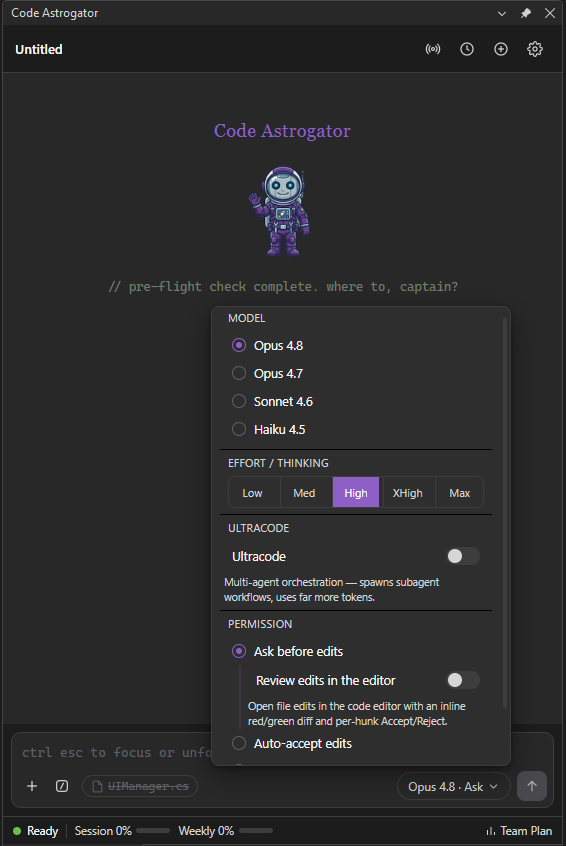
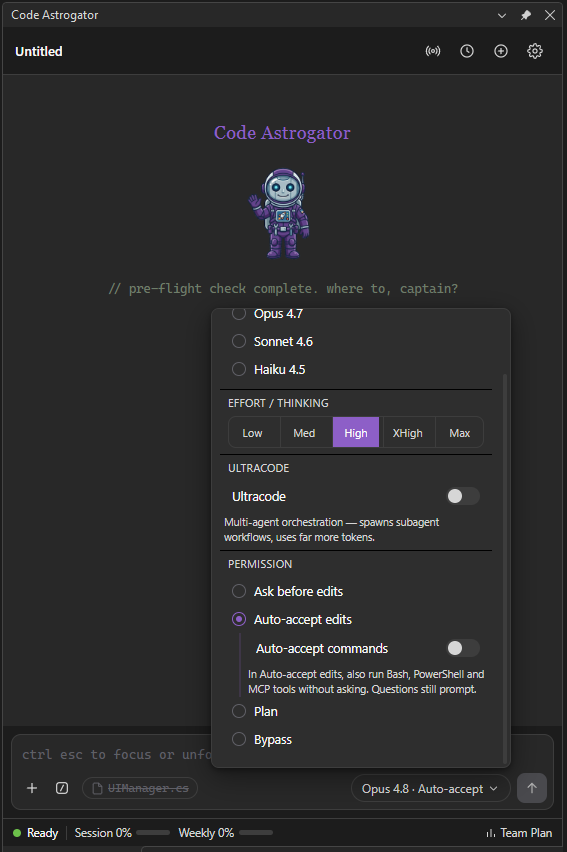
Pick model, effort, and how edits are approved
The Model · Mode popover selects the model, effort/thinking level, ultracode, and the permission
mode. Under Ask before edits you can opt into reviewing edits inline in the editor; under
Auto-accept edits an Auto-accept commands sub-toggle lets Bash / PowerShell / MCP calls run
without prompting too.
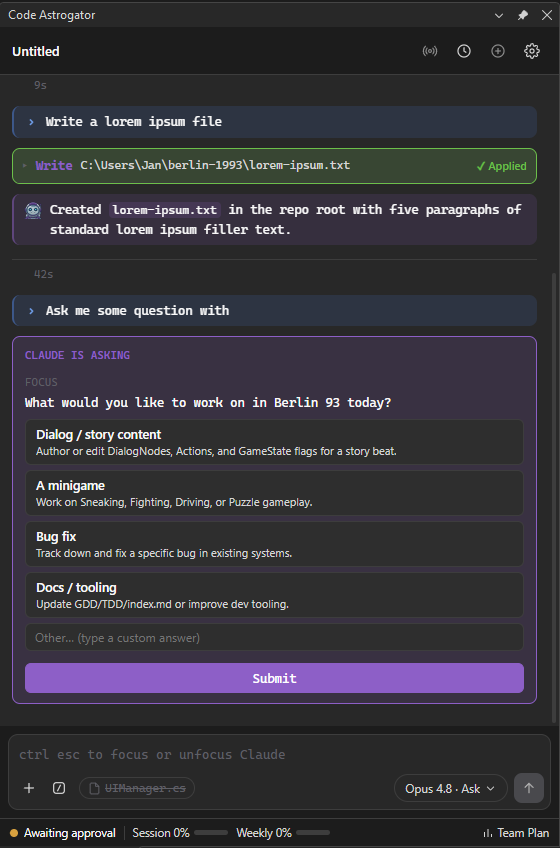
Approve edits and commands
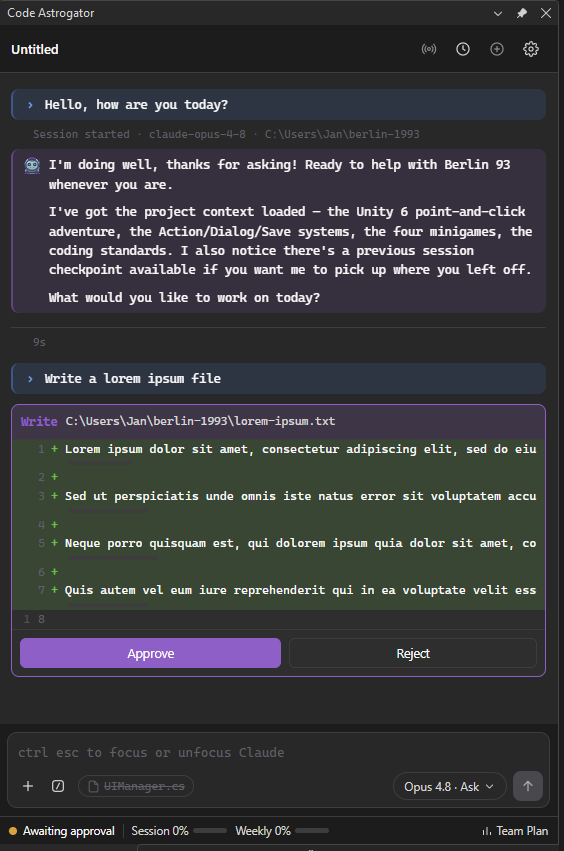
When Claude wants to edit a file or run a command, an approval card appears in the chat with a diff —
Approve or Reject. Claude's follow-up questions show up as interactive cards with clickable
options.
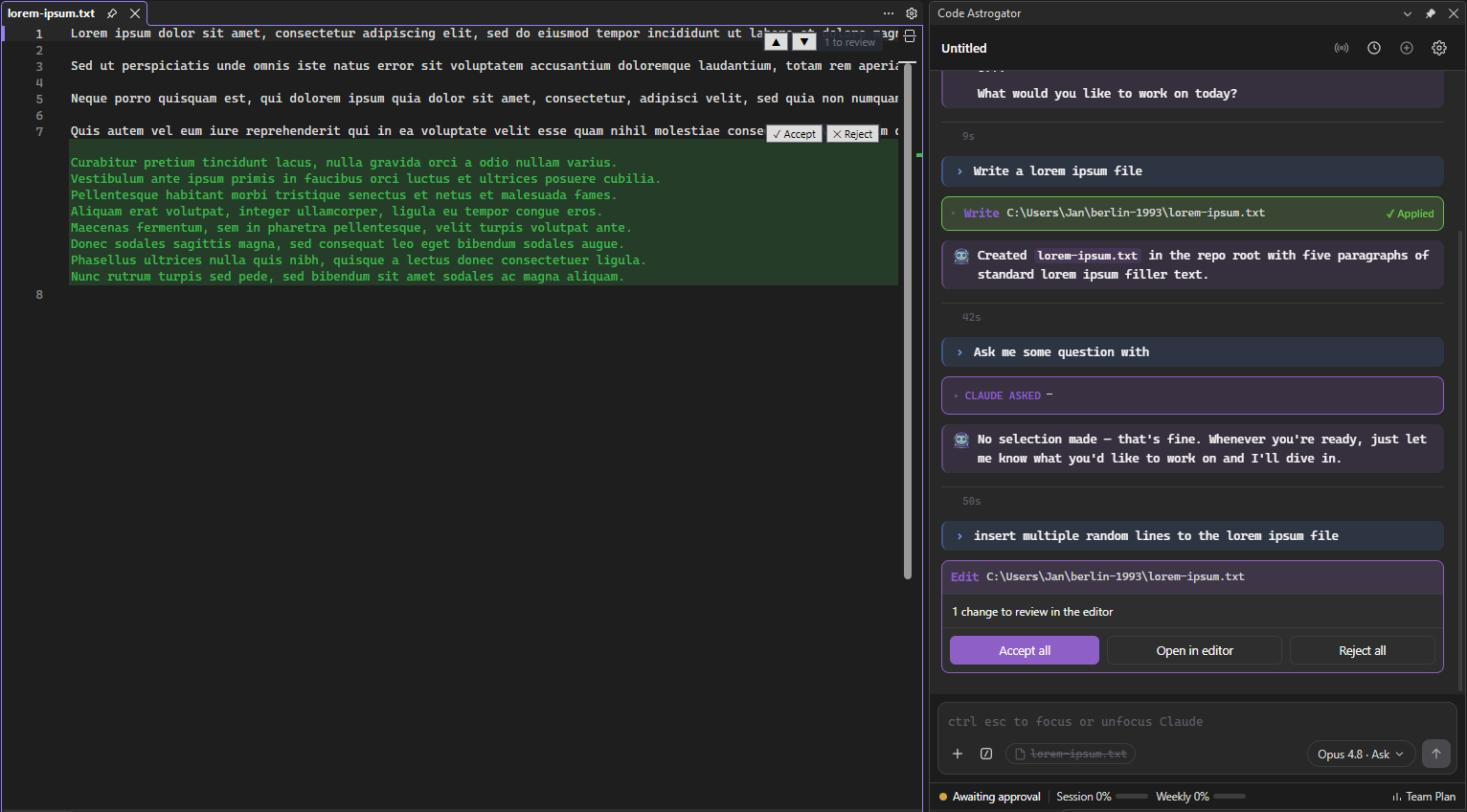
Inline edit review in the editor (opt-in)
With "Review edits in the editor" turned on, proposed changes are shown right in the code editor —
green phantom lines for additions, red for deletions — with Accept / Reject per hunk, scrollbar
marks, and a jump-to-change toolbar. The chat card offers Accept all, Open in editor, or
Reject all.
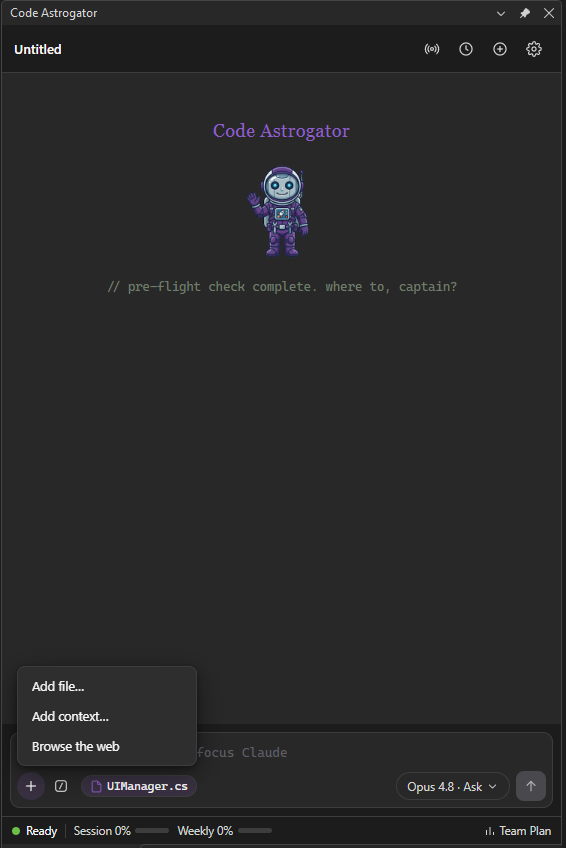
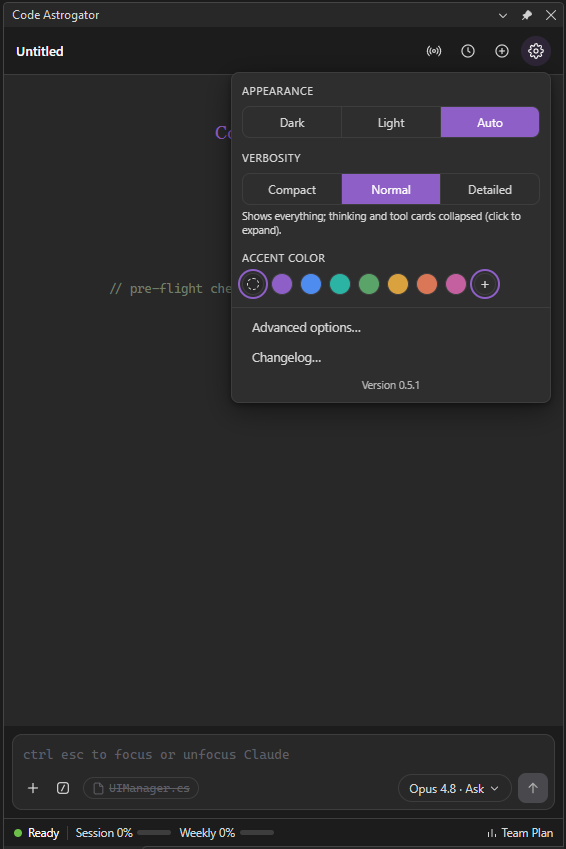
Attach context and tune appearance
Attach files, paste images, reference the active editor file, or browse the web from the + menu.
The gear popover sets theme, verbosity, and accent color, and links to advanced options and the
changelog.
Requirements
- Visual Studio 2026 (Community, Professional, or Enterprise). Recommended target; the extension is
built and tested against VS 2026.
- The Claude Code CLI installed and on your
PATH
(or point to it in settings) and signed in:
- Subscription: run
claude /login.
- API key: sign in with your Anthropic API key.
Installation
- In Visual Studio, open Extensions → Manage Extensions, search for Code Astrogator, and
click Install (or install this page's download and double-click the
.vsix).
- Restart Visual Studio to complete the installation.
- Show the panel via View → Other Windows → Code Astrogator.
Getting started
- Make sure the Claude Code CLI is signed in (see Requirements). If not, the panel shows a
sign-in hint.
- Type a prompt and press Enter (Shift+Enter for a new line).
- When Claude wants to edit a file or run a command, an approval card appears — review it and
Approve or Reject.
- Use the toolbar to attach files (
+), run slash commands (/), or change model and permission
mode (Model · Mode).
The working directory of each turn is your open solution/folder, so Claude has your project context.
Settings
Open settings via the gear icon → "Advanced options…". From there you can configure, among others:
- The Claude CLI path (if it isn't on
PATH), default model / effort, theme, and verbosity.
- Permission mode and the auto-approve pattern list.
- Restore-last-session, auto-add active file, include selected lines.
- Prompt timeout.
- Whether to receive announcements and update notifications, and whether to keep the model list
up to date from the project's GitHub.
Quick appearance options (theme, accent color) are also available directly in the gear popover.
License
GNU Affero General Public License v3.0 (AGPLv3). This project is open-source.
- ✅ Commercial use — free to use in a paid development environment or for client projects.
- ✅ Modification — free to modify the code to suit your needs.
- 🔄 Copyleft — if you distribute a modified version, you must release your modifications under the
same AGPLv3 license. Closed-source proprietary forks are not allowed.
See the project repository for full details.
"Claude" and "Claude Code" are products of Anthropic; this extension integrates the Claude Code CLI
but is not affiliated with or endorsed by Anthropic.
| |

