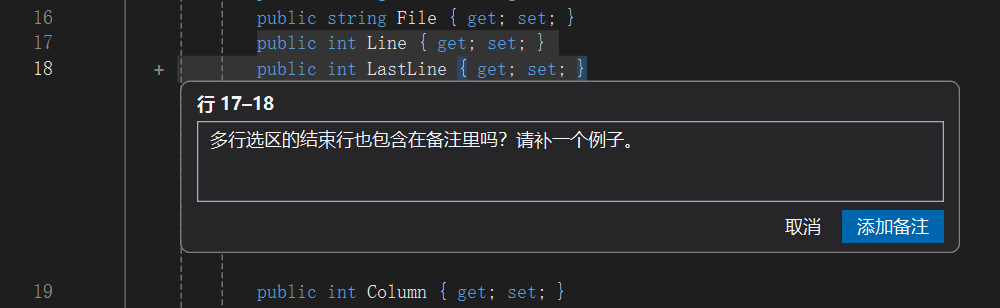
Orca Code NotesAdd a review comment to a line or selection in Visual Studio and send it to an Orca AI conversation. Each comment includes the relative file path, line number or range, and your note. Add a noteOpen the same project in Orca and Visual Studio. Hover over a line and click +. To comment on several lines, select them first. Write your comment, then press Ctrl+Enter to save it. You can edit or delete a saved comment from its card.
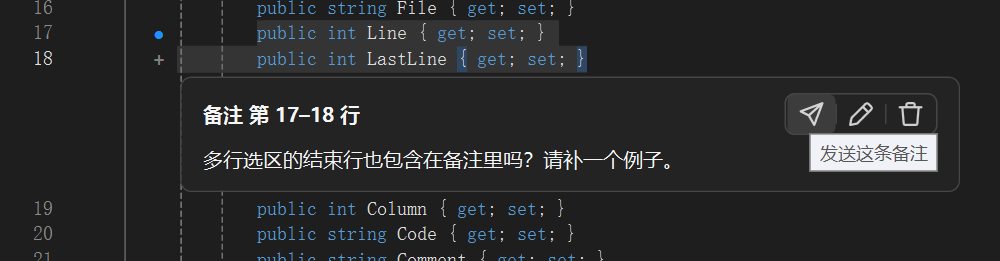
Send notes to OrcaTo send one note, click the paper plane just to the left of the pencil on its card. The send dialog opens with only that note.
To send several notes, click the blue paper plane on Visual Studio’s Standard toolbar.
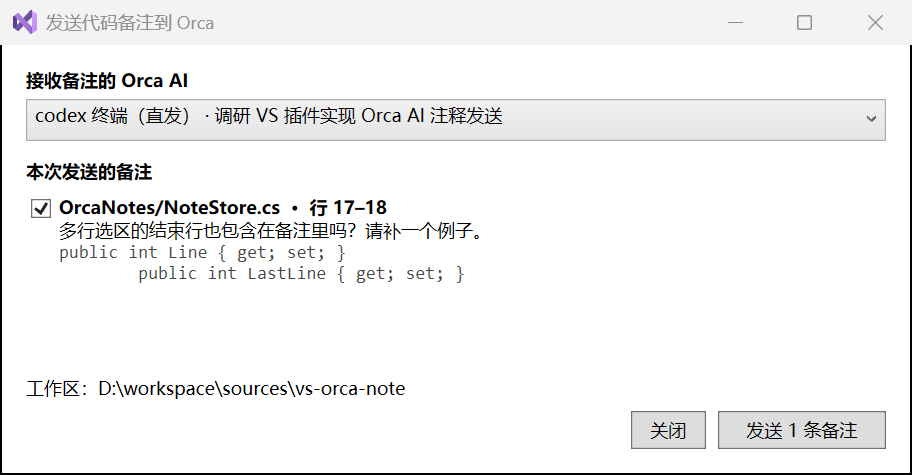
Choose the Orca conversation, check the notes you want to send, then click Send. In this example, the note on lines 17–18 is ready to send to a Codex terminal.
Requires Orca and x64 Visual Studio 2022 (17.14) or Visual Studio 2026. The extension supports English and Simplified Chinese. |