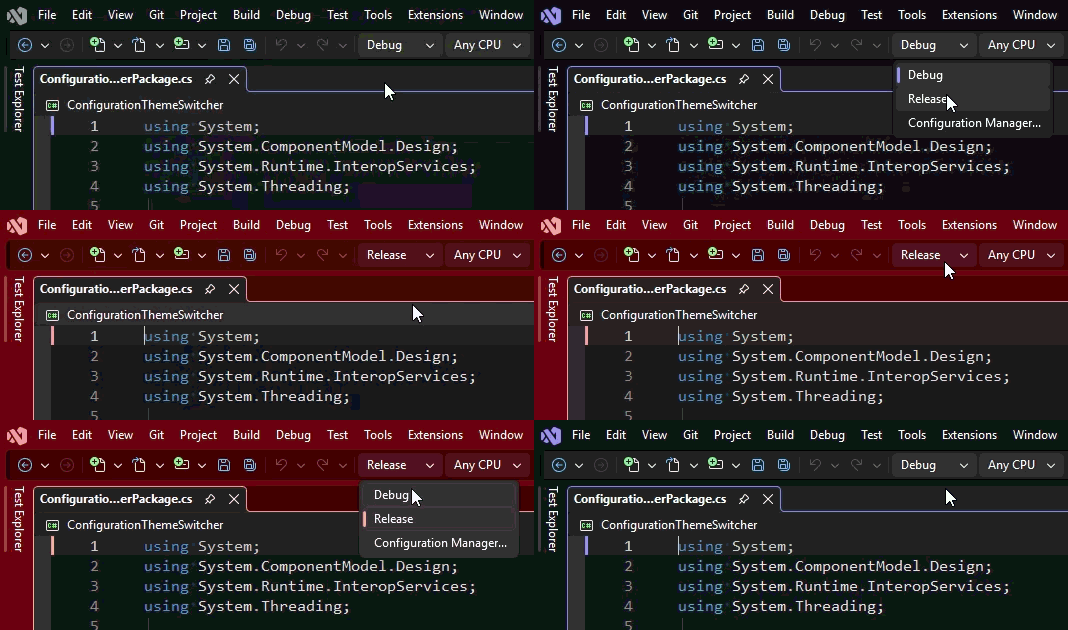
Configuration Theme SwitcherAutomatically switches Visual Studio 2026 themes when solution configurations or debugger state change, with dropdown-based theme mappings and fallback theme restore. |

Configuration Theme Switcher automatically changes the active Visual Studio theme when your solution configuration changes. Use different themes for Debug, Release, Staging, Benchmark, or any custom configuration so your current build state is obvious at a glance. This helps prevent accidental work in the wrong configuration and gives each workflow a clear visual identity.
Features
Example MappingsKnown QuirksApplying the theme is a global effect across all open Visual Studio instances. v1.0.1 has been updated to listen for the active window, and will refresh the theme accordingly. Closing RemarksI know I've burned time wondering why my changes were applied locally while still in Release mode. Configuration Theme Switcher is lightweight, settings-driven, and built to stay out of your way while making configuration changes much easier to notice. May it save you a few minutes of debugging. |