A better looking multi-stage pipeline view for Azure DevOps dashboards.
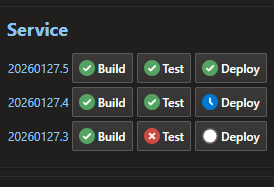
Features
- Visual Pipeline Status: See all your pipeline stages at a glance with color-coded status indicators
- Multiple Build View: Display 3 builds (1 row) or 8 builds (2 rows) depending on widget size
- Stage Status Icons:
- ✅ Success (green)
- ❌ Failed (red)
- ⏱️ Waiting (blue clock)
- 🔄 In Progress (animated spinner)
- ⏭️ Skipped (gray)
- 🚫 Canceled (gray)
- Direct Links: Click on build numbers or stages to jump directly to the logs
- Dark Mode Support: Automatically adapts to your system's color scheme preference
Usage
- Add the widget to your Azure DevOps dashboard
- Configure it by selecting a YAML pipeline
- Resize the widget to show 3 builds (1 row) or 8 builds (2 rows)
Configuration
Click the widget's configuration button (gear icon) and select the YAML pipeline you want to monitor.
Support
For issues or feature requests, please contact the publisher.
| |

