Skip to content
| Marketplace
Sign in
Visual Studio>Tools>Faaahh Build Notifier
Faaahh Build Notifier

Faaahh Build Notifier

BackbenchLabs

|
46 installs
| (0) | Free
Faaahh Build Notifier adds a dramatic sound effect whenever your build fails.
Download

Faaahh Build Notifier

Faaahh Build Notifier adds a dramatic sound effect whenever your build fails in Visual Studio.

Because sometimes compiler errors deserve a reaction.


Features

  • Plays a sound when a build fails
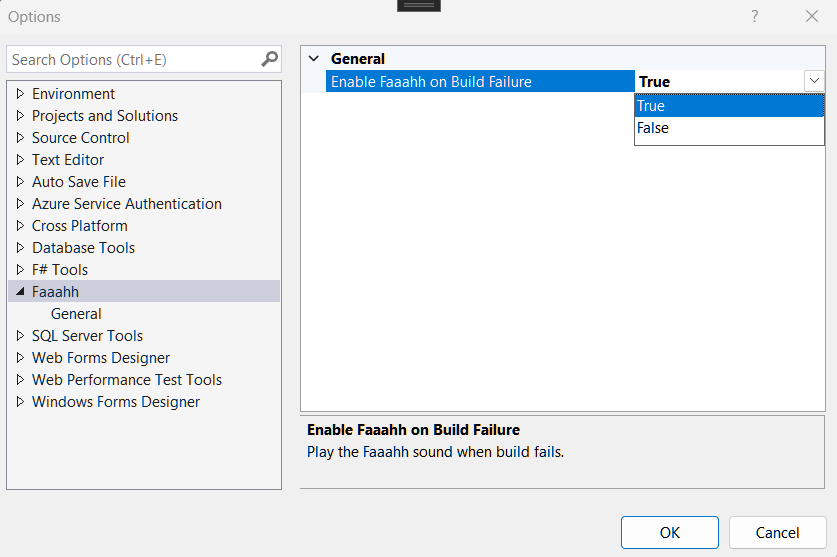
  • Toggle enable/disable via Tools → Options → Faaahh
  • Lightweight and non-intrusive
  • Works with modern Visual Studio (2022+)

Why Use It?

Build failures happen frequently during development.

Instead of silently checking the Error List after every build, Faaahh Build Notifier provides an audible cue when something goes wrong. This helps you instantly recognize failed builds while staying focused on your workflow.

It is simple, lightweight, and designed to integrate seamlessly into your development experience.


Configuration

You can enable or disable the sound at any time:

Tools → Options → Faaahh

Screenshot_2026-03-03_101139.png

Lightweight and Safe

  • No data collection
  • No background services
  • No external dependencies
  • Pure Visual Studio extension

Roadmap

Future updates may include:

  • Sound for successful builds
  • Custom sound selection
  • Multiple sound profiles

If you enjoy developer tools with personality and simplicity, Faaahh Build Notifier is built for you.

  • Contact us
  • Jobs
  • Privacy
  • Manage cookies
  • Terms of use
  • Trademarks
© 2026 Microsoft