Improvement Tracker
Measure whether a process change works. Set goals on your team's pull-request and work-item metrics, freeze the
targets when you adopt the change, and see each goal move from its baseline, week by week.
What it does
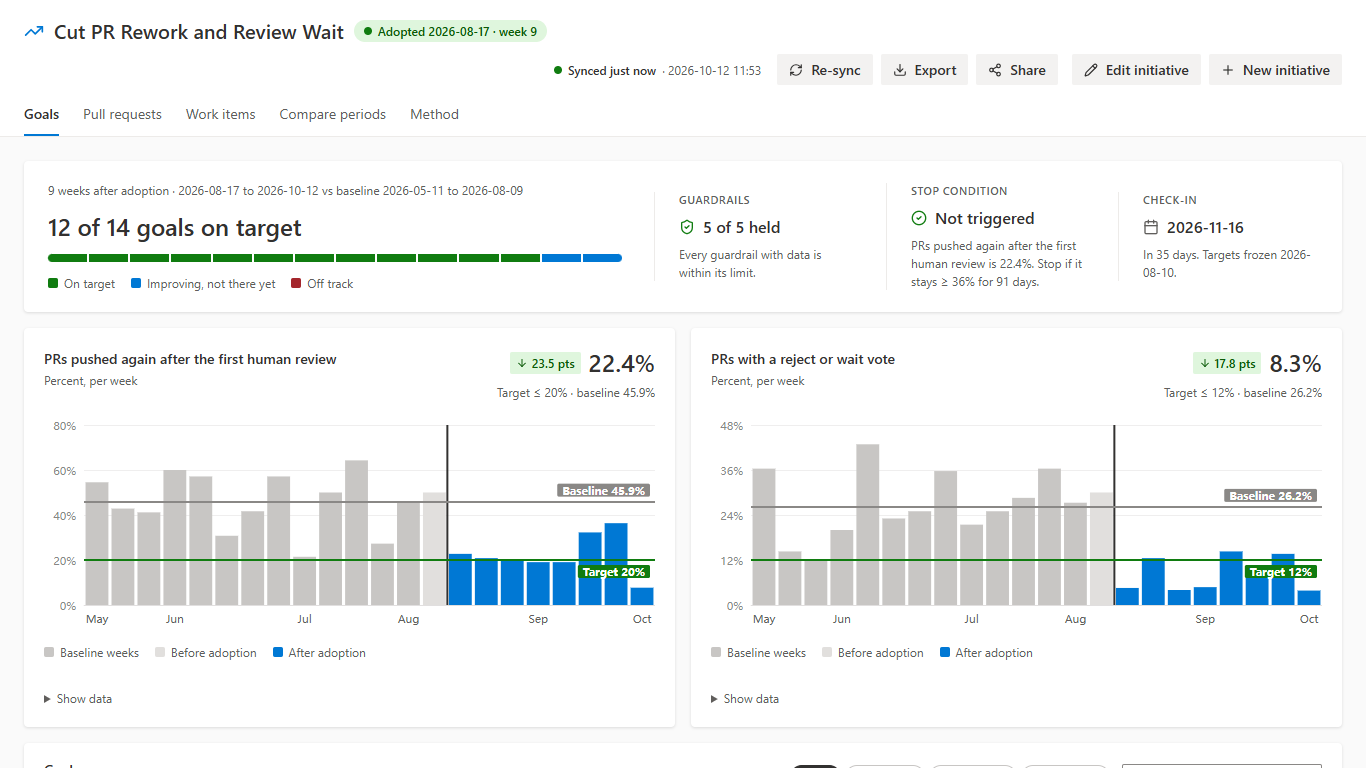
- Initiatives with goals, guardrails and a stop condition. Pick metrics such as PR open-to-merged time, review
rework or work-item cycle time, set a target for each, add guardrails that must not get worse, and a stop condition
that says when to drop the change. A ready-made PR-flow initiative is filled in to start from. An initiative can be
scoped to iterations or areas, for example delivery work without the support lane; every view of it then reads only
that work.
- Baselines from your own history. Each goal's baseline is computed from the weeks before adoption, so you start
from real numbers, not guesses.
- Frozen targets. Freeze the targets when you adopt the change; later edits need a reason and stay visible.
- Simple view. A Simple | Detailed switch in the header. Simple shows one iteration or picked dates at a glance: a
one-sentence summary, four PR numbers and four work-item numbers, and a few charts. Compare it with another
iteration or the days before. Each panel lists its five slowest PRs or work items and how much of the time they took.
- Goals. Every goal shows its baseline, now, target and progress, an 8-week sparkline and a weekly trend chart,
plus how a work item's time splits between coding, review, and test and release. Each goal opens a panel with its
definition, weekly chart and the longest-waiting PRs or slowest items. Notes explain what moved a number.
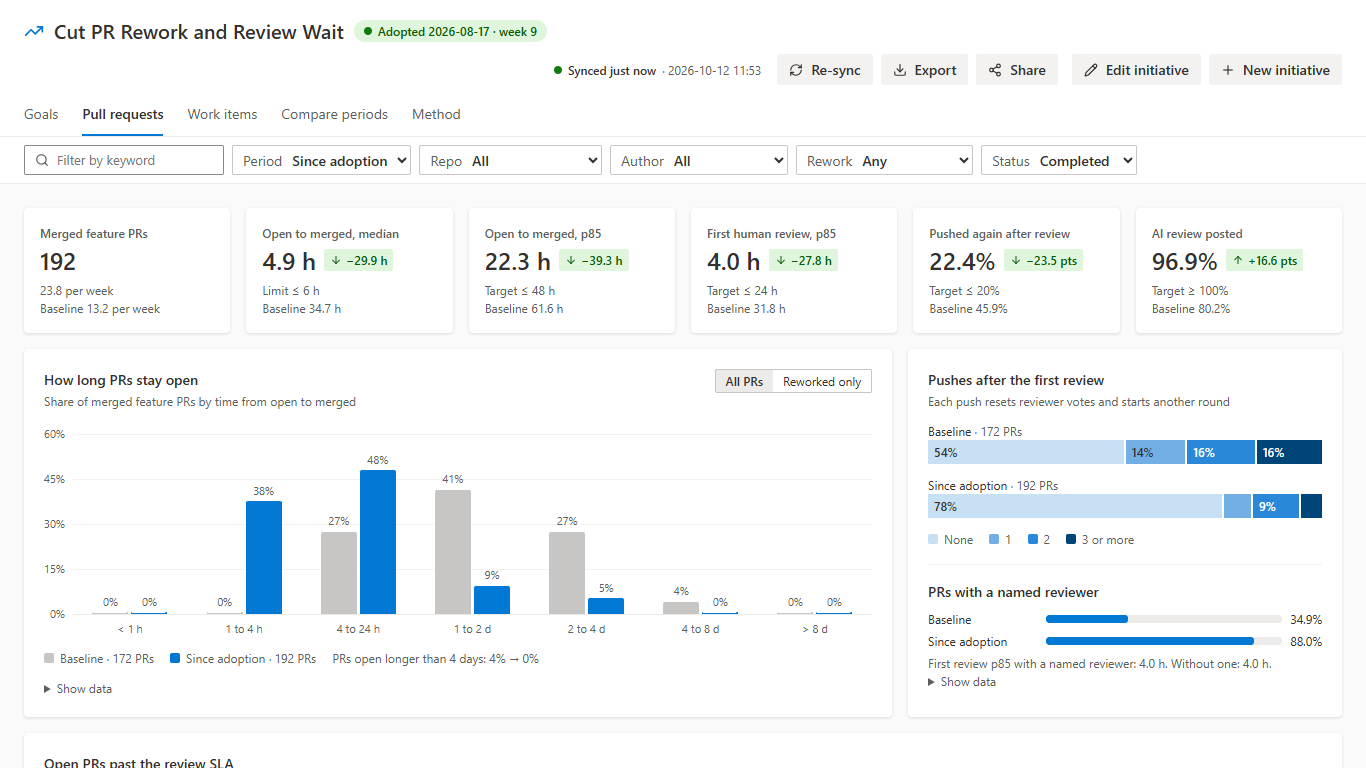
- Pull requests. Filter by repository, team, author, iteration, area and period; see the slowest reviews, PRs past the review SLA and
how long open PRs have waited. A team is its members as they are now in Azure DevOps.
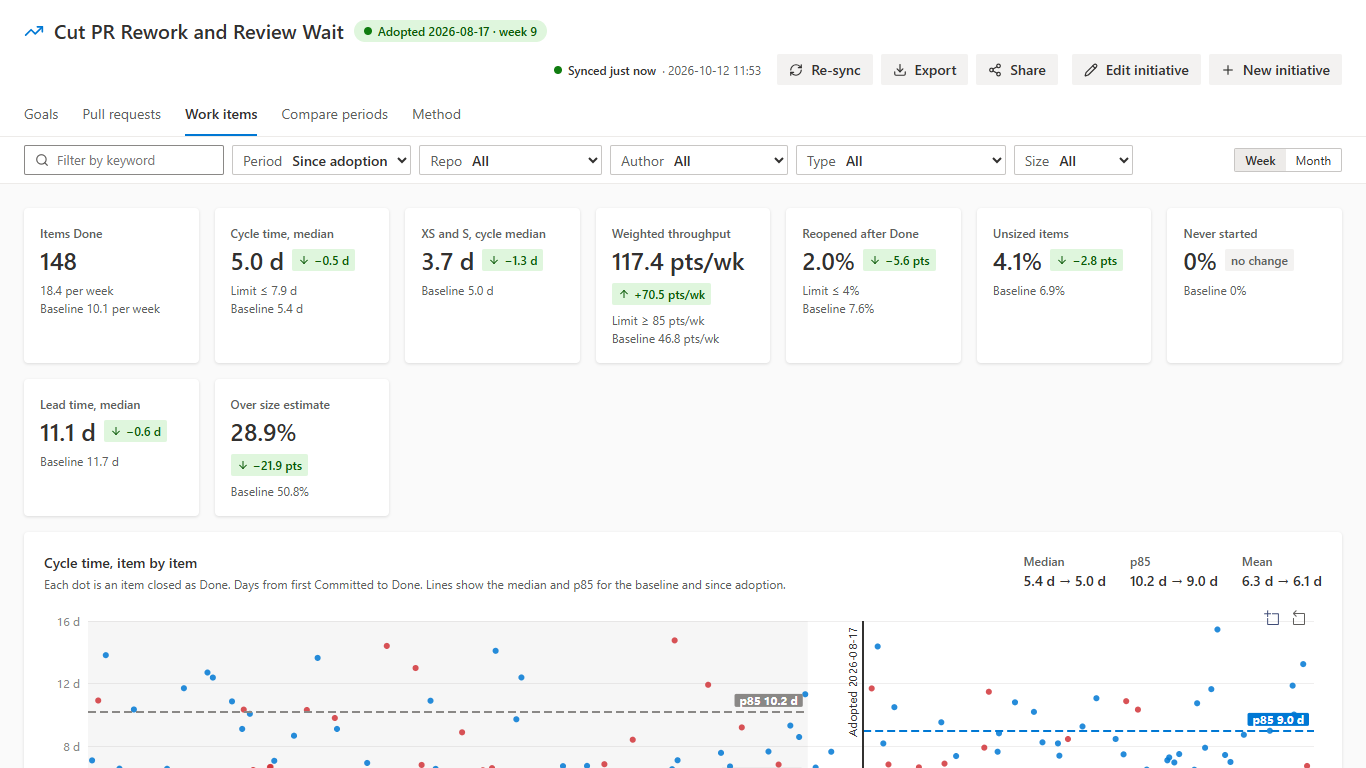
- Work items. Weekly or monthly throughput, a cycle-time scatter you can zoom, and a month-by-month table.
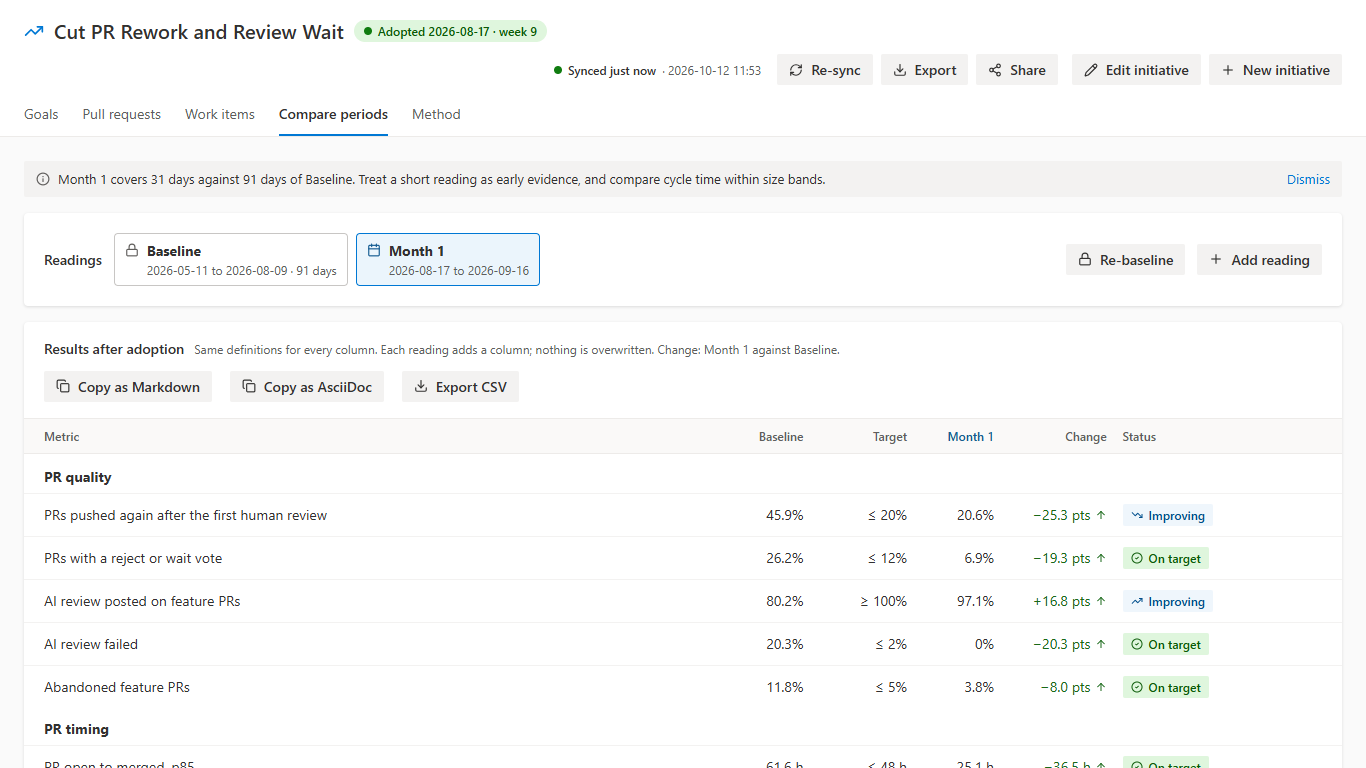
- Compare periods. Record readings (the baseline, then one after adoption every month) so the numbers you
reported stay fixed, and compare them side by side. Switch the columns to iterations or areas to compare Iteration 3
with Iteration 4, or one product area with another, on the same definitions. Repos and Authors columns put
repositories or people side by side over one period. A filter bar narrows every column, live; while it is set,
readings cannot be recorded.
- People. For 1:1s and coaching: each person's PR, review and work-item numbers against their own baseline and the
team median, and up to four people side by side. People with too few PRs in the window are greyed out.
- RCAs. Track root cause analyses (RCAs) kept as work items. An admin says what counts as one in the settings: a
work item type, a tag such as
RCA, or both. Tags that start with cause:, caught: and sev: give an RCA its root
cause, the step that could have caught it and its severity; its child items are its action items. The tab shows how
many RCAs are open, how many were opened and resolved and how long they took, which are past their due date, action
items done, open RCAs by age and severity, root causes and catch points, RCAs that came back within 90 days, and a
table you can export. Time to resolve, RCAs opened and resolved per week and the came-back share can be goals and
guardrails. The came-back share of a recent period can still rise, because an RCA has 90 days to come back. RCAs are off until an admin turns them on; until then those metrics show no data.
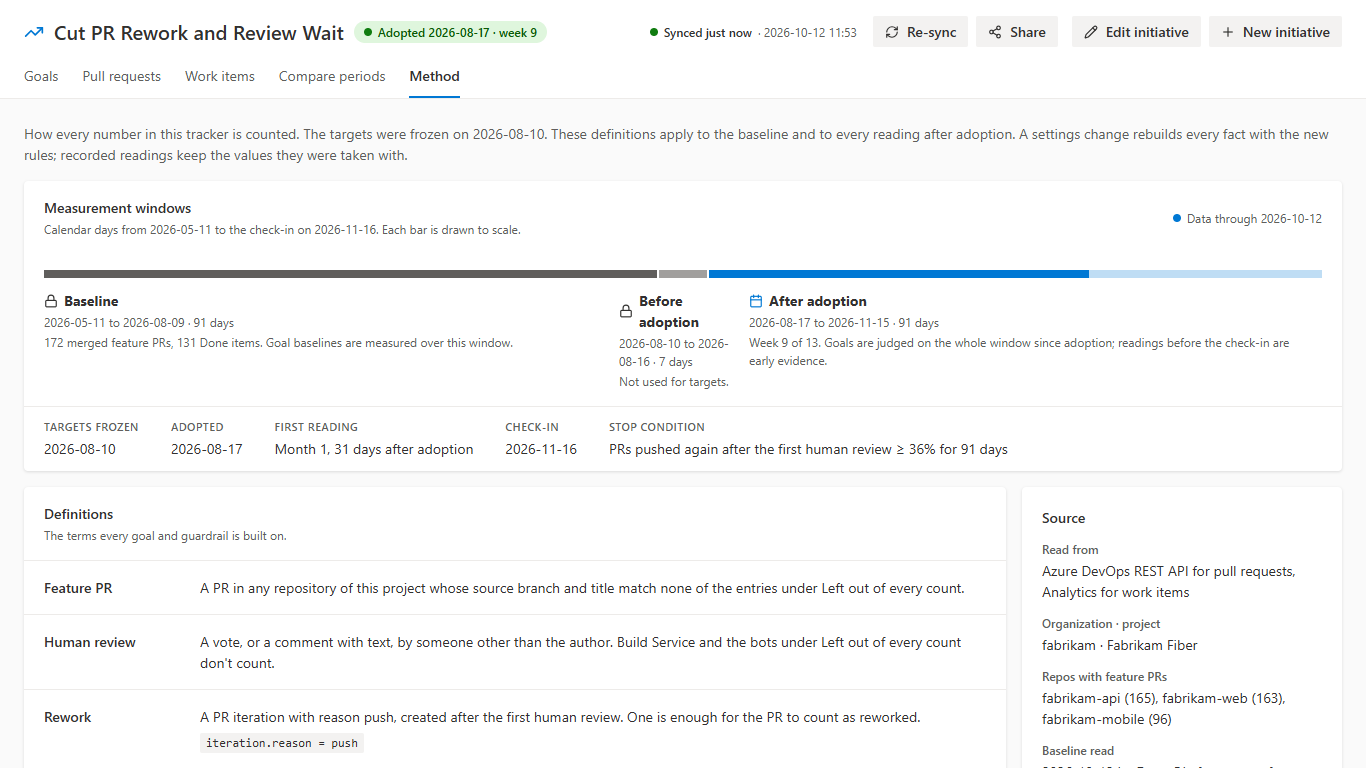
- Method. The measurement windows to scale, how every metric is counted, what each count leaves out, data-quality
checks, the settings, and the full version history of the settings and each initiative.
- Export and Share. Download the open tab's main table as CSV (every tab but Method), or copy a link that opens
the same initiative and tab.
Getting started
- Install the extension in your organization.
- Open Boards → Improvements in a project. Only Project Administrators can open it. The first one to do so runs the setup wizard once: it detects your
work item types, states and size field, and starts the first sync.
- Create an initiative, set its baseline, targets and adoption date, and save. Freeze the targets when you adopt the
change.
The hub keeps itself up to date: when someone opens it and the data is more than 12 hours old, it syncs in the
background.
Requirements and permissions
- Azure DevOps Services. Work-item metrics need Analytics, which is on by default; without it the hub shows
pull-request metrics only.
- The extension asks for read access to Code (pull requests, their reviews and commits), Work items (types,
states and fields for the setup wizard, and RCAs), Analytics (work-item history) and Project and team (the
Team filter reads teams and their members).
- It syncs in the browser of whoever opens the hub, with that person's access.
- Only users with Edit project-level information on the project (Project Administrators, and Project Collection
Administrators) can open the hub; everyone else sees a page saying so. Every change to the settings and initiatives
is kept in a version history with who made it and why.
Privacy
- Nothing leaves Azure DevOps. The extension runs inside Azure DevOps in your browser and talks only to Azure
DevOps services in your organization. It sends nothing to the publisher or anyone else: no telemetry, no tracking,
no external scripts or fonts.
- What it stores. Facts derived from pull requests (id, repository, title, author name and id, dates, counts
of pushes, votes and review threads, and for each reviewer on a pull request their name and id, when they first reviewed,
how many comments they wrote and whether they approved), from work items (id, type, title, dates, size, tags, and the iteration and area path of every item a fact or a pull request refers to) and from RCAs (id,
title, state, dates, the owner's display name, the severity, root cause and catch point read from their tags, the
ids of the work items they have Related links with, and whether each action item is done and when it is due), plus
the settings, initiatives, readings and notes your team saves, each with the name and id of the person who saved it. All of it
lives in this extension's data storage in your organization. Review comment text is read to tell bot and AI-review
comments apart, and is never stored.
- Who can see it. Only Project Administrators can open the hub. The check runs in the hub: the stored facts stay
readable through the Azure DevOps REST API by anyone in the organization who can use the extension, including titles
of pull requests and work items they cannot open themselves. Install it where that is acceptable.
Support
Ask questions and report problems in the Q & A tab of this listing.
| |

