Skip to content
| Marketplace
Sign in
Azure DevOps>Azure Boards>Smart Work Item Creator
Smart Work Item Creator

Smart Work Item Creator

Ansi ByteCode LLP

|
1 install
| (0) | Free
AI-powered work item creation for Azure DevOps. Generate Bugs, User Stories, Features, Epics and Tasks from plain text using Azure OpenAI — review, edit, and save without leaving your board.
Get it free

Smart Work Item Creator

AI-powered work item generation for Azure DevOps — describe your work in plain English and get a fully structured, ready-to-save item in seconds.

Built by Ansi ByteCode LLP


What It Does

Smart Work Item Creator adds a Create Work Item hub to your Azure Boards. Instead of filling out forms field by field, you write a plain-text description of the work you need to capture. Azure OpenAI turns that description into a complete, structured work item — with a title, description, acceptance criteria (or repro steps for bugs), severity, and auto-generated child tasks or stories — which you review, tweak, and save, all without leaving your board.


Supported Work Item Types

Type What the AI generates
Bug Title, Description, Steps to Reproduce, Expected Behavior, Severity
User Story Title, Description, Acceptance Criteria, child Tasks
Feature Title, Description, Acceptance Criteria, child User Stories
Epic Title, Description, Acceptance Criteria
Task Title, Description, Acceptance Criteria

Quick Start

1 — Install the extension

Install from the Visual Studio Marketplace and grant the requested scopes (Work Items, Project, Graph). No Personal Access Token is needed; the extension uses your existing Azure DevOps browser session.

2 — Configure Azure OpenAI

Click AI Settings (top-right of the hub) and enter:

Field Example
Endpoint https://your-resource.openai.azure.com
API Key Your Azure OpenAI key
Deployment Name gpt-4o
API Version 2024-02-01

Settings are saved in browser local storage — no server, no shared secrets.

3 — Create your first work item

  1. Open Boards → Create Work Item in your project's left navigation.
  2. Select the work item type from the tab bar.
  3. Paste or type a description of the work.
  4. Click Generate with AI.
  5. Review, edit, and click Save Work Item.

Creating a Bug

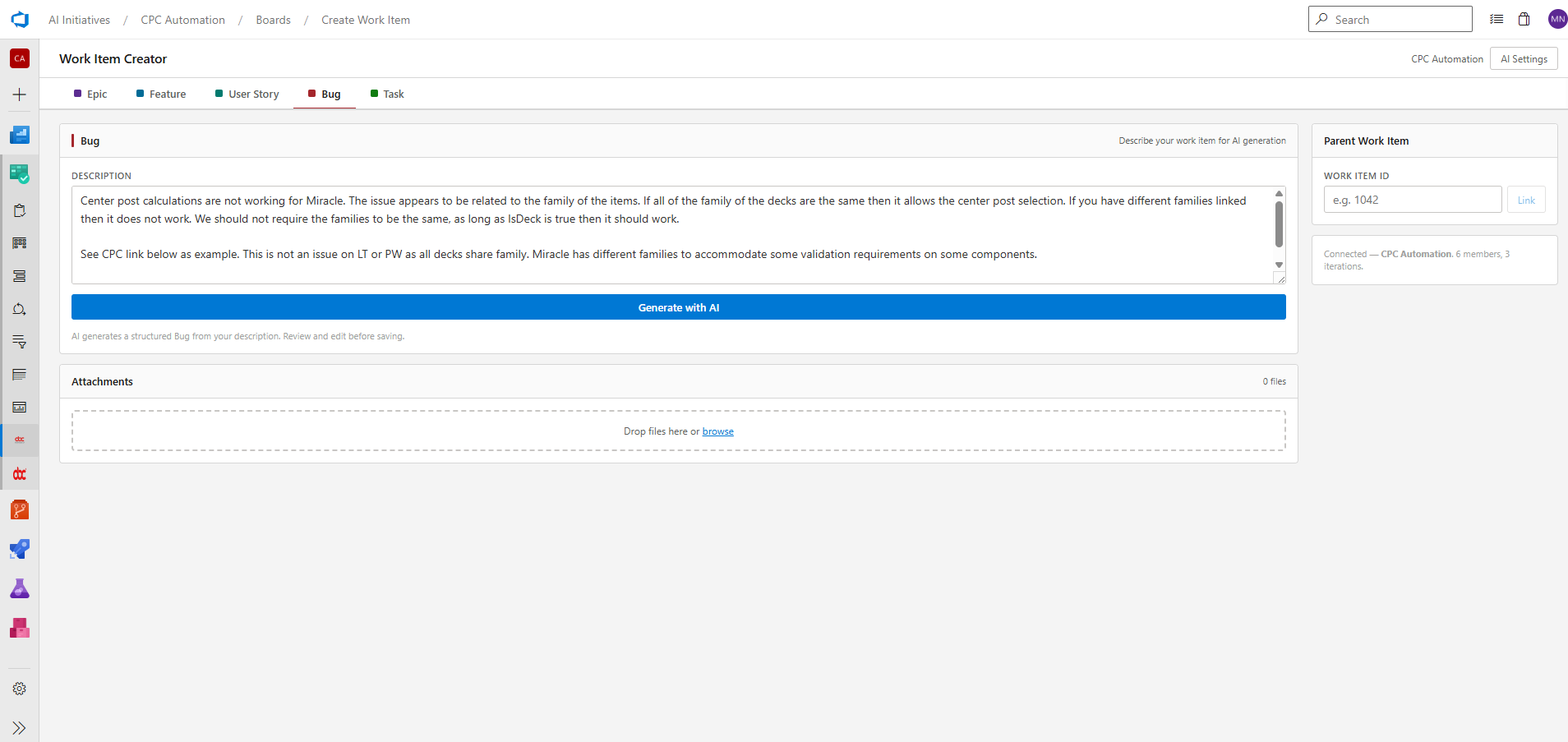
Select the Bug tab, describe the issue in your own words — copy-paste a Slack message, an email, a stack trace, whatever you have — and click Generate with AI.

Describing a bug in plain text

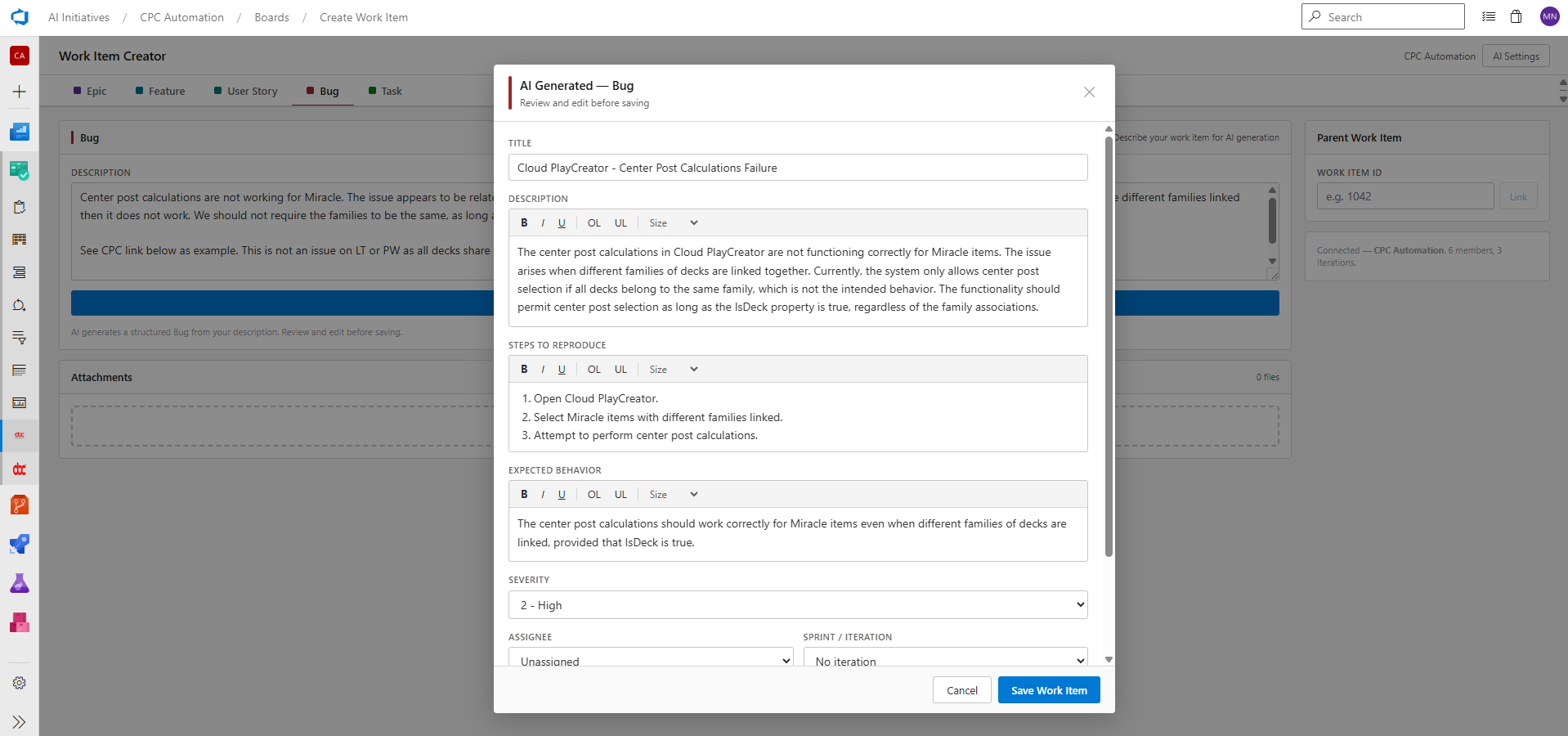
The review modal opens with every field pre-filled:

  • Title — concise, editable
  • Description — full context, rich-text formatted
  • Steps to Reproduce — numbered list inferred from your description
  • Expected Behavior — what should have happened
  • Severity — AI-suggested (1 Critical → 4 Low), adjustable
  • Assignee — pick from your team
  • Sprint / Iteration — select the target sprint

Bug review modal with all fields pre-filled by AI

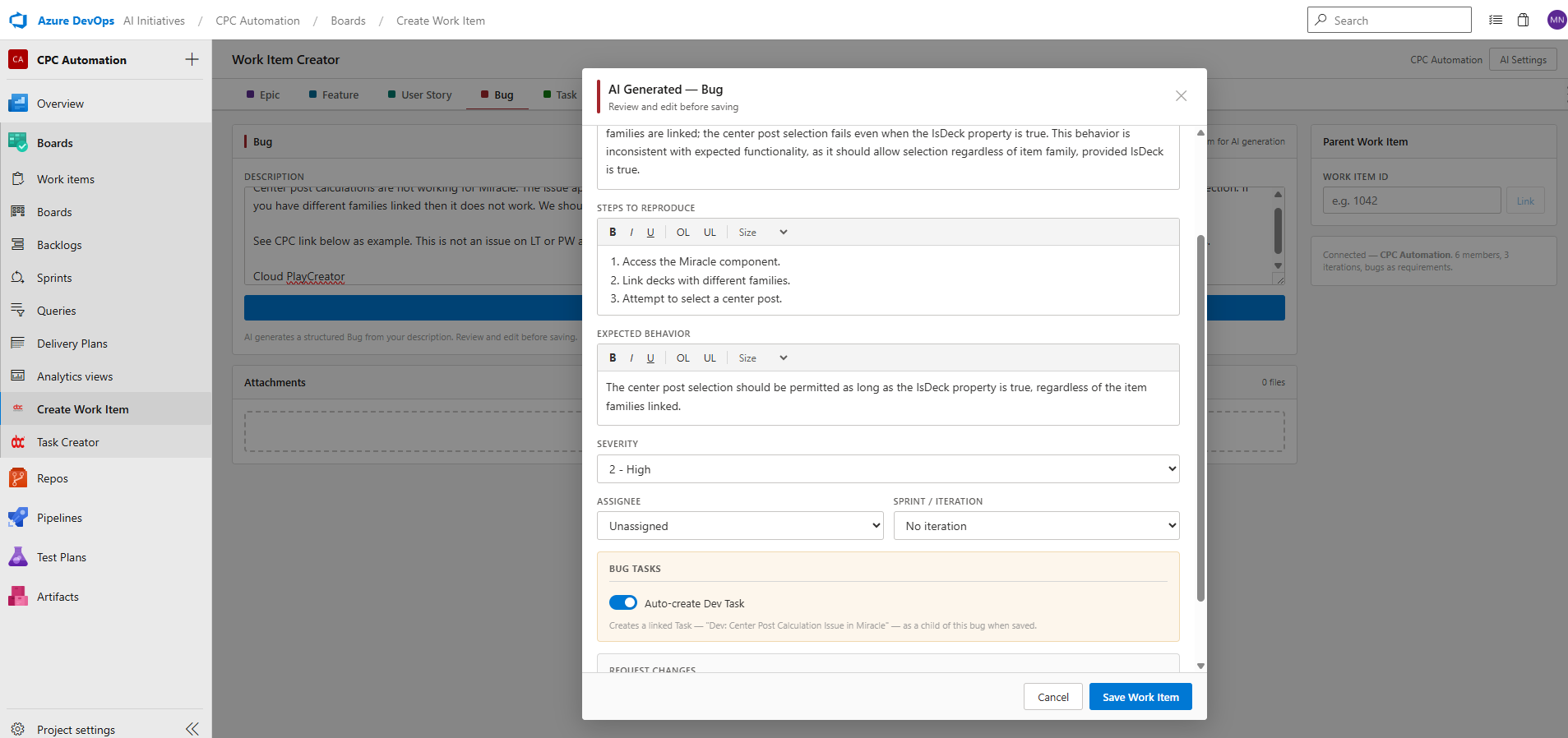
Auto-create Dev Task

When your project is configured to treat bugs as requirements (Project Settings → Boards → Working with bugs → Bugs are managed with requirements), a Bug Tasks section appears at the bottom of the modal. Toggle Auto-create Dev Task on and a child Task named Dev: <bug title> is automatically created and linked to the bug when you save.

Bug modal showing the Auto-create Dev Task toggle


Creating a User Story

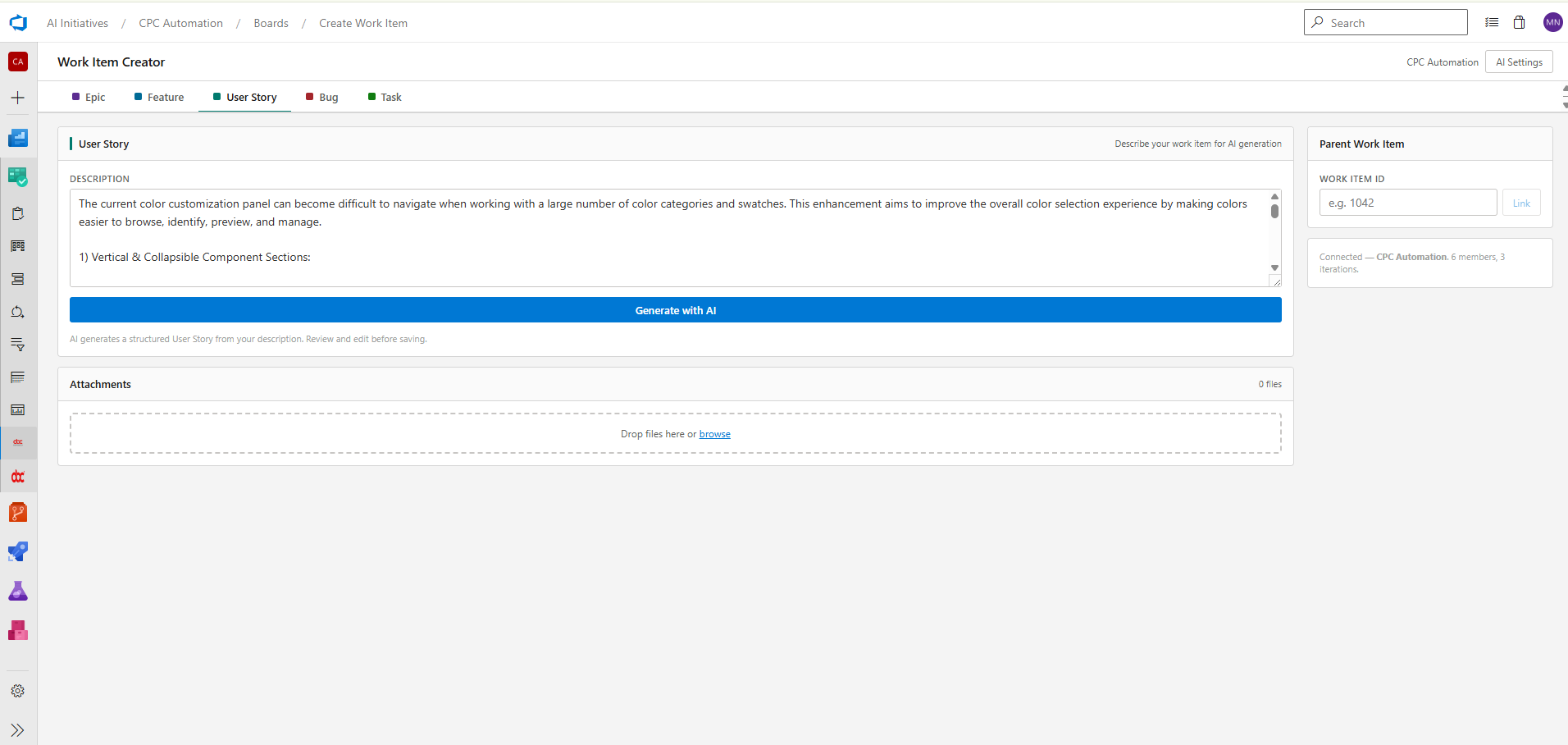
Select the User Story tab, describe the feature or enhancement, and click Generate with AI.

Describing a user story in plain text

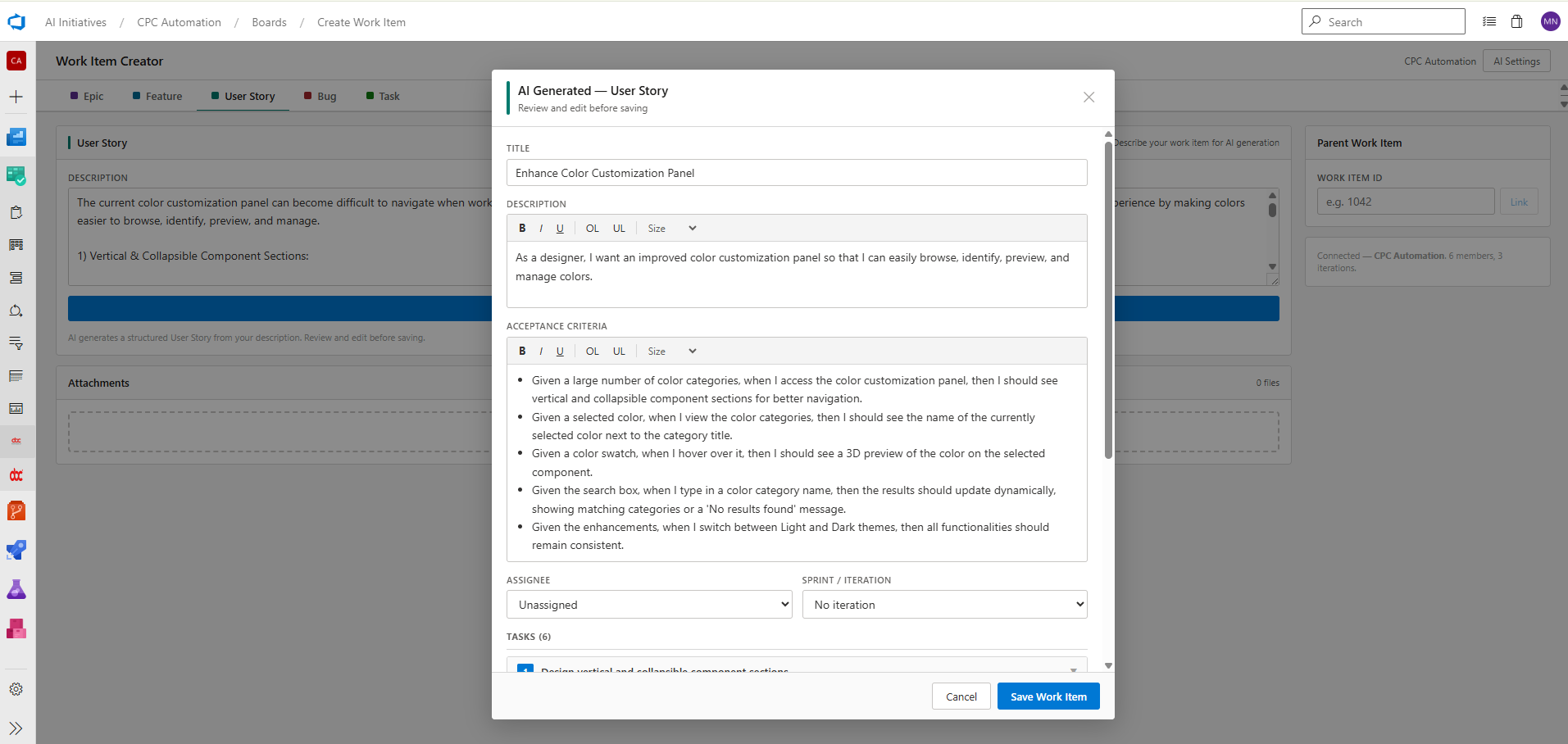
The review modal fills in:

  • Title and Description in standard "As a … I want … so that …" format
  • Acceptance Criteria — detailed, bullet-pointed Given/When/Then statements
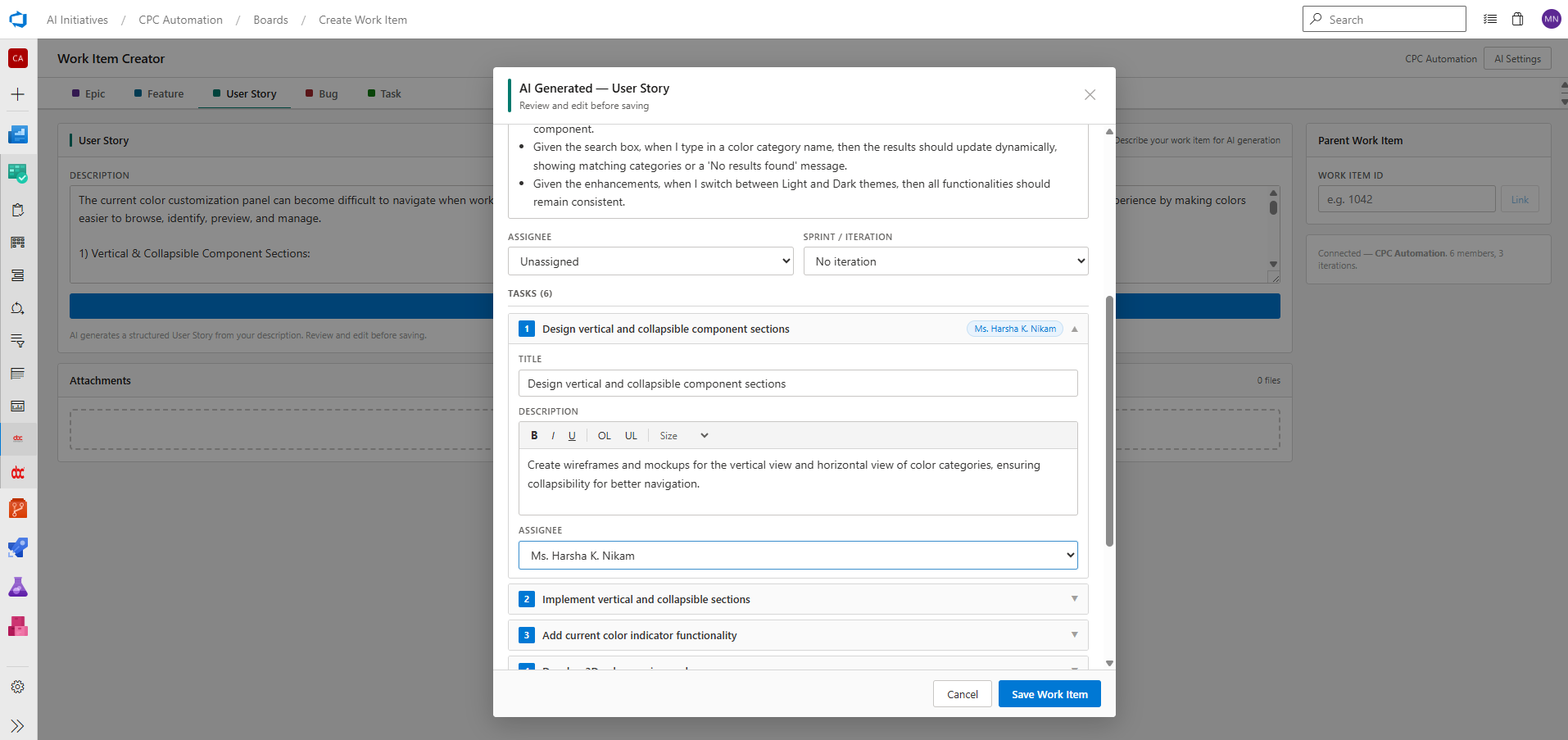
  • Tasks — a numbered list of implementation tasks, each editable inline
  • Assignee and Sprint / Iteration

User Story review modal with acceptance criteria and auto-generated tasks

Per-task Assignee

Expand any task card to edit its title, description, and assignee independently. Each task is created as a linked child work item when you save the story.

Expanding a task card to assign it to a specific team member


Key Features

Request Changes

Not happy with a field? Use the Request Changes box at the bottom of any review modal to ask the AI to refine specific fields — "make the acceptance criteria more concise" or "change severity to Critical" — without regenerating the whole item.

Generate Child Items with AI

For User Stories, click Generate Tasks with AI inside the modal to produce a fresh set of child tasks from the story description. For Features, the same button generates child User Stories.

Parent Linking

Enter a Work Item ID in the Parent Work Item sidebar before saving. The extension resolves the item's title and type so you can confirm the right parent, then creates the hierarchy link automatically.

Attachments

Drag and drop files onto the Attachments drop zone (or click to browse). Files are uploaded to Azure DevOps and attached to the work item on save.

Rich Text Editing

All text fields in the review modal include a lightweight rich-text toolbar — bold, italic, underline, ordered/unordered lists, and font size — so you can format content before saving without switching to another tool.

No PAT Required

The extension calls Azure DevOps APIs using the authenticated browser session via the Azure DevOps Extension SDK. Your personal access token is never needed.


Settings Reference

Setting Where it lives Notes
Azure OpenAI Endpoint Browser local storage Per-user, per-browser
API Key Browser local storage Never sent to any server other than your own Azure OpenAI resource
Deployment Name Browser local storage Must match the deployment in your Azure OpenAI resource
API Version Browser local storage Default: 2024-02-01
Bugs as Requirements Project Settings → Boards Enables the Auto Dev Task toggle in bug modals

Tips

  • More detail → better output. The AI works best when you give it context: what broke, what you expected, which component is involved. A two-sentence description produces a better result than a single sentence.
  • Use Request Changes instead of regenerating. If 90% of the generated item is correct, use the change request box to fix the remaining 10% rather than starting over.
  • Link a parent before saving. Setting the parent ID before clicking Save Work Item creates the hierarchy in one step — no need to edit the item afterwards.
  • Attachments upload on save. Add screenshots or log files to the drop zone while you are still reviewing; they will be uploaded and attached when you click Save Work Item.

Requirements

  • Azure DevOps Services (cloud) — any tier
  • An Azure OpenAI resource with a GPT-4 class deployment (GPT-4o recommended)

Questions or feedback? Email us at support@ansibytecode.com

Built by Ansi ByteCode LLP

  • Contact us
  • Jobs
  • Privacy
  • Manage cookies
  • Terms of use
  • Trademarks
© 2026 Microsoft