
DevRichNotesAttach rich text notes to any node in Solution Explorer. Notes can include mermaid diagrams, images and html tables. |

Add rich text notes to any file, folder, project or solution in Visual Studio Solution Explorer. A note can include mermaid diagrams, html tables and images plus text formatting. It supports RTL languages. It doesn't support Markdown. To create a new note or view an existing note, right click on a node in the solution explorer, select 'Open a note'. An html editor opens where you can enter text and mermaid diagrams. To edit a diagram, double click on it. 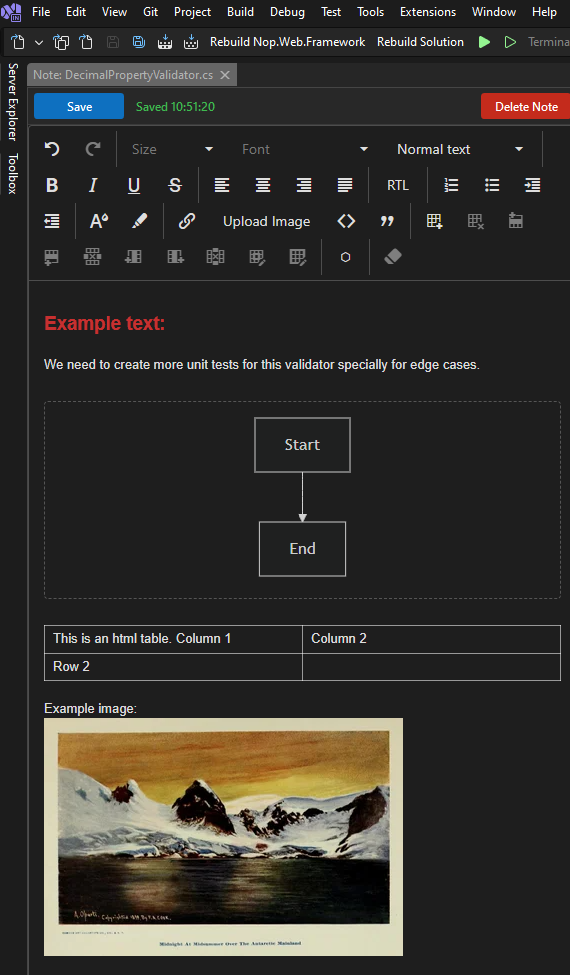
To view all the notes in a solution, select View -> Other Windows -> Notes Explorer. The Notes Explorer pane opens where it shows all the notes in the solution in a tree hierarchy. To open a note, double click on a node or right mouse click and select 'Open note'. To have the Note Explorer open automatically when the solution opens, check the checkbox. All the notes and images are saved in the .vsnotes folder which can be ignored by source control. 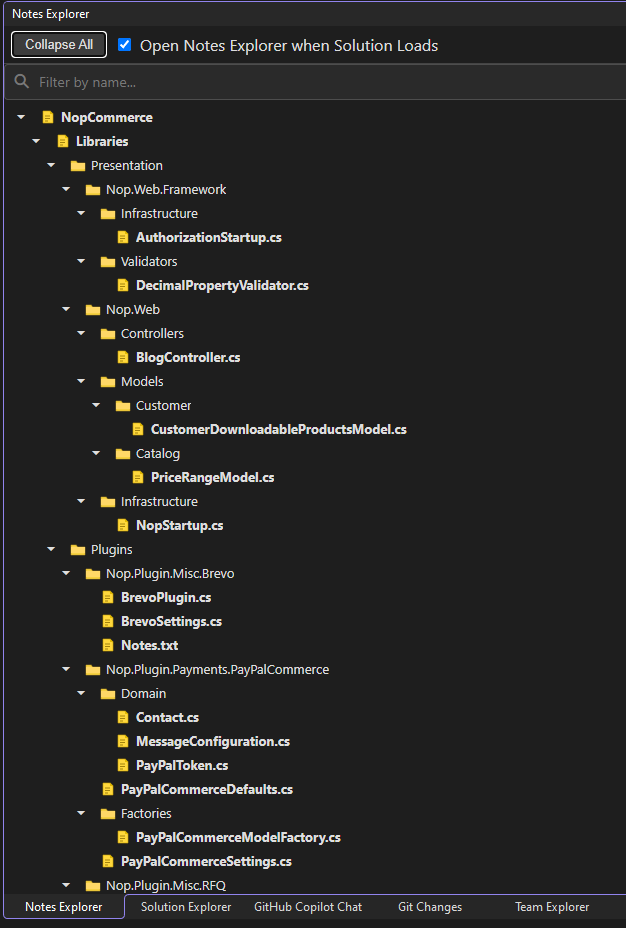
If you encounter any issues with the extension, instead of putting a low rating, please submit an issue at https://github.com/abukres/devRichNotes and I will look into it. Thanks. |