SafeTF
SafeTF is an Azure DevOps extension that provides:
A SafeTFTask you add to your Azure Pipelines YAML to run Terraform or OpenTofu install / init / validate / plan / apply / destroy / output / show
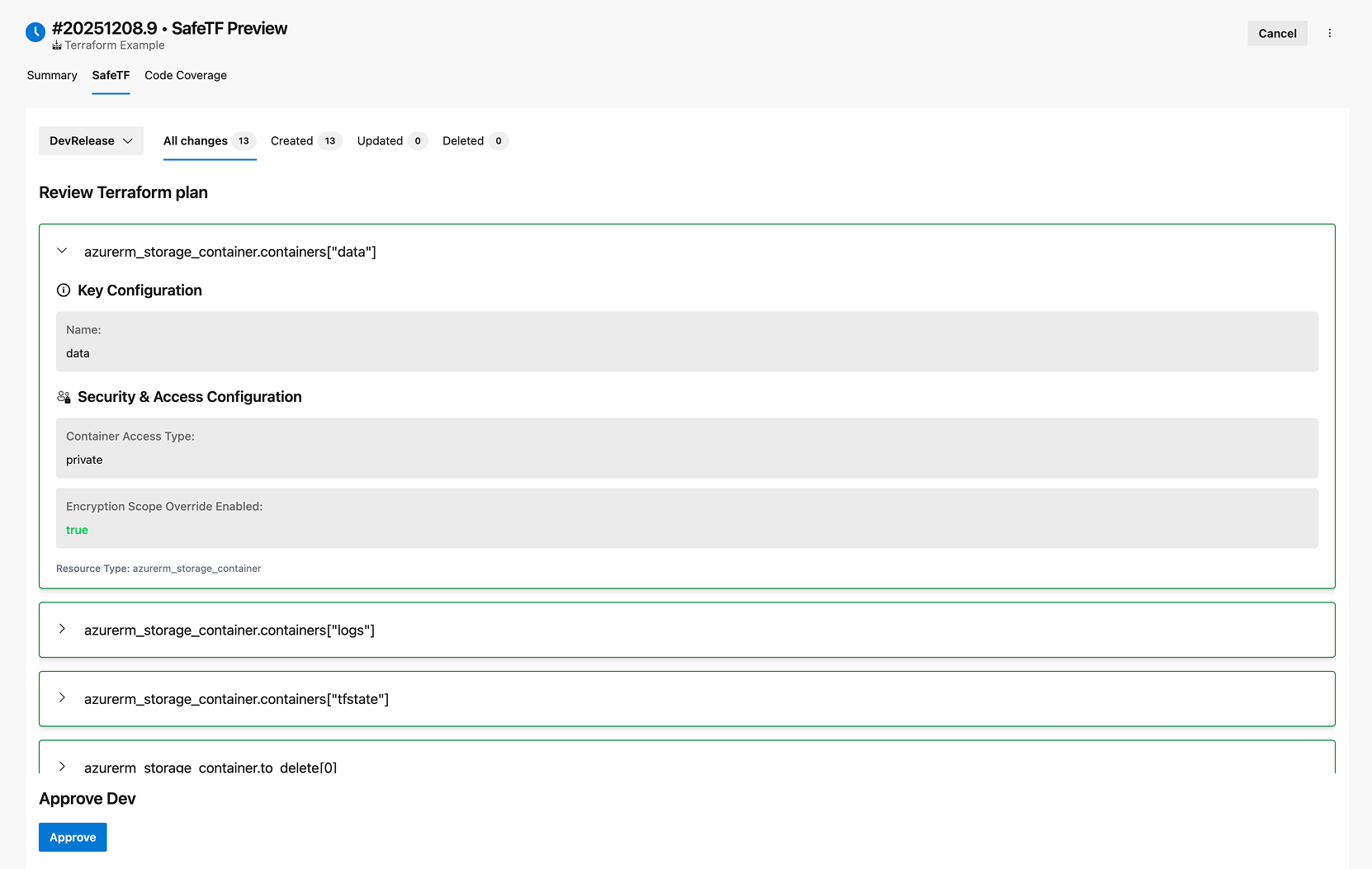
A SafeTF tab in the pipeline run (Build results) with a clean Terraform plan preview, grouped into: Created, Updated, Deleted
What SafeTF can do
Use SafeTFTask@1 to:
- Install Terraform (
command: install)
- Initialize backend (
command: init)
- Validate configuration (
command: validate)
- Generate a plan (
command: plan)
- Apply a previously generated plan (
command: apply)
2) Plan → Artifact → Apply workflow
A recommended approach is:
- Run plan in one stage
- Publish the
tfplan directory as a pipeline artifact
- Download the artifact in the apply stage and apply it
In the pipeline run UI you get a SafeTF tab where the plan is displayed in a structured way, split by resource actions (created/updated/deleted), so reviewers can understand changes quickly.
4) OpenTofu support
SafeTF supports Terraform, OpenTofu, and Terragrunt. Use the iacTool input to choose which tool to use:
| Value |
Description |
terraform |
HashiCorp Terraform (default) |
opentofu |
OpenTofu |
terragrunt |
Terragrunt (wrapper around Terraform/OpenTofu) |
Add iacTool: "opentofu" or iacTool: "terragrunt" to each task input to use the respective tool. All commands (install, init, validate, plan, apply, destroy, output, show) work with all tools.
Terragrunt note: Terragrunt is a wrapper, not a standalone IaC engine. You must install Terraform or OpenTofu in a separate install step before installing Terragrunt. When using Terragrunt, backend configuration is managed in terragrunt.hcl, so SafeTF skips the -backend-config flags during init — you do not need to provide backend inputs.
5) Multi-cloud support
SafeTF can be used for Terraform/OpenTofu workflows across: Azure, AWS, GCP, OCI
Note: To see more YAML examples for different providers, see: https://marketplace.visualstudio.com/items?itemName=ms-devlabs.custom-terraform-tasks
Integration examples
Below are practical YAML examples showing how to integrate SafeTF. The recommended structure is two stages: one for Plan, one for Apply. You can repeat this pattern for multiple environments (e.g., dev/staging/prod).
Note: all values below are placeholders. Replace them with your actual variables/paths/services.
SafeTFTask follows the same command semantics as the standard Azure Pipelines Terraform tasks. For a full list of commands and more YAML examples, see: https://marketplace.visualstudio.com/items?itemName=ms-devlabs.custom-terraform-tasks. You do not need to install both extensions—SafeTF is a standalone task + UI experience.
- task: SafeTFTask@1
  displayName: "Install Terraform"
  inputs:
    terraformVersion: $(TERRAFORM_VERSION)
    command: "install"

- task: SafeTFTask@1
  displayName: "Terraform Init ($(ENV_NAME))"
  inputs:
    provider: "$(TF_PROVIDER)" # e.g., azurerm/aws/gcp/oci
    command: "init"
    workingDirectory: "$(System.DefaultWorkingDirectory)/$(TF_WORKING_DIR)"
    backendServiceArm: $(AZURE_BACKEND_SERVICE_CONNECTION) # Azure only (if using azurerm backend)
    backendAzureRmStorageAccountName: $(TFSTATE_STORAGE_ACCOUNT) # Azure only
    backendAzureRmContainerName: $(TFSTATE_CONTAINER) # Azure only
    backendAzureRmKey: "$(TFSTATE_KEY)" # e.g., env.terraform.tfstate
    backendAzureRmUseEntraIdForAuthentication: $(USE_ENTRA_ID) # true/false (Azure only)

- task: SafeTFTask@1
  displayName: "Terraform Validate ($(ENV_NAME))"
  inputs:
    provider: "$(TF_PROVIDER)"
    command: "validate"
    workingDirectory: "$(System.DefaultWorkingDirectory)/$(TF_WORKING_DIR)"

- task: SafeTFTask@1
  displayName: "Terraform Plan ($(ENV_NAME))"
  inputs:
    provider: "$(TF_PROVIDER)"
    command: "plan"
    workingDirectory: "$(System.DefaultWorkingDirectory)/$(TF_WORKING_DIR)"
    environmentServiceNameAzureRM: $(CLOUD_SERVICE_CONNECTION) # set for your provider
    environmentAzureRmUseIdTokenGeneration: $(USE_ID_TOKEN) # true/false (Azure only)
    commandOptions: "$(TF_PLAN_OPTIONS)" # e.g., -var="key=$(VALUE)" ...
    applyEnvironmentName: "$(APPLY_ENVIRONMENT_NAME)" # name of stage with apply

- task: PublishPipelineArtifact@1
  displayName: "Publish Plan Artifact ($(ENV_NAME))"
  condition: succeeded()
  inputs:
    targetPath: "$(System.DefaultWorkingDirectory)/$(TF_WORKING_DIR)/tfplan"
    artifact: "$(PLAN_ARTIFACT_NAME)" # e.g., dev-tfplan. It is required to have "tfplan" in the name
    publishLocation: "pipeline"
Example 2 — Plan stage (one environment, OpenTofu)
- task: SafeTFTask@1
  displayName: "Install OpenTofu"
  inputs:
    iacTool: "opentofu"
    terraformVersion: "latest"
    command: "install"

- task: SafeTFTask@1
  displayName: "OpenTofu Init ($(ENV_NAME))"
  inputs:
    iacTool: "opentofu"
    provider: "$(TF_PROVIDER)"
    command: "init"
    workingDirectory: "$(System.DefaultWorkingDirectory)/$(TF_WORKING_DIR)"
    backendServiceArm: $(AZURE_BACKEND_SERVICE_CONNECTION)
    backendAzureRmStorageAccountName: $(TFSTATE_STORAGE_ACCOUNT)
    backendAzureRmContainerName: $(TFSTATE_CONTAINER)
    backendAzureRmKey: "$(TFSTATE_KEY)"
    backendAzureRmUseIdTokenGeneration: $(USE_ID_TOKEN)

- task: SafeTFTask@1
  displayName: "OpenTofu Plan ($(ENV_NAME))"
  inputs:
    iacTool: "opentofu"
    provider: "$(TF_PROVIDER)"
    command: "plan"
    workingDirectory: "$(System.DefaultWorkingDirectory)/$(TF_WORKING_DIR)"
    environmentServiceNameAzureRM: $(CLOUD_SERVICE_CONNECTION)
    environmentAzureRmUseIdTokenGeneration: $(USE_ID_TOKEN)
    commandOptions: "$(TF_PLAN_OPTIONS)"
    applyEnvironmentName: "$(APPLY_ENVIRONMENT_NAME)"

- task: PublishPipelineArtifact@1
  displayName: "Publish Plan Artifact ($(ENV_NAME))"
  condition: succeeded()
  inputs:
    targetPath: "$(System.DefaultWorkingDirectory)/$(TF_WORKING_DIR)/tfplan"
    artifact: "$(PLAN_ARTIFACT_NAME)"
    publishLocation: "pipeline"
Example 3 — Apply stage (uses the published plan artifact)
- task: SafeTFTask@1
  displayName: "Install Terraform"
  inputs:
    terraformVersion: $(TERRAFORM_VERSION)
    command: "install"

- task: DownloadPipelineArtifact@2
  displayName: "Download Plan Artifact ($(ENV_NAME))"
  inputs:
    artifact: "$(PLAN_ARTIFACT_NAME)"
    path: "$(System.DefaultWorkingDirectory)/$(TF_WORKING_DIR)"

- task: SafeTFTask@1
  displayName: "Terraform Init ($(ENV_NAME))"
  inputs:
    provider: "$(TF_PROVIDER)"
    command: "init"
    workingDirectory: "$(System.DefaultWorkingDirectory)/$(TF_WORKING_DIR)"
    backendServiceArm: $(AZURE_BACKEND_SERVICE_CONNECTION)
    backendAzureRmStorageAccountName: $(TFSTATE_STORAGE_ACCOUNT)
    backendAzureRmContainerName: $(TFSTATE_CONTAINER)
    backendAzureRmKey: "$(TFSTATE_KEY)"
    backendAzureRmUseEntraIdForAuthentication: $(USE_ENTRA_ID)

- task: SafeTFTask@1
  displayName: "Terraform Apply ($(ENV_NAME))"
  inputs:
    provider: "$(TF_PROVIDER)"
    command: "apply"
    workingDirectory: "$(System.DefaultWorkingDirectory)/$(TF_WORKING_DIR)"
    environmentServiceNameAzureRM: $(CLOUD_SERVICE_CONNECTION)
    environmentAzureRmUseIdTokenGeneration: $(USE_ID_TOKEN)
    commandOptions: "tfplan" # apply the downloaded plan
Example 4 — Plan stage (Terragrunt)
Terragrunt wraps Terraform/OpenTofu, so you need two install steps. Backend config is managed in terragrunt.hcl, so no backend inputs are needed for init — but you still need to provide a service connection for Azure authentication.
- task: SafeTFTask@1
  displayName: "Install Terraform"
  inputs:
    terraformVersion: $(TERRAFORM_VERSION)
    command: "install"

- task: SafeTFTask@1
  displayName: "Install Terragrunt"
  inputs:
    iacTool: "terragrunt"
    terraformVersion: "latest"
    command: "install"

- task: SafeTFTask@1
  displayName: "Terragrunt Init ($(ENV_NAME))"
  inputs:
    iacTool: "terragrunt"
    provider: "$(TF_PROVIDER)"
    command: "init"
    workingDirectory: "$(System.DefaultWorkingDirectory)/$(TF_WORKING_DIR)"
    environmentServiceNameAzureRM: $(CLOUD_SERVICE_CONNECTION) # required for Azure backend auth

- task: SafeTFTask@1
  displayName: "Terragrunt Plan ($(ENV_NAME))"
  inputs:
    iacTool: "terragrunt"
    provider: "$(TF_PROVIDER)"
    command: "plan"
    workingDirectory: "$(System.DefaultWorkingDirectory)/$(TF_WORKING_DIR)"
    environmentServiceNameAzureRM: $(CLOUD_SERVICE_CONNECTION)
    commandOptions: "$(TF_PLAN_OPTIONS)"
    applyEnvironmentName: "$(APPLY_ENVIRONMENT_NAME)"

- task: PublishPipelineArtifact@1
  displayName: "Publish Plan Artifact ($(ENV_NAME))"
  condition: succeeded()
  inputs:
    targetPath: "$(System.DefaultWorkingDirectory)/$(TF_WORKING_DIR)/tfplan"
    artifact: "$(PLAN_ARTIFACT_NAME)"
    publishLocation: "pipeline"
Example 5 — Apply stage (Terragrunt)
- task: SafeTFTask@1
  displayName: "Install Terraform"
  inputs:
    terraformVersion: $(TERRAFORM_VERSION)
    command: "install"

- task: SafeTFTask@1
  displayName: "Install Terragrunt"
  inputs:
    iacTool: "terragrunt"
    terraformVersion: "latest"
    command: "install"

- task: DownloadPipelineArtifact@2
  displayName: "Download Plan Artifact ($(ENV_NAME))"
  inputs:
    artifact: "$(PLAN_ARTIFACT_NAME)"
    path: "$(System.DefaultWorkingDirectory)/$(TF_WORKING_DIR)"

- task: SafeTFTask@1
  displayName: "Terragrunt Init ($(ENV_NAME))"
  inputs:
    iacTool: "terragrunt"
    provider: "$(TF_PROVIDER)"
    command: "init"
    workingDirectory: "$(System.DefaultWorkingDirectory)/$(TF_WORKING_DIR)"
    environmentServiceNameAzureRM: $(CLOUD_SERVICE_CONNECTION)

- task: SafeTFTask@1
  displayName: "Terragrunt Apply ($(ENV_NAME))"
  inputs:
    iacTool: "terragrunt"
    provider: "$(TF_PROVIDER)"
    command: "apply"
    workingDirectory: "$(System.DefaultWorkingDirectory)/$(TF_WORKING_DIR)"
    environmentServiceNameAzureRM: $(CLOUD_SERVICE_CONNECTION)
    commandOptions: "tfplan"

