AI Code Reviewer for Azure DevOps
Automated AI code review on every pull request — directly in Azure DevOps, using your own Azure OpenAI. No extra servers, no data leaving your tenant.
What makes it different: it learns your team's own standards from past PR comments and enforces them automatically on new PRs. Not generic best practices from the internet — your rules, your history.
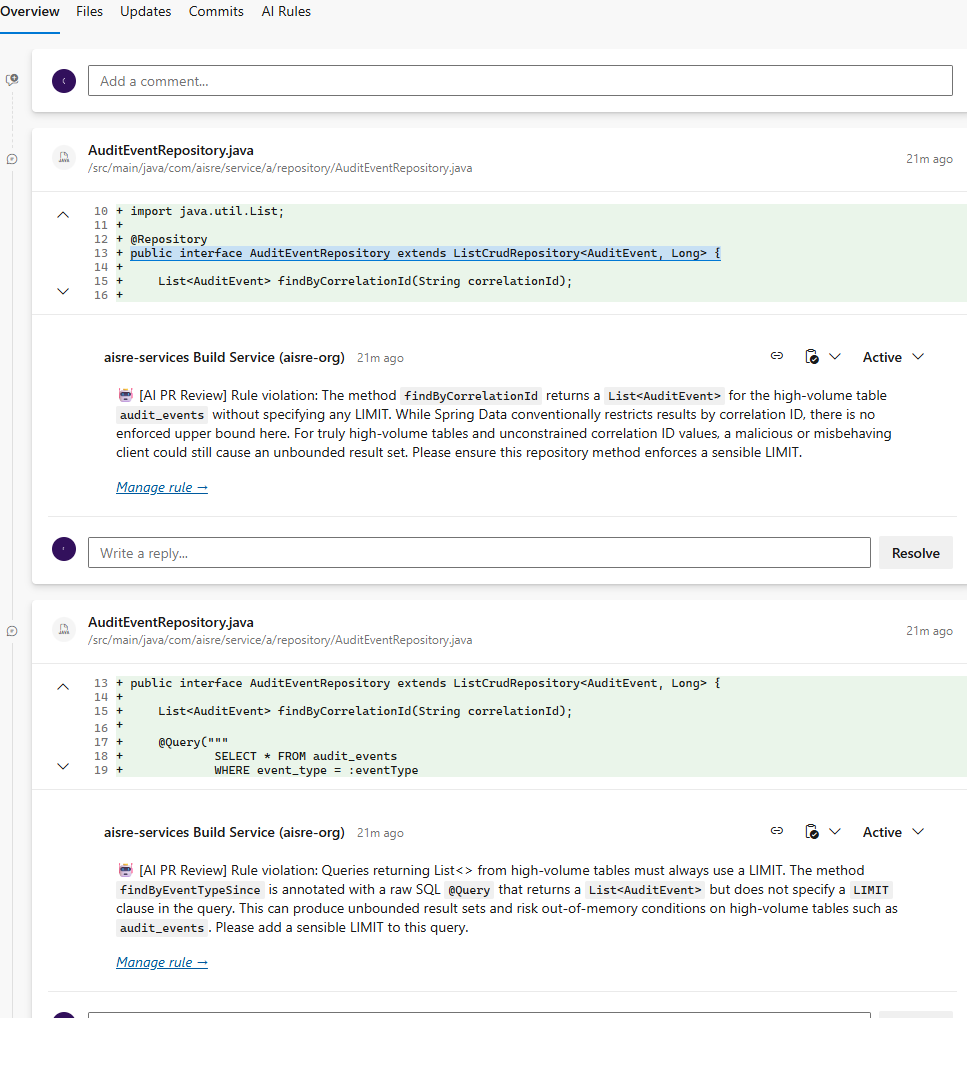
How it works
- Install the extension, enter your Azure OpenAI endpoint in Project Settings → AI Code Reviewer.
- Add one pipeline task to your PR validation pipeline:
- task: PrReviewLearning@1
  inputs:
    mode: review
- Every new PR gets reviewed automatically. AI comments appear inline, like a human reviewer.
- When your team resolves a comment and pushes a fix, the extension learns that rule and applies it to all future PRs across your repos.
Features
- Inline comments on every PR — findings appear directly on the changed lines
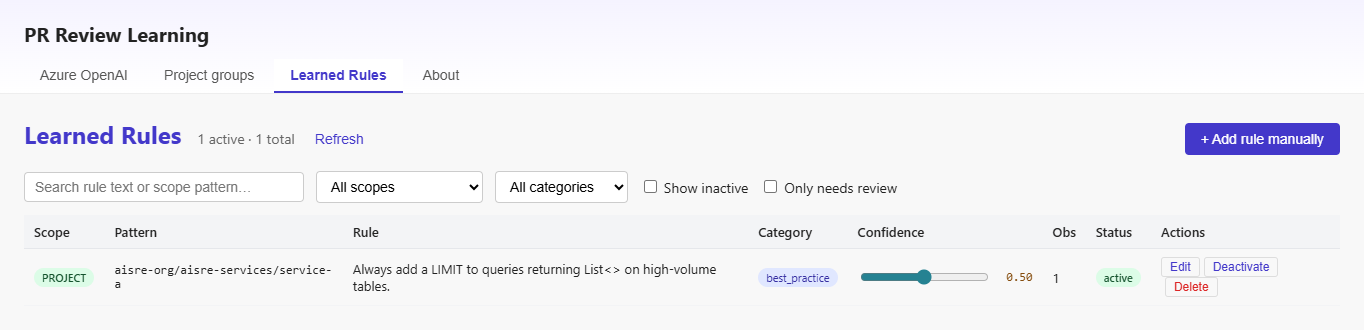
- Learns from your history — rules extracted from resolved PR comments, not internet opinions
#best-practice tag — mark any comment to immediately create a rule, no AI classification needed- Project groups — one rule can cover a set of related repositories
- Three review modes — full AI, rule-based only, or disabled — choose per pipeline
- Four learning modes — strict (default), tagged-only, conversation, all
- Rule approval workflow — non-tagged rules require admin approval before affecting PRs
- Rule usage counters — see how often each rule fires, gets cited, gets accepted/rejected (informational, no auto-judgment)
- Rule provenance & audit log — every rule shows its source PR comments and full change history
- Feedback-loop protection — ingest always skips AI-posted comments (never learns from itself)
- API key encrypted at rest — AES-GCM with per-organization key before writing to Extension Data Service
- Your data stays in your tenant — BYOK Azure OpenAI, stored in ADO Extension Data Service
- Free — pay only for your own Azure OpenAI token usage (~$5–50/month typical)
Requirements
- Azure DevOps (cloud or on-prem)
- Azure OpenAI resource with a chat model (e.g.
gpt-4o-mini) and embedding model (text-embedding-3-small)
- Azure Pipelines
Privacy & security
Source code, PR diffs, and comments never leave your Azure tenant. All AI calls go directly to your own Azure OpenAI deployment. AISRE Labs never sees your code.
Full privacy policy
Pipeline setup
1. Review pipeline — runs on every PR
Save as ai-review-pipeline.yml in your repo root, then register it as a Branch Policy → Build Validation on your target branch (e.g. main). Set it as Optional to give feedback without blocking merge:
trigger: none

pr:
  branches:
    include: [main]
  paths:
    exclude:
      - '**/*.md'
      - docs/*

pool:
  vmImage: 'ubuntu-latest'

jobs:
  - job: Review
    timeoutInMinutes: 5
    steps:
      - task: PrReviewLearning@1
        inputs:
          mode: review
2. Ingest pipeline — auto-runs on merge, learns rules + updates metrics
Save as ai-ingest-pipeline.yml. Configured to auto-trigger on every merge to main (or your target branch). Extracts the PR number from the merge commit message and runs ingest: captures #best-practice tagged rules, updates Accepted/Rejected metrics based on thread resolution at merge time.
trigger:
  branches:
    include: [main]
  paths:
    exclude:
      - '**/*.md'
      - docs/*

parameters:
  - name: pullRequestId
    displayName: 'Pull Request ID (leave empty for auto-detect from merge commit)'
    type: string
    default: ''

pool:
  vmImage: 'ubuntu-latest'

jobs:
  - job: IngestRules
    timeoutInMinutes: 10
    steps:
      - bash: |
          # Use manual param if provided, else extract from merge commit message
          # ADO generates "Merged PR N: Title" for standard merge-completion
          PR_ID='${{ parameters.pullRequestId }}'
          if [ -z "$PR_ID" ]; then
            PR_ID=$(echo "$BUILD_SOURCEVERSIONMESSAGE" | grep -oE 'Merged PR [0-9]+' | grep -oE '[0-9]+' | head -1)
          fi
          if [ -z "$PR_ID" ]; then
            echo "No PR ID — skipping (not a standard merge commit)."
            exit 0
          fi
          echo "##vso[task.setvariable variable=System.PullRequest.PullRequestId]$PR_ID"
          echo "Ingesting PR #$PR_ID"

      - task: PrReviewLearning@1
        inputs:
          mode: ingest
Default merge style matters. ADO has three PR completion options; only one produces the required commit message:
| ADO complete option |
Commit message |
Auto-ingest |
| Merge (no fast-forward) (default) |
Merged PR N: Title |
✅ Works |
| Squash commit |
User-defined |
❌ Skip (no PR ref) |
| Rebase and fast-forward |
Individual commits |
❌ Skip |
If your org uses squash/rebase, the pipeline skips — you can still trigger ingest manually with the pullRequestId parameter.
Manual trigger is useful for:
- Re-ingesting old PRs to bootstrap rules from history
- Re-running after adding Project Groups (to re-scope existing rules)
| Input |
Default |
Description |
mode |
— |
Required. review or ingest |
reviewMode |
from Hub |
full, rules-only, disabled — overrides Hub default |
maxComments |
20 |
Hard cap on AI comments posted per run |
minConfidence |
0.5 |
Rules below this confidence are ignored |
dryRun |
false |
Log findings to build output instead of posting |
How to register the pipelines in Azure DevOps
After saving the YAML files in your repo, each one needs to be registered as a pipeline in ADO:
- Pipelines → New pipeline
- Azure Repos Git → pick your repo
- Existing Azure Pipelines YAML file → select
/ai-review-pipeline.yml (or /ai-ingest-pipeline.yml)
- Save (don't run yet)
- Optionally rename the pipeline (three-dot menu → Rename), e.g.
myrepo-ai-review and myrepo-ai-ingest
Set review pipeline as Branch Policy (one-time)
So the review runs on every PR targeting main:
- Project Settings → Repositories → [your repo] → Policies
- Under Branch Policies, click on
main (or your target branch)
- Build Validation → Add
- Build pipeline: select
myrepo-ai-review
- Trigger: Automatic
- Policy requirement: Optional (recommended — AI review is advisory, not blocking). Pick Required only once you trust its precision.
- Save
The pipeline task posts comments to PRs using $(System.AccessToken) — ADO's Build Service identity. This identity needs explicit permission to contribute to pull requests on your repo. Without this step, reviews succeed but no comments appear and the pipeline log shows 403 Forbidden — TF401027: PullRequestContribute.
- Project Settings → Repositories → [your repo] → Security
- Find the identity
<project> Build Service (<org>) (e.g. aisre-services Build Service (aisre-org))
- Set
Contribute to pull requests → Allow
- Optionally also set
Contribute → Allow
- The change saves automatically — no button needed
Repeat per repo where you want AI review to post.
When does each mode actually run?
Review — automatic, every PR
Once the Branch Policy is set up:
- Dev opens a PR targeting the protected branch → review pipeline triggers automatically
- AI analyzes the diff, applies learned rules, posts inline comments on the PR
- Dev pushes new commits → pipeline re-runs; already-posted comments are not duplicated (idempotent by file+line+rule hash)
- Nothing manual — set it once, forget it.
Ingest — automatic, at merge time
With the auto-trigger YAML above, ingest runs on every merge to your target branch:
- Reviewer leaves a comment on a PR (optionally tagged
#best-practice to make it a rule immediately, or untagged for strict-mode gating)
- Author fixes, merges the PR — ADO creates commit
Merged PR 42: Title
- CI trigger fires automatically on the push to
main
- Bash step extracts PR #42 from the commit message
- Task runs ingest: captures tagged rules + updates Accepted/Rejected metrics based on each bot-comment thread's final status
- Done — no human action required
For re-ingesting a historical PR (bootstrap from pre-extension history, or re-scope after adding Project Groups), go to Pipelines → myrepo-ai-ingest → Run pipeline and paste the PR number manually.
By default, a rule learned in one repository applies only to that repository. If your team works across multiple repos that share conventions, you can group them so a rule learned in one applies to all.
When do you need it?
- You have microservices split across multiple repos that share coding standards (
payment-api, payment-worker, payment-gateway)
- A reviewer notes "we always use HikariCP for DB pooling" in one of them — without project groups, this rule applies only to that one repo. With a
payments group, it applies to all three.
- Not needed if you have one repo or each repo has different standards.
- In ADO: Project Settings → AI Code Reviewer → Project groups
- + New group
- Fill in:
- Save
From the next ingest onwards, the AI classifier sees your groups and can scope a rule to a group instead of just one repo. Add a new repo to the group later → all group-scoped rules apply to it automatically, no re-ingest needed.
⚠ Pipelines are still per-repo
A project group shares rules across repos, not pipelines. Each repo in the group still needs:
- Its own
ai-review-pipeline.yml in the repo root
- Its own pipeline registration in ADO (one-time, via New pipeline wizard)
- Its own Branch Policy → Build Validation set on
main
Same for ingest — each repo needs its own ai-ingest-pipeline.yml to run ingest on a merged PR from that repo. The group controls how rules match; the pipelines control where reviews run.
A practical setup for a 3-repo group: 6 pipelines total (review + ingest × 3 repos), all sharing the same learned rules store via the extension's per-organization data service.
Scope hierarchy
The AI picks the narrowest scope that fits each rule:
| Scope |
Matches |
Example pattern |
DIRECTORY |
Files matching a glob |
**/*Repository.java |
PROJECT |
One specific repo |
myorg/myproj/payment-api |
PROJECT_GROUP |
Group of repos (you config) |
payment-services |
LANGUAGE |
Any file of that language |
java, typescript |
You can edit any rule's scope later in the Learned Rules tab if AI classified it too narrow or too broad.
Enterprise governance — learning mode, provenance, audit log
Set in Azure OpenAI tab → Learning mode section. Four strictness levels:
| Mode |
What becomes a rule |
Scope of non-tagged rules |
Recommended for |
| Strict (default) |
Tagged + threads that are BOTH marked Resolved AND had a commit changing the commented line |
Forced PROJECT |
Everyone — safest default |
| Tagged-only |
Only #best-practice / #best-global-practice tagged comments |
n/a (no non-tagged rules) |
Highest precision, zero AI interpretation |
| Conversation |
Strict + AI analyzes replies to classify intent |
Forced PROJECT |
Higher recall, some AI risk |
| All |
Tagged + AI conversation + diff-heuristic without requiring Resolved |
AI-picked (any scope) |
Legacy — small teams accepting false positives |
Rule approval workflow (non-tagged rules only)
Rules created from comments explicitly tagged #best-practice or #best-global-practice are pre-approved — the reviewer intentionally opted in by using the tag, so they go live immediately.
Non-tagged rules (those inferred from Resolved + commit-touched-line heuristic) are marked pendingApproval: true when created. They are NOT applied to any PR review until an admin explicitly approves them in the Learned Rules tab.
- Open Hub → Learned Rules → filter "Only pending approval"
- Click Approve on rules that make sense, Reject to discard
- Every approval/rejection is recorded in the audit log
This prevents the plugin from silently enforcing rules the team didn't explicitly agree on — especially important under conversation or all learning modes where AI interpretation is involved.
Feedback-loop protection
Ingest always skips comments posted by the AI review bot itself — regardless of learning mode. This is a hard-coded safety to prevent the plugin learning from its own output (e.g., AI posts a rule violation, dev disagrees → AI re-learns the violation as a new rule). The detection checks bot prefix, known service-account authors, and rule-violation comment structure.
Rule usage metrics — is this rule actually working?
Every rule tracks four counters, visible when you expand Details in the Learned Rules tab:
- Triggered — PRs where this rule matched against at least one file (bumped every review run)
- Posted — PRs where AI actually cited this rule in a comment (bumped every review run)
- Accepted — reviewer's final decision: thread marked Resolved at merge time
- Rejected — reviewer's final decision: thread marked Won't Fix / Closed (By Design), or reply contains
#rejected
Critical: accept/reject counters only bump during ingest — that is, after the PR is merged. This ensures we capture the developer's final decision, not intermediate state during review where a reviewer might click Resolved tentatively and later reconsider. Until you run ingest on a merged PR, accept/reject stay at their previous values.
Idempotent: re-running ingest on the same PR never double-counts — each bot thread's metric signal is recorded once and replayed safely.
Uses standard ADO thread statuses — no custom conventions required. Click Resolved on a bot comment → accepted. Click Won't Fix → rejected. Plus #rejected reply as backup for orgs that don't use the status dropdown.
Counters are informational, not prescriptive — the plugin shows raw numbers and lets you decide whether a rule needs editing, scope tightening, or deactivation. No automatic warnings or quality scores that could misjudge context-specific false positives.
Why strict is the default
The old "all" behavior could turn ambiguous PR discussions into enforced rules — a reviewer saying "hmm, this looks weird" followed by any commit touching that line would become a project-wide rule, with AI extrapolating the meaning. Strict mode closes this by requiring both explicit human signals:
- The thread is marked Resolved in the PR UI (reviewer verified the fix)
- A commit actually changed the commented line (there's evidence of action)
Plus, non-tagged rules are forced to PROJECT scope — they can't accidentally become cross-repo policies. To create a global rule intentionally, reviewers use the explicit #best-global-practice tag.
Rule provenance — click Details to see source PRs
Every rule in the Learned Rules tab has a Details button. Expanding it shows:
- Provenance — the exact PR comments that created or reinforced this rule, with reviewer name, date, file path / line, and deep-link back to the PR
- Audit log — chronological history of every change: creation, ingest merges, confidence adjustments, activation toggles, manual edits, deletions
Audit log — who changed what and when
Every state change on a rule is recorded. Each event captures:
- Actor —
system:ingest (PR #42) for automated events or user:<display name> for Hub UI changes
- Action — created / merged / confidence_changed / active_toggled / edited / deleted
- Before/after — only the fields that changed (compact audit footprint)
- Human-readable note — e.g. "confidence 0.50 → 0.70" or "conflict accepted (rule kept active)"
Audit events are sharded (~100 per document) in the same per-organization Extension Data Service as the rules themselves — zero external dependencies, zero new infrastructure.
Troubleshooting / FAQ
Full error:
ADO postThread failed: 403 Forbidden — TF401027: You need the Git 'PullRequestContribute'
permission to perform this action. Details: identity 'Build\<guid>', scope 'repository'.
Cause: The pipeline posts comments using $(System.AccessToken), which maps to your project's Build Service identity. By default, this identity does NOT have permission to comment on pull requests. You need to grant it once per repo.
Fix:
- Project Settings → Repositories → [your repo] → Security
- Find
<project> Build Service (<org>) in the identity list (e.g. aisre-services Build Service (aisre-org))
- Set
Contribute to pull requests → Allow
- Optionally also
Contribute → Allow
- Change saves automatically — retry the pipeline (empty commit push or manual run)
Pipeline runs with old extension version even after updating in Installed Extensions
If the pipeline log shows an older [pr-review] extension v0.1.X than what Installed Extensions reports, ADO's task cache can serve a stale bundle until the next task version bump. Force a refresh:
- Organization Settings → Extensions → Installed → AI Code Reviewer → Uninstall
- Shared tab → AI Code Reviewer → Install
Uninstall does NOT delete your Extension Data Service (rules, config, metrics, audit log are per-organization and persist). It only clears the bundled task code cache.
Ingest doesn't auto-run after merge
ai-ingest-pipeline.yml auto-triggers on master pushes AND extracts the PR number from the merge commit message (format Merged PR N: Title). Two common reasons it doesn't fire:
- ADO Pipeline not registered — every YAML in the repo must be saved as a pipeline (Pipelines → New pipeline → Existing YAML) before ADO watches it for triggers.
- Non-standard complete option — if your PR was completed with Squash or Rebase, the commit message doesn't contain
Merged PR N. The pipeline skips silently. Either switch the PR complete option to Merge (no fast-forward), or run ingest manually with the pullRequestId parameter.
Counters live in Extension Data Service and are bumped by the task. Checklist:
- Review pipeline is actually running (check its log history)
- Log shows
matched=N ruleCitations=M at end (new format) — not just files=X batches=Y posted=Z. If old format, see stale extension issue above.
- For Accepted/Rejected specifically: they only update when the ingest pipeline runs on a merged PR. If you only see Triggered/Posted updating but never Accepted/Rejected, your ingest pipeline is not auto-triggering (see above).
temperature=0 with a stable seed makes output ~deterministic, but Azure OpenAI's determinism is best-effort. Small variance (0 or 1 extra comment) is possible, especially if the model's system_fingerprint changes between runs. Empirically: >90% of re-runs on the exact same PR produce identical output.
For true "same PR = same output" guarantee, Azure OpenAI does not currently offer a stronger contract than seed.
Rule applied across projects is flagging borderline cases as "Won't Fix" material
This is the known recall/precision tradeoff with #best-global-practice tags. The rule matches any file of the given LANGUAGE — context-specific exceptions (e.g. a derived Spring Data query that's naturally bounded) still get flagged. Options:
- Click Won't Fix on the individual comment — bumps
Rejected counter on that rule (rule admin can then decide whether to deactivate)
- Click Closed (By Design) — also counts as rejection under current implementation (same effect)
- Edit the rule text in Hub to include explicit exclusions (e.g. "…unless the query is a Spring Data derived method filtering by a unique key")
Support
Issues and feedback: github.com/aisre-labs/pr-review/issues

