CoPilot Status
[!IMPORTANT]
Copyright Notice:
"GitHub Copilot", the Copilot logo, the Copilot Octocat icon and related trademarks are the property of GitHub, Inc.
This extension is an independent, community-developed project and is not affiliated with, endorsed by, or sponsored by GitHub, Inc. or Microsoft Corporation.
The use of the name "Copilot" and related terms is solely for the purpose of describing the functionality of this extension (i.e., displaying status information from the GitHub Copilot API) and does not imply any official association.
Overview
CoPilot Status is a Visual Studio extension (VSIX) that displays your GitHub Copilot quota status directly in the Visual Studio status bar — always visible, always up to date.
At a glance you can see:
- Your GitHub username
- The percentage of premium interactions used (e.g. GPT-4o, Claude Sonnet …)
- A progress bar in the status bar that fills as your quota is consumed
Clicking the status bar item opens a detail popup with a full breakdown of all quota categories.
Screenshots
1 · Status Bar Item
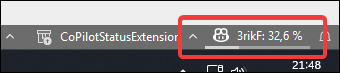
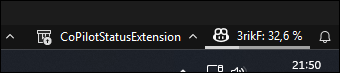
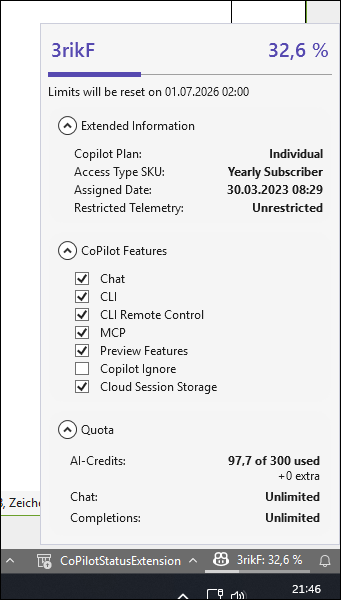
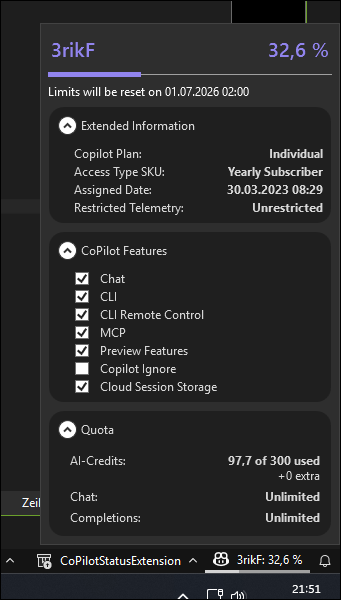
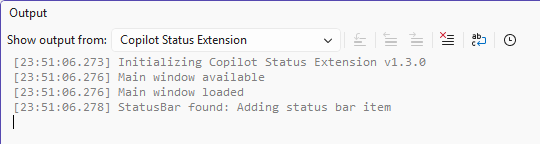
Since v1.3.0, the extension also adds a Copilot Status Extension category to the Visual Studio Output tool window,
which currently logs the startup sequence.
Features
| Feature |
Description |
| 🟢 Status bar integration |
Lightweight item in the VS status bar — no tool window needed |
| 📊 Usage progress bar |
Thin bar below the status text fills proportionally to quota consumed |
| 💬 Detail popup |
Click to expand a full quota breakdown per category |
| 🎨 Theme-aware |
Adapts automatically to the active Visual Studio color theme (Light / Dark / High Contrast) |
| 🔄 Auto-refresh |
Periodically polls the GitHub Copilot API for up-to-date quota data |
| 🔒 Secure token handling |
Uses the GitHub Personal Access Token stored in Visual Studio's credential store |
Requirements
| Requirement |
Version |
| Visual Studio |
2026 (18.5) or later — Community, Professional, or Enterprise |
| .NET Framework |
4.5 or later (included with Visual Studio) |
| GitHub Account |
With an active GitHub Copilot subscription |
Installation
Via Visual Studio Marketplace (recommended)
- Open Visual Studio.
- Navigate to Extensions → Manage Extensions.
- Search for "CoPilot Status".
- Click Download and restart Visual Studio.
Via VSIX file
- Download the latest
.vsix from the Releases page.
- Double-click the
.vsix file.
- Follow the installation wizard and restart Visual Studio.
Configuration
No configuration is needed. The extension uses the access token from the currently signed-in GitHub user in Visual Studio.
How It Works
The extension calls the GitHub Copilot REST API on your behalf:
GET https://api.github.com/copilot_internal/user
The responses are deserialized into strongly-typed models (CopilotQuotaResponse, QuotaSnapshots, …) and bound to the WPF status bar control via a standard INotifyPropertyChanged ViewModel.
Project Structure
CoPilotStatusExtension/
├── GitHubApiModels/        # JSON-deserialization models for the GitHub API
├── Models/                 # Token management & API service (HttpClient)
├── ViewModels/             # MVVM ViewModel (GitHubStatusBarViewModel)
└── Views/
    ├── GitHubStatusBarControl.xaml     # Status bar item (icon + text + progress bar)
    ├── StatusInfoPopupControl.xaml     # Detail popup
    ├── Converters/                     # WPF value converters
    ├── ThemeManagers/                  # Visual Studio theme integration
    └── Resources/                      # Styles, margins, converter resources
Building from Source
git clone https://github.com/3rikF/vsix-copilot-status-extension.git
cd vsix-copilot-status-extension\CoPilotStatusExtension
# Open CoPilotStatusExtension.sln in Visual Studio 2022+
# Build → Build Solution  (or press Ctrl+Shift+B)
The build produces a .vsix file in the bin\ output directory.
Contributing
Contributions are welcome! Please open an issue first to discuss what you would like to change.
License
This project is licensed under the MIT License — see LICENSE for details.

